Autopilot Operations
Autopilot / ESP deployments classified by phase, failure category and cause — per deployment.
Download the script View on GitHub
1 · The script
Read-only by construction — it authenticates with a Managed Identity, calls Microsoft Graph read-only (.Read.All scopes), and writes a sanitized CSV snapshot. Set the CONFIG values at the top, then run.
View the full script (68 KB)
#requires -Version 7.0
<#
.SYNOPSIS
Collect-AutopilotOperations.ps1 — Autopilot / ESP deployment operations collector for the
Zero-Access Pattern. Read-only, Managed-Identity.
.DESCRIPTION
One row per recently-enrolled Windows device describing how its Autopilot + Enrollment
Status Page (ESP) deployment went. It stitches together:
- managed devices (recent Windows enrolments)
- Autopilot device identities (group tag, profile assignment)
- Autopilot deployment events (severity-first per device)
- the ESP-tracked app set + per-app install reports (the "why it failed" join)
- Entra device object (trust type) and user location — gated to suspicious devices only
then derives a deployment status, ESP phase, deployment scenario, and a potential failure
cause, and writes a detailed CSV + a grouped summary CSV (root/ for Power BI, size-gated
copies to agent-data/).
Read-only throughout — every call is a GET or a reports export job. Nothing is written to
the tenant. The design is deliberately honest about Autopilot v1's limits (the app report
is CURRENT state, not an ESP-time snapshot — fields are named Current* accordingly).
.NOTES
GENERIC / PARAMETERIZED: no resource group, storage account, or container is hardcoded.
$AppAssignmentGroupNames are example naming patterns — set them to your own. Run against a
personal lab tenant only.
BETA ENDPOINT: managed devices, autopilotEvents, deviceEnrollmentConfigurations, mobileApps
and reports use /beta; devices/users/audit use /v1.0. Re-verify after Graph updates.
Read-only Graph app roles on the Managed Identity:
DeviceManagementManagedDevices.Read.All (managed devices, autopilot events)
DeviceManagementServiceConfig.Read.All (windowsAutopilotDeviceIdentities)
DeviceManagementConfiguration.Read.All (enrollment configurations / ESP)
DeviceManagementApps.Read.All (mobileApps + install-status reports)
Device.Read.All, Directory.Read.All (Entra device object + group membership)
User.Read.All (user location)
AuditLog.Read.All (directory audits — optional correlation)
Plus "Storage Blob Data Contributor" on the storage account.
MIT licensed. Microsoft, Intune, Entra, Windows, Microsoft Graph and Azure are trademarks
of the Microsoft group of companies. Independent content; not endorsed by Microsoft.
#>
# ===========================================================================
# CONFIGURE ME -> set these to your own values, then run.
# These three lines are the only thing you MUST change.
# ===========================================================================
$ResourceGroup = "<your-resource-group-name>" # resource group that holds your storage account
$StorageAccount = "<your-storage-account-name>" # storage account name (lowercase, globally unique)
$Container = "<your-container-name>" # blob container, e.g. "intune-report"
# -- optional settings (safe to leave as they are) --------------------------
$DaysBack = 2 # only devices enrolled within this many days
$BatchSize = 400 # device batch size for processing
$SlowDeploymentThresholdMinutes = 60 # deployments longer than this are flagged "slow"
# Name patterns that identify YOUR app-assignment groups (matched with -like "*pattern*").
# These are examples — replace with your own group naming convention.
$AppAssignmentGroupNames = @(
"MDM Apps",
"App Assignment"
)
# ===========================================================================
# Safety net - stop if the placeholders above weren't replaced.
if ("$ResourceGroup $StorageAccount $Container" -match '<your-') {
throw "Please set ResourceGroup, StorageAccount, and Container at the top of the script before running."
}
#-- Step 1 - Initialize Variables
$ExportLocation = "$env:TEMP"
$ProgressPreference = 'SilentlyContinue'
$VerbosePreference = 'Continue'
$DetailedCsvFileName = "Autopilot_Operations_Detailed.csv"
$SummaryCsvFileName = "Autopilot_Operations_Summary.csv"
$Today = Get-Date -Format 'yyyy-MM-dd'
# Export-report fetch controls
$ExportPostStaggerSeconds = 3 # gap between the export POSTs (throttle courtesy)
$ExportPollIntervalSeconds = 15 # one timer for the whole batch
$ExportPollTimeoutMinutes = 10
#-- Step 2 - Graph GET with pagination and 429 back-off
# Returns ,$AllResults. Bare return of an empty List[object] unrolls to $null, so
# "no rows" was indistinguishable from "call failed". Callers must test .Count for
# emptiness and $null only for genuine failure.
Function Invoke-MyGraphGetRequest {
Param (
[string]$URL,
[int]$MaxRetries = 5,
[switch]$Quiet
)
Write-Verbose "GET $URL"
$AllResults = [System.Collections.Generic.List[object]]::new()
try {
do {
$RetryCount = 0
$Success = $false
do {
try {
$WebRequest = Invoke-WebRequest -Uri $URL -Method GET -Headers $script:Headers `
-UseBasicParsing -ErrorAction Stop
$Success = $true
}
catch {
if ($_.Exception.Message -match "429") {
$RetryCount++
$RetryAfter = 30
try {
$HeaderVal = $_.Exception.Response.Headers["Retry-After"]
if ($HeaderVal -and [int]::TryParse($HeaderVal, [ref]$null)) {
$RetryAfter = [int]$HeaderVal
}
} catch {}
Write-Warning ("Throttled: {0} Retry {1}/{2} in {3}s" -f $URL, $RetryCount, $MaxRetries, $RetryAfter)
Start-Sleep -Seconds $RetryAfter
}
else { throw }
}
} while (-not $Success -and $RetryCount -lt $MaxRetries)
if (-not $Success) { throw "Max retries reached for $URL" }
$Response = $WebRequest.Content | ConvertFrom-Json
if ($null -ne $Response.value) {
foreach ($item in $Response.value) { $AllResults.Add($item) }
}
elseif ($null -ne $Response) {
$AllResults.Add($Response)
}
$URL = $Response.'@odata.nextLink'
} while ($URL)
return ,$AllResults
}
catch {
if (-not $Quiet) {
Write-Error ("Graph request failed [{0}]: {1}" -f $URL, $_.Exception.Message)
if ($_.ErrorDetails.Message) { Write-Warning ("Graph error body: " + $_.ErrorDetails.Message) }
}
return $null
}
}
#-- Step 2b - Graph POST with 429 back-off (used ONLY for reports/exportJobs)
Function Invoke-MyGraphPostRequest {
Param (
[string]$URL,
[string]$Body,
[int]$MaxRetries = 5
)
Write-Verbose "POST $URL"
$RetryCount = 0
do {
try {
$WebRequest = Invoke-WebRequest -Uri $URL -Method POST -Headers $script:Headers `
-Body $Body -UseBasicParsing -ErrorAction Stop
return ($WebRequest.Content | ConvertFrom-Json)
}
catch {
if ($_.Exception.Message -match "429") {
$RetryCount++
$RetryAfter = 30
try {
$HeaderVal = $_.Exception.Response.Headers["Retry-After"]
if ($HeaderVal -and [int]::TryParse($HeaderVal, [ref]$null)) {
$RetryAfter = [int]$HeaderVal
}
} catch {}
Write-Warning ("Throttled (POST): {0} Retry {1}/{2} in {3}s" -f $URL, $RetryCount, $MaxRetries, $RetryAfter)
Start-Sleep -Seconds $RetryAfter
}
else {
Write-Error ("Graph POST failed [{0}]: {1}" -f $URL, $_.Exception.Message)
return $null
}
}
} while ($RetryCount -lt $MaxRetries)
Write-Error "Max retries reached for POST $URL"
return $null
}
#-- Step 3 - Authenticate via Azure Managed Identity
$url = $env:IDENTITY_ENDPOINT
$headers = [System.Collections.Generic.Dictionary[string,string]]::new()
$headers.Add("X-IDENTITY-HEADER", $env:IDENTITY_HEADER)
$headers.Add("Metadata", "True")
$body = @{ resource = 'https://graph.microsoft.com/' }
Write-Verbose "Acquiring Managed Identity token..."
try {
$accessToken = (Invoke-RestMethod -Uri $url -Method POST -Headers $headers `
-ContentType 'application/x-www-form-urlencoded' -Body $body).access_token
if (-not $accessToken) { Write-Error "Token acquisition returned null."; return }
$script:Headers = @{
'Authorization' = "Bearer $accessToken"
'Content-Type' = 'application/json'
}
Write-Verbose "Token acquired."
}
catch {
Write-Error "Managed Identity auth failed: $_"
return
}
#-- Step 4 - Safe datetime parser
Function Get-SafeDateTime {
Param ($Value)
if (-not $Value) { return $null }
try { return [datetime]::Parse($Value) }
catch { return $null }
}
#-- Step 5 - ISO 8601 duration to minutes (PT1H30M etc.)
Function Get-SafeDurationMinutes {
Param ($Value)
if ([string]::IsNullOrWhiteSpace($Value)) { return $null }
try { return [math]::Round(([System.Xml.XmlConvert]::ToTimeSpan($Value)).TotalMinutes, 2) }
catch { return $null }
}
#-- Step 6 - Extract display names / UPNs from audit targetResources
# [DELETION CANDIDATE - kept pending loggedByService check.]
Function Get-TargetDisplayNames {
Param ($TargetResources)
if (-not $TargetResources) { return @() }
$Names = [System.Collections.Generic.List[string]]::new()
foreach ($t in $TargetResources) {
if ($t.displayName) { [void]$Names.Add([string]$t.displayName) }
if ($t.userPrincipalName) { [void]$Names.Add([string]$t.userPrincipalName) }
}
return ($Names | Where-Object { $_ } | Select-Object -Unique)
}
#-- Step 7 - ESP phase from Autopilot status
# Device success + populated deployment end time = Completed: with
# disableUserStatusTrackingAfterFirstUser set on every ESP profile here,
# accountSetupStatus "unknown" means never tracked, not unfinished.
Function Get-ESPPhaseFromAutopilot {
Param (
[string]$DeviceSetupStatus,
[string]$AccountSetupStatus,
$DeploymentEndDateTime # deliberately untyped: [datetime] throws on $null,
# aborting the call so the PREVIOUS device's value
# leaked into this one (absent-value bug, variant 4;
# evidenced by a device reading Completed with zero
# Autopilot events)
)
if ($DeviceSetupStatus -eq "failure") { return "Device Setup" }
if ($AccountSetupStatus -eq "failure") { return "User Setup" }
if ($DeviceSetupStatus -eq "inProgress") { return "Device Setup - In Progress" }
if ($AccountSetupStatus -eq "inProgress") { return "User Setup - In Progress" }
if ($DeviceSetupStatus -eq "success" -and $AccountSetupStatus -eq "success") { return "Completed" }
if ($DeviceSetupStatus -eq "success" -and $DeploymentEndDateTime) { return "Completed" }
if ($DeviceSetupStatus -eq "success") { return "Device Setup Complete - User Setup Not Reported" }
return "None"
}
#-- Step 8 - Deployment status
# deploymentState=success + populated end time is Successful regardless of
# accountSetupStatus - "unknown" there means never tracked in this tenant
# (confirmed by ESP profile configuration, not inferred). "User Setup Not
# Reported" survives only where there is NO end time.
Function Get-DeploymentStatus {
Param (
[string]$AutopilotDeploymentState,
[string]$DeviceSetupStatus,
[string]$AccountSetupStatus,
$DeploymentEndDateTime,
[string]$AuditResult
)
$phases = @($AutopilotDeploymentState, $DeviceSetupStatus, $AccountSetupStatus)
if ($phases -contains "failure") { return "Failed" }
if ($phases -contains "inProgress") { return "In Progress" }
if ($AutopilotDeploymentState -eq "success") {
if ($AccountSetupStatus -eq "success") { return "Successful" }
if ($DeploymentEndDateTime) { return "Successful" }
return "Device Setup Complete - User Setup Not Reported"
}
if ($AuditResult -in @("failure","failed","timeout")) { return "Failed" }
if ($AuditResult -eq "success") { return "Successful" }
return "Inconclusive"
}
#-- Step 8b - Event severity rank (used to choose between multiple events per device)
Function Get-EventSeverityRank {
Param ($Event)
if (-not $Event) { return 0 }
$phases = @($Event.deploymentState, $Event.deviceSetupStatus, $Event.accountSetupStatus)
if ($phases -contains "failure") { return 3 }
if ($phases -contains "inProgress") { return 2 }
if ($phases -contains "success") { return 1 }
return 0
}
#-- Step 8c - DeploymentScenario from autopilotEvent.enrollmentType
# The event's enrollmentType is the only server-side per-device field that
# records what a deployment ACTUALLY did (vs the profile, which only records
# what is allowed - intent, not fact, so it is deliberately not used here).
# Zero extra API calls: the field is already in the autopilotEvents payload.
# All nine documented enum values mapped explicitly (Graph beta,
# deviceManagementAutopilotEvent). CAVEAT: Microsoft publishes no formal
# scenario-to-enum crosswalk; the self-deploying = device-auth mapping is
# community-validated, not official. The raw value is therefore published
# alongside the derived label so nothing depends solely on this mapping.
# Unrecognised values pass through as "Unrecognised: <raw>".
Function Get-DeploymentScenario {
Param ([string]$EnrollmentType)
if ([string]::IsNullOrWhiteSpace($EnrollmentType)) { return "Unknown (no Autopilot event)" }
switch ($EnrollmentType) {
'azureADJoinedWithAutopilotProfile' { return 'User-Driven (Entra Join)' }
'offlineDomainJoined' { return 'User-Driven (Hybrid Join)' }
'azureADJoinedWithWhiteGlove' { return 'Pre-Provisioning (Entra Join)' }
'offlineDomainJoinedWithWhiteGlove' { return 'Pre-Provisioning (Hybrid Join)' }
'azureADJoinedUsingDeviceAuthWithAutopilotProfile' { return 'Self-Deploying (Entra Join)' }
'azureADJoinedUsingDeviceAuthWithoutAutopilotProfile' { return 'Self-Deploying (device auth, no Autopilot profile)' }
'azureADJoinedWithOfflineAutopilotProfile' { return 'Entra Join (offline Autopilot profile)' }
'offlineDomainJoinedWithOfflineAutopilotProfile' { return 'Hybrid Join (offline Autopilot profile)' }
'unknown' { return 'Unknown' }
default { return "Unrecognised: $EnrollmentType" }
}
}
#-- Step 9 - Classify one app-install report row: failure / notfailure / unrecognised
# EVIDENCE-BASED WHITELIST (Rule 8). Tuples observed in-tenant:
# InstallState=2 -> hard install failure
# (evidence: a device with 0x87D30065,
# "Failed to retrieve content information.")
# InstallState=3 + Detail=3000 -> dependency failure
# (evidence: several devices, "1 or more
# dependent apps failed to install.")
# InstallState=3 + Detail=0 -> not installed, NOT a failure
# InstallState=1 -> installed
# ANYTHING ELSE is logged to the tuple inventory and treated as NOT failure
# evidence. It is never guessed into either bucket. Extend this whitelist
# only from observed rows, never from a remembered enum - Detail has known
# non-failure nonzero values (pending-reboot class) that must not read as
# failures.
$script:TupleInventory = @{} # "state|detail" -> @{ Count; SampleText }
Function Get-AppRowClassification {
Param ($Row)
$State = "$($Row.InstallState)".Trim()
$Detail = "$($Row.InstallStateDetail)".Trim()
$Text = "$($Row.AppInstallStateDetails_loc)".Trim()
$TupleKey = "$State|$Detail"
if (-not $script:TupleInventory.ContainsKey($TupleKey)) {
$script:TupleInventory[$TupleKey] = [PSCustomObject]@{ Count = 0; SampleText = $Text }
}
$script:TupleInventory[$TupleKey].Count++
if ($State -eq "2") { return "Failure" }
if ($State -eq "3" -and $Detail -eq "3000") { return "Failure" }
if ($State -eq "3" -and $Detail -eq "0") { return "NotFailure" }
if ($State -eq "5") { return "NotFailure" } # Install Pending (Detail 0, and 5001 "Installing dependent apps.")
if ($State -eq "-1") { return "NotFailure" } # Not Applicable (tuple -1|-1); app not targeted at this device
if ($State -eq "1") { return "NotFailure" } # Installed (1|0 = the bulk of rows; 1|1009 superseded)
return "Unrecognised"
}
#-- Step 9b - THE FAILURE REASON: Intune reporting export API
# Flow:
# (1) GET deviceEnrollmentConfigurations -> union of ESP-tracked app GUIDs
# (2) GET mobileApps/{id} -> display names
# (3) POST one exportJob per app (staggered), poll the batch on one timer
# (4) Download each report via its SAS url - NO auth header - parse rows
# (5) Consolidate: rows are per device x user; collapse to one worst row
# per device+app; classify via the whitelist above
# KNOWN LIMITATION (labelled accordingly): the report is CURRENT app state,
# not an ESP-time snapshot. An app that failed during ESP and later healed
# reads clean here. Output fields are therefore named Current*, and a
# device can honestly be "Failed ESP, no currently-failing app".
Function Get-ESPTrackedAppIds {
$URI = "https://graph.microsoft.com/beta/deviceManagement/deviceEnrollmentConfigurations"
$Configs = Invoke-MyGraphGetRequest -URL $URI
if ($null -eq $Configs) { Write-Warning "deviceEnrollmentConfigurations fetch failed."; return @() }
$AppIds = [System.Collections.Generic.HashSet[string]]::new([System.StringComparer]::OrdinalIgnoreCase)
foreach ($c in $Configs) {
if ($c.'@odata.type' -ne '#microsoft.graph.windows10EnrollmentCompletionPageConfiguration') { continue }
foreach ($id in @($c.selectedMobileAppIds)) {
if (-not [string]::IsNullOrWhiteSpace($id)) { [void]$AppIds.Add($id.Trim()) }
}
}
return @($AppIds)
}
Function Get-MobileAppNames {
Param ([string[]]$AppIds)
# NOTE: mobileApps is under /deviceAppManagement, NOT /deviceManagement.
# A wrong path returns "Resource not found for the segment 'mobileApps'."
# Fallback remains the raw GUID: a lookup failure degrades readability,
# never correctness.
$Names = @{}
foreach ($id in $AppIds) {
$URI = "https://graph.microsoft.com/beta/deviceAppManagement/mobileApps/$id"
$App = Invoke-MyGraphGetRequest -URL $URI
if ($App -and $App.Count -gt 0 -and $App[0].displayName) {
$Names[$id] = [string]$App[0].displayName
}
else {
$Names[$id] = $id
Write-Warning "App name lookup failed for $id - reporting as GUID."
}
}
return $Names
}
Function Get-AppInstallReports {
Param ([string[]]$AppIds)
$ExportBase = "https://graph.microsoft.com/beta/deviceManagement/reports/exportJobs"
$Jobs = @{} # appId -> job object
#-- (3a) Fire all POSTs, staggered
foreach ($AppId in $AppIds) {
$Body = @{
reportName = 'DeviceInstallStatusByApp'
format = 'csv'
filter = "(ApplicationId eq '$AppId')"
} | ConvertTo-Json
$Job = Invoke-MyGraphPostRequest -URL $ExportBase -Body $Body
if ($Job -and $Job.id) {
$Jobs[$AppId] = $Job
Write-Verbose "Export job created for $AppId : $($Job.id)"
}
else {
Write-Warning "Export job POST failed for app $AppId - this app's install state will be Inconclusive."
}
Start-Sleep -Seconds $ExportPostStaggerSeconds
}
if ($Jobs.Count -eq 0) { Write-Warning "No export jobs created."; return @() }
#-- (3b) Poll the batch on one timer
$Deadline = (Get-Date).AddMinutes($ExportPollTimeoutMinutes)
$Pending = [System.Collections.Generic.HashSet[string]]::new([string[]]$Jobs.Keys)
while ($Pending.Count -gt 0 -and (Get-Date) -lt $Deadline) {
Start-Sleep -Seconds $ExportPollIntervalSeconds
foreach ($AppId in @($Pending)) {
$JobId = $Jobs[$AppId].id
$Status = Invoke-MyGraphGetRequest -URL "$ExportBase('$JobId')" -Quiet
if ($null -eq $Status -or $Status.Count -eq 0) { continue }
$J = $Status[0]
if ($J.status -eq 'completed') {
$Jobs[$AppId] = $J
[void]$Pending.Remove($AppId)
}
elseif ($J.status -eq 'failed') {
Write-Warning "Export job for $AppId ended 'failed' - app will be Inconclusive."
$Jobs.Remove($AppId)
[void]$Pending.Remove($AppId)
}
}
Write-Verbose "Export jobs pending: $($Pending.Count)"
}
foreach ($AppId in $Pending) {
Write-Warning "Export job for $AppId did not complete within $ExportPollTimeoutMinutes min - Inconclusive."
$Jobs.Remove($AppId)
}
#-- (4) Download and parse. SAS url: no auth header. Payload may be a ZIP
# containing the CSV or a bare CSV - handle both.
$AllRows = [System.Collections.Generic.List[object]]::new()
foreach ($AppId in $Jobs.Keys) {
$J = $Jobs[$AppId]
if (-not $J.url) { Write-Warning "Completed job for $AppId has no url - Inconclusive."; continue }
$TmpFile = Join-Path $env:TEMP ("appreport_" + $AppId)
try {
Invoke-WebRequest -Uri $J.url -OutFile $TmpFile -UseBasicParsing # deliberately NO $script:Headers
$Bytes = [System.IO.File]::ReadAllBytes($TmpFile) | Select-Object -First 2
$CsvPaths = @()
if ($Bytes.Count -ge 2 -and $Bytes[0] -eq 0x50 -and $Bytes[1] -eq 0x4B) { # "PK" = zip
$ExtractDir = Join-Path $env:TEMP ("appreport_x_" + $AppId)
if (Test-Path $ExtractDir) { Remove-Item $ExtractDir -Recurse -Force }
Rename-Item -Path $TmpFile -NewName ($TmpFile + ".zip") -Force
Expand-Archive -Path ($TmpFile + ".zip") -DestinationPath $ExtractDir -Force
$CsvPaths = @(Get-ChildItem $ExtractDir -Filter *.csv -Recurse | Select-Object -ExpandProperty FullName)
Remove-Item ($TmpFile + ".zip") -Force -ErrorAction SilentlyContinue
}
else {
$CsvPaths = @($TmpFile)
}
foreach ($p in $CsvPaths) {
foreach ($row in (Import-Csv -Path $p)) { $AllRows.Add($row) }
}
}
catch { Write-Warning "Download/parse failed for $AppId : $_" }
finally {
Remove-Item $TmpFile -Force -ErrorAction SilentlyContinue
}
}
Write-Verbose "App-install report rows (all apps, pre-consolidation): $($AllRows.Count)"
return ,$AllRows
}
#-- Fetch reports BEFORE the device loop
Write-Verbose "Resolving ESP-tracked apps..."
$ESPAppIds = Get-ESPTrackedAppIds
Write-Verbose "ESP-tracked app union: $($ESPAppIds.Count) apps"
$AppNames = if ($ESPAppIds.Count -gt 0) { Get-MobileAppNames -AppIds $ESPAppIds } else { @{} }
$AppRows = if ($ESPAppIds.Count -gt 0) { Get-AppInstallReports -AppIds $ESPAppIds } else { @() }
#-- Step 9c - Consolidate report rows into per-device failure lookups
# Rows are per device x user. Collapse to ONE row per device+app: any Failure
# classification wins; ties broken by newest LastModifiedDateTime.
# JOIN KEY: primary = report DeviceId vs managedDevice.id. Fallback = DeviceName,
# but a name mapping to more than one DeviceId is marked Ambiguous and produces
# NO attribution (reimaged devices reuse names; wrong attribution is worse than none).
$AppFailuresByDeviceId = @{} # deviceId -> List of failure objects
$DeviceIdsByName = @{} # NAME -> HashSet of deviceIds seen in report
$ReportDeviceIds = [System.Collections.Generic.HashSet[string]]::new([System.StringComparer]::OrdinalIgnoreCase)
if ($AppRows.Count -gt 0) {
$Best = @{} # "deviceId|appId" -> @{ Row; IsFailure; Modified }
foreach ($r in $AppRows) {
$DevId = "$($r.DeviceId)".Trim()
$AppId = "$($r.ApplicationId)".Trim()
if (-not $DevId -or -not $AppId) { continue }
[void]$ReportDeviceIds.Add($DevId)
$Nm = "$($r.DeviceName)".Trim().ToUpper()
if ($Nm) {
if (-not $DeviceIdsByName.ContainsKey($Nm)) {
$DeviceIdsByName[$Nm] = [System.Collections.Generic.HashSet[string]]::new([System.StringComparer]::OrdinalIgnoreCase)
}
[void]$DeviceIdsByName[$Nm].Add($DevId)
}
$Class = Get-AppRowClassification -Row $r
$IsFail = ($Class -eq "Failure")
$Modified = Get-SafeDateTime -Value $r.LastModifiedDateTime
if (-not $Modified) { $Modified = [datetime]::MinValue }
$Key = "$DevId|$AppId"
$Cur = $Best[$Key]
if (-not $Cur -or
($IsFail -and -not $Cur.IsFailure) -or
($IsFail -eq $Cur.IsFailure -and $Modified -gt $Cur.Modified)) {
$Best[$Key] = @{ Row = $r; IsFailure = $IsFail; Modified = $Modified }
}
}
foreach ($Key in $Best.Keys) {
if (-not $Best[$Key].IsFailure) { continue }
$r = $Best[$Key].Row
$DevId = "$($r.DeviceId)".Trim()
$AppId = "$($r.ApplicationId)".Trim()
if (-not $AppFailuresByDeviceId.ContainsKey($DevId)) {
$AppFailuresByDeviceId[$DevId] = [System.Collections.Generic.List[object]]::new()
}
$AppFailuresByDeviceId[$DevId].Add([PSCustomObject]@{
AppName = if ($AppNames.ContainsKey($AppId)) { $AppNames[$AppId] } else { $AppId }
HexCode = "$($r.HexErrorCode)".Trim() # empty on dependency failures - do NOT backfill
Text = "$($r.AppInstallStateDetails_loc)".Trim()
})
}
Write-Verbose "Devices with at least one currently-failing ESP-tracked app: $($AppFailuresByDeviceId.Count)"
}
#-- Step 9d - Per-device lookup with join telemetry
$script:JoinById = 0; $script:JoinByName = 0; $script:JoinAmbiguous = 0; $script:JoinNone = 0
Function Get-CurrentAppFailuresForDevice {
Param ([string]$ManagedDeviceId, [string]$DeviceName)
$NoResult = [PSCustomObject]@{ Failures = @(); JoinKey = "None" }
if ($ManagedDeviceId -and $ReportDeviceIds.Contains($ManagedDeviceId)) {
$script:JoinById++
$F = if ($AppFailuresByDeviceId.ContainsKey($ManagedDeviceId)) { @($AppFailuresByDeviceId[$ManagedDeviceId]) } else { @() }
return [PSCustomObject]@{ Failures = $F; JoinKey = "managedDeviceId" }
}
$Nm = if ($DeviceName) { $DeviceName.Trim().ToUpper() } else { $null }
if ($Nm -and $DeviceIdsByName.ContainsKey($Nm)) {
$Ids = @($DeviceIdsByName[$Nm])
if ($Ids.Count -gt 1) {
$script:JoinAmbiguous++
return [PSCustomObject]@{ Failures = @(); JoinKey = "Ambiguous" } # name reuse: no attribution
}
$script:JoinByName++
$F = if ($AppFailuresByDeviceId.ContainsKey($Ids[0])) { @($AppFailuresByDeviceId[$Ids[0]]) } else { @() }
return [PSCustomObject]@{ Failures = $F; JoinKey = "DeviceName" }
}
$script:JoinNone++
return $NoResult
}
#-- Step 10 - Potential failure cause
# Priority: named currently-failing app > phase-level detail > honest silence.
Function Get-PotentialFailureCause {
Param (
[bool]$IsReimaged,
[int]$PrevRecordCount,
[int]$AppGroupCount,
[string]$CurrentAppFailures,
[string]$CurrentAppFailureCodes,
[string]$DeploymentStatus
)
# A SUCCESSFUL deployment has no failure cause. A currently-failing app on a
# device that deployed fine is real information, but it is CURRENT APP STATE,
# not a deployment-failure cause - it lives in CurrentAppFailures/Codes/Text
# and must not be promoted into this field (Rule 8: a value's field
# attribution must be the field it came from). Observed: a device reading
# Successful but reporting "App(s) currently failing on device" as its cause.
if ($DeploymentStatus -in @("Failed","In Progress") -and
$CurrentAppFailures -and $CurrentAppFailures -ne "None") {
$cause = "App(s) currently failing on device: $CurrentAppFailures"
if ($CurrentAppFailureCodes -and $CurrentAppFailureCodes -ne "None") { $cause += " [error $CurrentAppFailureCodes]" }
return $cause
}
if ($DeploymentStatus -eq "In Progress") { return "Deployment still running at snapshot time - no outcome yet" }
if ($DeploymentStatus -eq "Failed") { return "Failed - no currently-failing tracked app; failure may have been transient/self-healed. Exact ESP-time attribution is device-side only (Autopilot v1)." }
if ($DeploymentStatus -eq "Successful") { return "None" }
if ($IsReimaged -and $AppGroupCount -gt 1) { return "Reimaged device with multiple app-assignment groups" }
if ($IsReimaged -and $PrevRecordCount -gt 1) { return "Reimaged device with previous record present" }
if ($AppGroupCount -gt 1) { return "Multiple app-assignment groups" }
return "None"
}
#-- Step 11 - Gate for expensive enrichment
Function Test-IsSuspiciousDevice {
Param (
[string]$DeploymentStatus,
[string]$FailureCategory,
[bool]$IsReimagedDevice,
[double]$DeploymentDurationMinutes,
[int]$SlowDeploymentThresholdMinutes,
[string]$AutopilotDeploymentState,
[string]$DeviceSetupStatus,
[string]$AccountSetupStatus,
[string]$ComplianceState
)
if ($DeploymentStatus -in @("Failed","In Progress")) { return $true }
if ($FailureCategory -like "*Failure*") { return $true }
if ($IsReimagedDevice) { return $true }
if ($DeploymentDurationMinutes -and $DeploymentDurationMinutes -ge $SlowDeploymentThresholdMinutes) { return $true }
if ($AutopilotDeploymentState -eq "failure") { return $true }
if ($DeviceSetupStatus -eq "failure") { return $true }
if ($AccountSetupStatus -eq "failure") { return $true }
if ($ComplianceState -in @("noncompliant","conflict","error","notApplicable")) { return $true }
return $false
}
#-- Step 12 - Score an audit entry by relevance [DELETION CANDIDATE]
Function Get-AuditSeverityScore {
Param ([string]$Result, [string]$ActivityDisplayName, [string]$ResultReason)
$Score = 0
$Text = (@($ActivityDisplayName, $Result, $ResultReason) -join " ").ToLowerInvariant()
if ($Result -in @("failure","failed","timeout")) { $Score += 100 }
if ($Text -match "error|fail|timeout") { $Score += 50 }
if ($Text -match "enrollment|autopilot|device|setup|account") { $Score += 10 }
return $Score
}
#-- Step 13 - Select the single most actionable audit entry [DELETION CANDIDATE]
Function Get-BestAuditForDevice {
Param ($RelevantAudits)
if (-not $RelevantAudits -or $RelevantAudits.Count -eq 0) { return $null }
return $RelevantAudits |
Sort-Object `
@{ Expression = { Get-AuditSeverityScore -Result $_.result -ActivityDisplayName $_.activityDisplayName -ResultReason $_.resultReason }; Descending = $true },
@{ Expression = { $dt = Get-SafeDateTime -Value $_.activityDateTime; if ($dt) { $dt } else { [datetime]::MinValue } }; Descending = $true } |
Select-Object -First 1
}
#-- Step 14 - Get Entra device ObjectId and TrustType
$script:DeviceInfoCache = @{}
Function Get-EntraDeviceInfo {
Param ([string]$AzureADDeviceId)
$Empty = [PSCustomObject]@{ ObjectId = $null; TrustType = "Unknown" }
if ([string]::IsNullOrWhiteSpace($AzureADDeviceId)) { return $Empty }
$Key = $AzureADDeviceId.Trim().ToUpper()
if ($script:DeviceInfoCache.ContainsKey($Key)) { return $script:DeviceInfoCache[$Key] }
$Encoded = $AzureADDeviceId.Replace("'", "''")
$URI = "https://graph.microsoft.com/v1.0/devices?`$filter=deviceId eq '$Encoded'&`$select=id,deviceId,displayName,trustType"
$Result = Invoke-MyGraphGetRequest -URL $URI
$Info = if ($Result -and $Result.Count -gt 0) {
[PSCustomObject]@{
ObjectId = [string]$Result[0].id
TrustType = if ($Result[0].trustType) { [string]$Result[0].trustType } else { "Unknown" }
}
} else { $Empty }
$script:DeviceInfoCache[$Key] = $Info
return $Info
}
#-- Step 15 - Get transitive group membership for a device object
$script:GroupCache = @{}
Function Get-DeviceGroupMembership {
Param ([string]$EntraDeviceObjectId)
if ([string]::IsNullOrWhiteSpace($EntraDeviceObjectId)) { return @() }
if ($script:GroupCache.ContainsKey($EntraDeviceObjectId)) { return $script:GroupCache[$EntraDeviceObjectId] }
$URI = "https://graph.microsoft.com/v1.0/devices/$EntraDeviceObjectId/transitiveMemberOf/microsoft.graph.group?`$select=id,displayName"
$Groups = Invoke-MyGraphGetRequest -URL $URI
$Groups = if ($Groups -and $Groups.Count -gt 0) { @($Groups) } else { @() }
$script:GroupCache[$EntraDeviceObjectId] = $Groups
return $Groups
}
#-- Step 16 - Filter groups by app-assignment name patterns
Function Get-MatchingAppAssignmentGroups {
Param ($Groups, [string[]]$Patterns)
if (-not $Groups -or -not $Patterns) { return @() }
$Matched = @()
foreach ($group in $Groups) {
foreach ($pattern in $Patterns) {
if ($group.displayName -like "*$pattern*") { $Matched += $group; break }
}
}
return ($Matched | Sort-Object id -Unique)
}
#-- Step 17 - Get user city/country/officeLocation (lazy, cached, suspicious devices only)
$script:UserCache = @{}
Function Get-UserDetailsByUpn {
Param ([string]$UserPrincipalName)
$Empty = [PSCustomObject]@{ City = "Unknown"; Country = "Unknown"; OfficeLocation = "Unknown" }
if ([string]::IsNullOrWhiteSpace($UserPrincipalName) -or $UserPrincipalName -eq "Unknown") { return $Empty }
$Key = $UserPrincipalName.Trim().ToUpper()
if ($script:UserCache.ContainsKey($Key)) { return $script:UserCache[$Key] }
$Encoded = $UserPrincipalName.Replace("'", "''")
$URI = "https://graph.microsoft.com/v1.0/users?`$filter=userPrincipalName eq '$Encoded'&`$select=city,country,officeLocation"
$Result = Invoke-MyGraphGetRequest -URL $URI
$Detail = if ($Result -and $Result.Count -gt 0) {
[PSCustomObject]@{
City = if ($Result[0].city) { [string]$Result[0].city } else { "Unknown" }
Country = if ($Result[0].country) { [string]$Result[0].country } else { "Unknown" }
OfficeLocation = if ($Result[0].officeLocation) { [string]$Result[0].officeLocation } else { "Unknown" }
}
} else { $Empty }
$script:UserCache[$Key] = $Detail
return $Detail
}
#-- Step 18 - Resolve Autopilot identity object for a device
Function Get-AutopilotIdentityForDevice {
Param ($Device, $NormalizedSerial, $BySerial, $ByAzureAdDeviceId)
if ($Device.azureADDeviceId) {
$k = $Device.azureADDeviceId.Trim().ToUpper()
if ($ByAzureAdDeviceId.ContainsKey($k)) { return $ByAzureAdDeviceId[$k] }
}
if ($NormalizedSerial -and $BySerial.ContainsKey($NormalizedSerial)) { return $BySerial[$NormalizedSerial] }
return $null
}
#==============================================================================
# DATA FETCH
#==============================================================================
$CutoffDate = (Get-Date).AddDays(-$DaysBack)
$UtcCutoff = $CutoffDate.ToUniversalTime().ToString('o')
#-- Step 19 - Fetch managed devices (Windows only)
$ManagedDevicesURI = "https://graph.microsoft.com/beta/deviceManagement/managedDevices" +
"?`$select=id,azureADDeviceId,deviceName,userPrincipalName,enrollmentProfileName," +
"enrolledDateTime,lastSyncDateTime,operatingSystem,osVersion,deviceEnrollmentType," +
"manufacturer,model,serialNumber,complianceState"
Write-Verbose "Fetching managed devices..."
$ManagedDevices = Invoke-MyGraphGetRequest -URL $ManagedDevicesURI
if ($null -eq $ManagedDevices) { Write-Error "Managed devices fetch FAILED."; return }
if ($ManagedDevices.Count -eq 0) { Write-Warning "Managed devices fetch succeeded but returned zero rows."; return }
$ManagedDevices = $ManagedDevices |
Where-Object { $_.operatingSystem -match '^Windows' } |
Where-Object {
$dt = Get-SafeDateTime -Value $_.enrolledDateTime
$dt -and $dt -ge $CutoffDate
}
if (-not $ManagedDevices) {
Write-Warning "No recent Windows devices in the last $DaysBack days."
return
}
$ManagedDeviceCount = @($ManagedDevices).Count
Write-Verbose "Recent Windows devices: $ManagedDeviceCount"
$Batches = @()
for ($i = 0; $i -lt $ManagedDeviceCount; $i += $BatchSize) {
$End = [math]::Min($i + $BatchSize - 1, $ManagedDeviceCount - 1)
$Batches += ,@($ManagedDevices[$i..$End])
}
#-- Step 20 - Serial number lookup for reimaged device detection
Write-Verbose "Building serial lookup..."
$SerialLookup = @{}
foreach ($d in $ManagedDevices) {
$s = if ($d.serialNumber) { $d.serialNumber.Trim().ToUpper() } else { $null }
if ([string]::IsNullOrWhiteSpace($s)) { continue }
if (-not $SerialLookup.ContainsKey($s)) { $SerialLookup[$s] = [System.Collections.Generic.List[object]]::new() }
$SerialLookup[$s].Add($d)
}
#-- Step 21 - Fetch Autopilot device identities
$ApIdentityBySerial = @{}
$ApIdentityByAadDeviceId = @{}
try {
Write-Verbose "Fetching Autopilot device identities..."
$ApIdentities = Invoke-MyGraphGetRequest -URL "https://graph.microsoft.com/v1.0/deviceManagement/windowsAutopilotDeviceIdentities"
if ($ApIdentities -and $ApIdentities.Count -gt 0) {
foreach ($obj in $ApIdentities) {
if ($obj.serialNumber) { $ApIdentityBySerial[$obj.serialNumber.Trim().ToUpper()] = $obj }
if ($obj.azureActiveDirectoryDeviceId) { $ApIdentityByAadDeviceId[$obj.azureActiveDirectoryDeviceId.Trim().ToUpper()] = $obj }
}
Write-Verbose "Autopilot identities loaded: $($ApIdentities.Count)"
}
}
catch { Write-Warning "Autopilot identity load failed (non-fatal): $_" }
#-- Step 22 - Fetch Autopilot deployment events (severity-first selection)
$ApEventByDeviceId = @{}
$ApEventBySerial = @{}
$ApEventStatsByKey = @{}
Function Add-ApEvent {
Param ($Table, $StatsTable, [string]$Key, $Event)
if ([string]::IsNullOrWhiteSpace($Key)) { return }
$evTime = Get-SafeDateTime -Value $Event.eventDateTime
$existing = $Table[$Key]
if (-not $existing) {
$Table[$Key] = $Event
}
else {
$newRank = Get-EventSeverityRank -Event $Event
$oldRank = Get-EventSeverityRank -Event $existing
$oldTime = Get-SafeDateTime -Value $existing.eventDateTime
if (($newRank -gt $oldRank) -or ($newRank -eq $oldRank -and $evTime -gt $oldTime)) {
$Table[$Key] = $Event
}
}
if (-not $StatsTable.ContainsKey($Key)) {
$StatsTable[$Key] = [PSCustomObject]@{ Count = 0; LatestState = "Unknown"; LatestTime = [datetime]::MinValue }
}
$StatsTable[$Key].Count++
if ($evTime -and $evTime -gt $StatsTable[$Key].LatestTime) {
$StatsTable[$Key].LatestTime = $evTime
$StatsTable[$Key].LatestState = if ($Event.deploymentState) { [string]$Event.deploymentState } else { "Unknown" }
}
}
try {
Write-Verbose "Fetching Autopilot deployment events..."
$ApEvents = Invoke-MyGraphGetRequest -URL "https://graph.microsoft.com/beta/deviceManagement/autopilotEvents?`$top=1000"
if ($ApEvents -and $ApEvents.Count -gt 0) {
$Recent = $ApEvents | Where-Object {
$dt = if (Get-SafeDateTime -Value $_.deploymentStartDateTime) { Get-SafeDateTime $_.deploymentStartDateTime }
elseif (Get-SafeDateTime -Value $_.enrollmentStartDateTime) { Get-SafeDateTime $_.enrollmentStartDateTime }
else { Get-SafeDateTime -Value $_.eventDateTime }
$dt -and $dt -ge $CutoffDate
}
foreach ($ev in $Recent) {
if ($ev.deviceId) {
Add-ApEvent -Table $ApEventByDeviceId -StatsTable $ApEventStatsByKey -Key $ev.deviceId.Trim().ToUpper() -Event $ev
}
foreach ($s in @($ev.deviceSerialNumber, $ev.serialNumber) | Where-Object { $_ }) {
Add-ApEvent -Table $ApEventBySerial -StatsTable $ApEventStatsByKey -Key $s.Trim().ToUpper() -Event $ev
}
}
Write-Verbose "Autopilot events in window: $($Recent.Count)"
}
}
catch { Write-Warning "Autopilot event load failed (non-fatal): $_" }
#-- Step 23 - Fetch audit logs [DELETION CANDIDATE]
# $null means the CALL failed; Count 0 means the call succeeded and found nothing.
$AuditURI = "https://graph.microsoft.com/v1.0/auditLogs/directoryAudits" +
"?`$filter=activityDateTime ge $UtcCutoff and loggedByService eq 'Microsoft Intune'"
Write-Verbose "Fetching Intune audit logs since $UtcCutoff..."
$AuditLogs = Invoke-MyGraphGetRequest -URL $AuditURI
if ($null -eq $AuditLogs) {
Write-Warning "Audit log fetch FAILED (call error) - correlation skipped."
$AuditLogs = @()
}
elseif ($AuditLogs.Count -eq 0) {
Write-Warning "Audit log fetch succeeded, ZERO Intune rows in window. If this persists, delete Steps 6/12/13/23/24 and the correlation loop."
}
Write-Verbose "Audit entries: $($AuditLogs.Count)"
#-- Step 24 - Build audit lookup indexes [DELETION CANDIDATE]
Write-Verbose "Indexing audit logs..."
$AuditByTarget = @{}
$AuditByInitiator = @{}
foreach ($a in $AuditLogs) {
foreach ($name in (Get-TargetDisplayNames -TargetResources $a.targetResources)) {
$k = $name.Trim().ToUpper()
if (-not $AuditByTarget.ContainsKey($k)) { $AuditByTarget[$k] = [System.Collections.Generic.List[object]]::new() }
$AuditByTarget[$k].Add($a)
}
$upn = $a.initiatedBy.user.userPrincipalName
if ($upn) {
$k = $upn.Trim().ToUpper()
if (-not $AuditByInitiator.ContainsKey($k)) { $AuditByInitiator[$k] = [System.Collections.Generic.List[object]]::new() }
$AuditByInitiator[$k].Add($a)
}
}
#==============================================================================
# MAIN PROCESSING - one row per device
#==============================================================================
Write-Verbose "Processing devices..."
$DetailedReport = [System.Collections.Generic.List[PSCustomObject]]::new()
$DeviceIndex = 0
foreach ($Batch in $Batches) {
foreach ($Device in $Batch) {
$DeviceIndex++
Write-Progress -Activity "Processing devices" -Status "$DeviceIndex / $ManagedDeviceCount" `
-PercentComplete ([math]::Round($DeviceIndex / $ManagedDeviceCount * 100))
$EnrollmentDateTime = Get-SafeDateTime -Value $Device.enrolledDateTime
if (-not $EnrollmentDateTime -or $EnrollmentDateTime -lt $CutoffDate) { continue }
if ($Device.operatingSystem -notmatch '^Windows') { continue }
$LastSyncDateTime = Get-SafeDateTime -Value $Device.lastSyncDateTime
$PrimaryUser = if ($Device.userPrincipalName) { [string]$Device.userPrincipalName } else { "Unknown" }
$ComplianceState = if ($Device.complianceState) { [string]$Device.complianceState } else { "Unknown" }
$NormalizedSerial = if ($Device.serialNumber) { $Device.serialNumber.Trim().ToUpper() } else { $null }
$SyncBasedDuration = $null
if ($EnrollmentDateTime -and $LastSyncDateTime -and $LastSyncDateTime -ge $EnrollmentDateTime) {
$SyncBasedDuration = [math]::Round((New-TimeSpan -Start $EnrollmentDateTime -End $LastSyncDateTime).TotalMinutes, 2)
}
$PreviousRecordCount = 0
$IsReimaged = $false
if ($NormalizedSerial -and $SerialLookup.ContainsKey($NormalizedSerial)) {
$PreviousRecordCount = ($SerialLookup[$NormalizedSerial] | Select-Object -ExpandProperty id -Unique).Count
$IsReimaged = $PreviousRecordCount -gt 1
}
#-- Autopilot event resolution
$ApEvent = $null
$ApEventKey = $null
if ($Device.azureADDeviceId) {
$k = $Device.azureADDeviceId.Trim().ToUpper()
if ($ApEventByDeviceId.ContainsKey($k)) { $ApEvent = $ApEventByDeviceId[$k]; $ApEventKey = $k }
}
if (-not $ApEvent -and $NormalizedSerial -and $ApEventBySerial.ContainsKey($NormalizedSerial)) {
$ApEvent = $ApEventBySerial[$NormalizedSerial]; $ApEventKey = $NormalizedSerial
}
$ApEventStats = if ($ApEventKey -and $ApEventStatsByKey.ContainsKey($ApEventKey)) { $ApEventStatsByKey[$ApEventKey] } else { $null }
$ApEventCount = if ($ApEventStats) { $ApEventStats.Count } else { 0 }
$ApLatestState = if ($ApEventStats) { $ApEventStats.LatestState } else { "Unknown" }
$ApIdentity = Get-AutopilotIdentityForDevice -Device $Device -NormalizedSerial $NormalizedSerial `
-BySerial $ApIdentityBySerial -ByAzureAdDeviceId $ApIdentityByAadDeviceId
$ApEventId = if ($ApEvent -and $ApEvent.id) { [string]$ApEvent.id } else { $null }
$ApEventDT = if ($ApEvent) { Get-SafeDateTime $ApEvent.eventDateTime } else { $null }
$ApEnrollStartDT = if ($ApEvent) { Get-SafeDateTime $ApEvent.enrollmentStartDateTime } else { $null }
$ApDeviceRegisteredDT = if ($ApEvent) { Get-SafeDateTime $ApEvent.deviceRegisteredDateTime } else { $null }
$ApDeployStartDT = if ($ApEvent) { Get-SafeDateTime $ApEvent.deploymentStartDateTime } else { $null }
$ApDeployEndDT = if ($ApEvent) { Get-SafeDateTime $ApEvent.deploymentEndDateTime } else { $null }
$ApDeployState = if ($ApEvent -and $ApEvent.deploymentState) { [string]$ApEvent.deploymentState } else { "Unknown" }
$ApDeviceSetupStatus = if ($ApEvent -and $ApEvent.deviceSetupStatus) { [string]$ApEvent.deviceSetupStatus } else { "Unknown" }
$ApAccountSetupStatus = if ($ApEvent -and $ApEvent.accountSetupStatus) { [string]$ApEvent.accountSetupStatus } else { "Unknown" }
$ApDeployDuration = if ($ApEvent) { Get-SafeDurationMinutes $ApEvent.deploymentDuration } else { $null }
$ApDeployTotalDuration = if ($ApEvent) { Get-SafeDurationMinutes $ApEvent.deploymentTotalDuration } else { $null }
$ApDeviceSetupDuration = if ($ApEvent) { Get-SafeDurationMinutes $ApEvent.deviceSetupDuration } else { $null }
$ApAccountSetupDuration = if ($ApEvent) { Get-SafeDurationMinutes $ApEvent.accountSetupDuration } else { $null }
$ApProfileName = if ($ApEvent -and $ApEvent.windowsAutopilotDeploymentProfileDisplayName) { [string]$ApEvent.windowsAutopilotDeploymentProfileDisplayName } else { "Unknown" }
$ApESPProfileName = if ($ApEvent -and $ApEvent.windows10EnrollmentCompletionPageConfigurationDisplayName) { [string]$ApEvent.windows10EnrollmentCompletionPageConfigurationDisplayName } else { "Unknown" }
$ApEnrollmentType = if ($ApEvent -and $ApEvent.enrollmentType) { [string]$ApEvent.enrollmentType } else { $null }
$DeploymentScenario = Get-DeploymentScenario -EnrollmentType $ApEnrollmentType
$ApEnrollState = if ($ApIdentity -and $ApIdentity.enrollmentState) { [string]$ApIdentity.enrollmentState } else { "Unknown" }
$ApGroupTag = if ($ApIdentity -and $ApIdentity.groupTag) { [string]$ApIdentity.groupTag } else { "Unknown" }
$ApPurchaseOrder = if ($ApIdentity -and $ApIdentity.purchaseOrderIdentifier) { [string]$ApIdentity.purchaseOrderIdentifier } else { "Unknown" }
$ApProfileAssignStatus = if ($ApIdentity -and $ApIdentity.deploymentProfileAssignmentStatus) { [string]$ApIdentity.deploymentProfileAssignmentStatus } else { "Unknown" }
$ApProfileAssignedDT = if ($ApIdentity) { Get-SafeDateTime $ApIdentity.deploymentProfileAssignedDateTime } else { $null }
$DeploymentDuration = if ($ApDeployTotalDuration) { $ApDeployTotalDuration }
elseif ($ApDeployDuration) { $ApDeployDuration }
else { $SyncBasedDuration }
$ESPPhase = Get-ESPPhaseFromAutopilot -DeviceSetupStatus $ApDeviceSetupStatus `
-AccountSetupStatus $ApAccountSetupStatus -DeploymentEndDateTime $ApDeployEndDT
#-- Audit correlation [DELETION CANDIDATE]
$RelevantAudits = [System.Collections.Generic.List[object]]::new()
$SeenAuditIds = @{}
foreach ($key in @(
$(if ($Device.deviceName) { $Device.deviceName.Trim().ToUpper() }),
$(if ($PrimaryUser -ne "Unknown") { $PrimaryUser.Trim().ToUpper() })
) | Where-Object { $_ } | Select-Object -Unique) {
if ($AuditByTarget.ContainsKey($key)) {
foreach ($a in $AuditByTarget[$key]) {
$id = if ($a.id) { $a.id } else { [guid]::NewGuid().Guid }
if (-not $SeenAuditIds.ContainsKey($id)) { $SeenAuditIds[$id] = $true; $RelevantAudits.Add($a) }
}
}
}
if ($PrimaryUser -ne "Unknown") {
$k = $PrimaryUser.Trim().ToUpper()
if ($AuditByInitiator.ContainsKey($k)) {
foreach ($a in $AuditByInitiator[$k]) {
$id = if ($a.id) { $a.id } else { [guid]::NewGuid().Guid }
if (-not $SeenAuditIds.ContainsKey($id)) { $SeenAuditIds[$id] = $true; $RelevantAudits.Add($a) }
}
}
}
$BestAudit = Get-BestAuditForDevice -RelevantAudits $RelevantAudits
$AuditResult = if ($BestAudit -and $BestAudit.result) { $BestAudit.result } else { "Unknown" }
$DeploymentStatus = Get-DeploymentStatus -AutopilotDeploymentState $ApDeployState `
-DeviceSetupStatus $ApDeviceSetupStatus -AccountSetupStatus $ApAccountSetupStatus `
-DeploymentEndDateTime $ApDeployEndDT -AuditResult $AuditResult
# "unknown" removed - it means never-tracked here, not in-flight.
# In-flight = any phase inProgress, OR an event exists with no deployment end time.
$IsInFlightAtSnapshot = (
$ApDeployState -eq "inProgress" -or
$ApDeviceSetupStatus -eq "inProgress" -or
$ApAccountSetupStatus -eq "inProgress" -or
($ApEvent -and -not $ApDeployEndDT)
)
$FailureCategory = "None"
if ($ApDeployState -eq "failure") { $FailureCategory = "Autopilot Deployment Failure" }
elseif ($ApDeviceSetupStatus -eq "failure") { $FailureCategory = "ESP Device Setup Failure" }
elseif ($ApAccountSetupStatus -eq "failure") { $FailureCategory = "ESP User Setup Failure" }
elseif ($DeploymentStatus -eq "Failed") { $FailureCategory = "Failed Deployment" }
#-- THE FAILURE REASON - current app-install state from the export report
$AppLookup = Get-CurrentAppFailuresForDevice -ManagedDeviceId $Device.id -DeviceName $Device.deviceName
$CurFailures = @($AppLookup.Failures)
$CurrentAppFailures = if ($CurFailures.Count -gt 0) { (@($CurFailures | ForEach-Object { $_.AppName } | Select-Object -Unique) -join '; ') } else { "None" }
$CurrentAppFailureCodes = if ($CurFailures.Count -gt 0) {
$c = @($CurFailures | ForEach-Object { $_.HexCode } | Where-Object { $_ } | Select-Object -Unique)
if ($c.Count -gt 0) { $c -join '; ' } else { "None" } # dependency failures carry no code - honest gap
} else { "None" }
$CurrentAppFailureText = if ($CurFailures.Count -gt 0) { (@($CurFailures | ForEach-Object { $_.Text } | Where-Object { $_ } | Select-Object -Unique) -join '; ') } else { "None" }
# Three-state evidence field - the report is CURRENT state, so absence
# of a currently-failing app on a failed device is itself information.
$AppFailureEvidence =
if ($CurFailures.Count -gt 0) { "Named current failure" }
elseif ($DeploymentStatus -eq "Failed" -and $AppLookup.JoinKey -in @("managedDeviceId","DeviceName")) { "Failed - no currently-failing tracked app (possible transient/self-healed)" }
elseif ($DeploymentStatus -eq "Failed") { "Failed - device not found in app report (join: $($AppLookup.JoinKey))" }
else { "None" }
#-- Expensive enrichment - gated
$UserDetail = [PSCustomObject]@{ City = "Unknown"; Country = "Unknown"; OfficeLocation = "Unknown" }
$EntraObjectId = $null
$TrustType = "Unknown"
$MatchingAppGroups = @()
$AppGroupCount = 0
$Suspicious = Test-IsSuspiciousDevice `
-DeploymentStatus $DeploymentStatus -FailureCategory $FailureCategory `
-IsReimagedDevice:$IsReimaged -DeploymentDurationMinutes:$DeploymentDuration `
-SlowDeploymentThresholdMinutes:$SlowDeploymentThresholdMinutes `
-AutopilotDeploymentState $ApDeployState -DeviceSetupStatus $ApDeviceSetupStatus `
-AccountSetupStatus $ApAccountSetupStatus -ComplianceState $ComplianceState
if ($Suspicious) {
$UserDetail = Get-UserDetailsByUpn -UserPrincipalName $PrimaryUser
if ($Device.azureADDeviceId) {
$EntraInfo = Get-EntraDeviceInfo -AzureADDeviceId $Device.azureADDeviceId
$EntraObjectId = $EntraInfo.ObjectId
$TrustType = $EntraInfo.TrustType
if ($EntraObjectId) {
$Groups = Get-DeviceGroupMembership -EntraDeviceObjectId $EntraObjectId
$MatchingAppGroups = Get-MatchingAppAssignmentGroups -Groups $Groups -Patterns $AppAssignmentGroupNames
$AppGroupCount = ($MatchingAppGroups | Measure-Object).Count
}
}
}
$PotentialFailureCause = Get-PotentialFailureCause `
-IsReimaged:$IsReimaged -PrevRecordCount:$PreviousRecordCount -AppGroupCount:$AppGroupCount `
-CurrentAppFailures:$CurrentAppFailures -CurrentAppFailureCodes:$CurrentAppFailureCodes `
-DeploymentStatus:$DeploymentStatus
$DetailedReport.Add([PSCustomObject]@{
# -- Outcome
DeploymentStatus = $DeploymentStatus
FailureCategory = $FailureCategory
ESPPhase = $ESPPhase
PotentialFailureCause = $PotentialFailureCause
# -- Why it failed (CURRENT app-install state, per Rule 8 labelling)
CurrentAppFailures = $CurrentAppFailures
CurrentAppFailureCodes = $CurrentAppFailureCodes
CurrentAppFailureText = $CurrentAppFailureText
CurrentAppFailureCount = $CurFailures.Count
AppFailureEvidence = $AppFailureEvidence
AppReportJoinKey = $AppLookup.JoinKey
# -- Snapshot honesty
IsInFlightAtSnapshot = $IsInFlightAtSnapshot
AutopilotEventCountInWindow = $ApEventCount
AutopilotLatestEventState = $ApLatestState
# -- Device identity
DeviceName = if ($Device.deviceName) { $Device.deviceName } else { "Unknown" }
SerialNumber = if ($Device.serialNumber) { $Device.serialNumber } else { "Unknown" }
Manufacturer = if ($Device.manufacturer) { $Device.manufacturer } else { "Unknown" }
Model = if ($Device.model) { $Device.model } else { "Unknown" }
OperatingSystem = if ($Device.operatingSystem) { $Device.operatingSystem } else { "Unknown" }
OSVersion = if ($Device.osVersion) { $Device.osVersion } else { "Unknown" }
DeviceEnrollmentType = if ($Device.deviceEnrollmentType) { $Device.deviceEnrollmentType } else { "Unknown" }
ComplianceState = $ComplianceState
ManagedDeviceId = if ($Device.id) { $Device.id } else { "Unknown" }
EntraDeviceObjectId = if ($EntraObjectId) { $EntraObjectId } else { "Unknown" }
TrustType = $TrustType
# -- User & location
PrimaryUser = $PrimaryUser
City = $UserDetail.City
Country = $UserDetail.Country
OfficeLocation = $UserDetail.OfficeLocation
# -- Enrollment & timing
EnrollmentProfileName = if ($Device.enrollmentProfileName) { $Device.enrollmentProfileName } else { "Unknown" }
EnrollmentDateTime = $EnrollmentDateTime
LastSyncDateTime = $LastSyncDateTime
DeploymentDurationMinutes = $DeploymentDuration
SyncBasedDurationMinutes = $SyncBasedDuration
IsSlowDeployment = ($DeploymentDuration -and $DeploymentDuration -ge $SlowDeploymentThresholdMinutes)
# -- Change risk
IsReimagedDevice = $IsReimaged
PreviousDeviceRecordCount = $PreviousRecordCount
AppAssignmentGroupCount = $AppGroupCount
AppAssignmentGroups = if ($MatchingAppGroups) { ($MatchingAppGroups.displayName -join "; ") } else { "None" }
# -- Audit correlation [DELETION CANDIDATE]
AuditLogId = if ($BestAudit -and $BestAudit.id) { $BestAudit.id } else { "None" }
AuditActivityDateTime = if ($BestAudit) { Get-SafeDateTime -Value $BestAudit.activityDateTime } else { $null }
ActivityDisplayName = if ($BestAudit -and $BestAudit.activityDisplayName) { $BestAudit.activityDisplayName } else { "Unknown" }
AuditResult = $AuditResult
AuditResultReason = if ($BestAudit -and $BestAudit.resultReason) { $BestAudit.resultReason } else { "Unknown" }
AuditTotalMatched = $RelevantAudits.Count
# -- Autopilot deployment pipeline
AutopilotEventId = if ($ApEventId) { $ApEventId } else { "Unknown" }
DeploymentScenario = $DeploymentScenario
AutopilotEnrollmentType = if ($ApEnrollmentType) { $ApEnrollmentType } else { "Unknown" }
AutopilotDeploymentState = $ApDeployState
AutopilotDeviceSetupStatus = $ApDeviceSetupStatus
AutopilotAccountSetupStatus = $ApAccountSetupStatus
AutopilotDeploymentDurationMinutes = $ApDeployDuration
AutopilotDeploymentTotalDurationMinutes = $ApDeployTotalDuration
AutopilotDeviceSetupDurationMinutes = $ApDeviceSetupDuration
AutopilotAccountSetupDurationMinutes = $ApAccountSetupDuration
AutopilotProfileName = $ApProfileName
AutopilotESPProfileName = $ApESPProfileName
AutopilotEventDateTime = $ApEventDT
AutopilotEnrollmentStartDateTime = $ApEnrollStartDT
AutopilotDeviceRegisteredDateTime = $ApDeviceRegisteredDT
AutopilotDeploymentStartDateTime = $ApDeployStartDT
AutopilotDeploymentEndDateTime = $ApDeployEndDT
# -- Autopilot identity
AutopilotEnrollmentState = $ApEnrollState
AutopilotGroupTag = $ApGroupTag
AutopilotPurchaseOrderIdentifier = $ApPurchaseOrder
AutopilotDeploymentProfileAssignmentStatus = $ApProfileAssignStatus
AutopilotDeploymentProfileAssignedDateTime = $ApProfileAssignedDT
# -- Provenance
SnapshotDate = $Today
})
}
}
Write-Progress -Activity "Processing devices" -Completed
if ($DetailedReport.Count -eq 0) {
Write-Warning "No data in report. Verify API permissions and lookback window."
return
}
#-- Step 26 - Deduplication
Write-Verbose "Deduplicating ($($DetailedReport.Count) rows pre-dedup)..."
$DetailedReport = $DetailedReport |
Sort-Object DeviceName, EnrollmentDateTime,
@{ Expression = {
switch ($_.DeploymentStatus) { "Failed" { 4 } "In Progress" { 3 } "Inconclusive" { 2 } "Successful" { 1 } default { 0 } }
}; Descending = $true },
AuditActivityDateTime -Unique
Write-Verbose "Rows post-dedup: $($DetailedReport.Count)"
#-- Step 26b - Outcome distribution + run telemetry (catches silent regressions)
$dist = $DetailedReport | Group-Object DeploymentStatus | Sort-Object Count -Descending
Write-Output ("DeploymentStatus distribution: " + (($dist | ForEach-Object { "$($_.Name)=$($_.Count)" }) -join ', '))
Write-Output ("In-flight at snapshot: " + @($DetailedReport | Where-Object { $_.IsInFlightAtSnapshot }).Count + " of " + $DetailedReport.Count)
$namedCauses = @($DetailedReport | Where-Object { $_.DeploymentStatus -eq "Failed" -and $_.AppFailureEvidence -eq "Named current failure" }).Count
$transient = @($DetailedReport | Where-Object { $_.DeploymentStatus -eq "Failed" -and $_.AppFailureEvidence -like "*transient*" }).Count
$totalFailed = @($DetailedReport | Where-Object { $_.DeploymentStatus -eq "Failed" }).Count
Write-Output "Failures - named current cause: $namedCauses of $totalFailed; no-current-failure (possible self-healed): $transient of $totalFailed"
# Join telemetry - evidence for the DeviceId question. If JoinById dominates,
# the report's DeviceId is confirmed as managedDevice.id.
Write-Output ("App-report join: byManagedDeviceId=$script:JoinById, byDeviceName=$script:JoinByName, ambiguousName=$script:JoinAmbiguous, notInReport=$script:JoinNone")
# Scenario distribution - which enrollmentType values THIS tenant produces.
# Any "Unrecognised:" entry means Graph returned an enum value outside the nine
# documented ones - review before trusting the label.
$scen = $DetailedReport | Group-Object DeploymentScenario | Sort-Object Count -Descending
Write-Output ("DeploymentScenario distribution: " + (($scen | ForEach-Object { "$($_.Name)=$($_.Count)" }) -join ', '))
# Tuple inventory - the classifier's evidence base. Any tuple here not in the
# Step 9 whitelist was treated as NOT failure evidence. Review before extending.
Write-Output "App-install tuple inventory (InstallState|InstallStateDetail = count):"
foreach ($k in ($script:TupleInventory.Keys | Sort-Object)) {
$t = $script:TupleInventory[$k]
Write-Output (" {0} = {1} [sample: {2}]" -f $k, $t.Count, $t.SampleText)
}
#-- Step 27 - Summary report
Write-Verbose "Building summary..."
$SummaryReport = $DetailedReport |
Group-Object EnrollmentProfileName, AutopilotProfileName, DeploymentStatus, FailureCategory, ESPPhase |
ForEach-Object {
$g = $_.Group
$f = $g | Select-Object -First 1
$DurationSamples = @($g | Where-Object { $_.DeploymentDurationMinutes -gt 0 } | Select-Object -ExpandProperty DeploymentDurationMinutes)
$AvgDuration = if ($DurationSamples.Count -gt 0) { [math]::Round(($DurationSamples | Measure-Object -Average).Average, 1) } else { $null }
[PSCustomObject]@{
EnrollmentProfileName = $f.EnrollmentProfileName
AutopilotProfileName = $f.AutopilotProfileName
DeploymentStatus = $f.DeploymentStatus
FailureCategory = $f.FailureCategory
ESPPhase = $f.ESPPhase
DeviceCount = ($g | Select-Object -ExpandProperty DeviceName -Unique).Count
RecordCount = $g.Count
FailedDeviceCount = ($g | Where-Object { $_.DeploymentStatus -eq "Failed" } | Select-Object -ExpandProperty DeviceName -Unique).Count
InProgressDeviceCount = ($g | Where-Object { $_.DeploymentStatus -eq "In Progress" } | Select-Object -ExpandProperty DeviceName -Unique).Count
NamedCauseDeviceCount = ($g | Where-Object { $_.AppFailureEvidence -eq "Named current failure" } | Select-Object -ExpandProperty DeviceName -Unique).Count
SlowDeviceCount = ($g | Where-Object { $_.IsSlowDeployment -eq $true } | Select-Object -ExpandProperty DeviceName -Unique).Count
NonCompliantDeviceCount = ($g | Where-Object { $_.ComplianceState -eq "noncompliant" } | Select-Object -ExpandProperty DeviceName -Unique).Count
AvgDeploymentDurationMinutes = $AvgDuration
SnapshotDate = $Today
}
}
#-- Step 28 - Export CSVs
Write-Verbose "Exporting CSVs..."
if (-not (Test-Path $ExportLocation)) { New-Item -ItemType Directory -Path $ExportLocation | Out-Null }
$DetailedPath = Join-Path $ExportLocation $DetailedCsvFileName
$SummaryPath = Join-Path $ExportLocation $SummaryCsvFileName
$DetailedReport | Export-Csv -Path $DetailedPath -NoTypeInformation -Force
$SummaryReport | Export-Csv -Path $SummaryPath -NoTypeInformation -Force
#-- Step 29 - Upload to Azure Blob Storage
Write-Verbose "Uploading to Blob Storage..."
try {
$Ctx = (Get-AzStorageAccount -ResourceGroupName $ResourceGroup -Name $StorageAccount).Context
Set-AzStorageBlobContent -File $DetailedPath -Container $Container -Blob (Split-Path -Leaf $DetailedPath) -Context $Ctx -Force
Set-AzStorageBlobContent -File $SummaryPath -Container $Container -Blob (Split-Path -Leaf $SummaryPath) -Context $Ctx -Force
foreach ($p in @($DetailedPath, $SummaryPath)) {
$mb = [math]::Round((Get-Item $p).Length / 1MB, 2)
if ($mb -le 12) {
Set-AzStorageBlobContent -File $p -Container $Container `
-Blob ("agent-data/" + (Split-Path -Leaf $p)) -Context $Ctx -Force | Out-Null
Write-Verbose "Agent copy uploaded: agent-data/$(Split-Path -Leaf $p) ($mb MB)"
}
else { Write-Warning "$(Split-Path -Leaf $p) is $mb MB - skipped agent copy." }
}
Write-Verbose "Upload successful."
}
catch {
Write-Warning "Blob upload failed: $_"
}
Write-Verbose "Script complete."
2 · The Power BI template
Autopilot Operations template (.pbit)
Opens to a pre-built report — KPI cards, charts, a detail table and slicers, already wired. On open it prompts for your Storage account / container / file, then loads from Blob. Full details on the report page.
3 · Example report
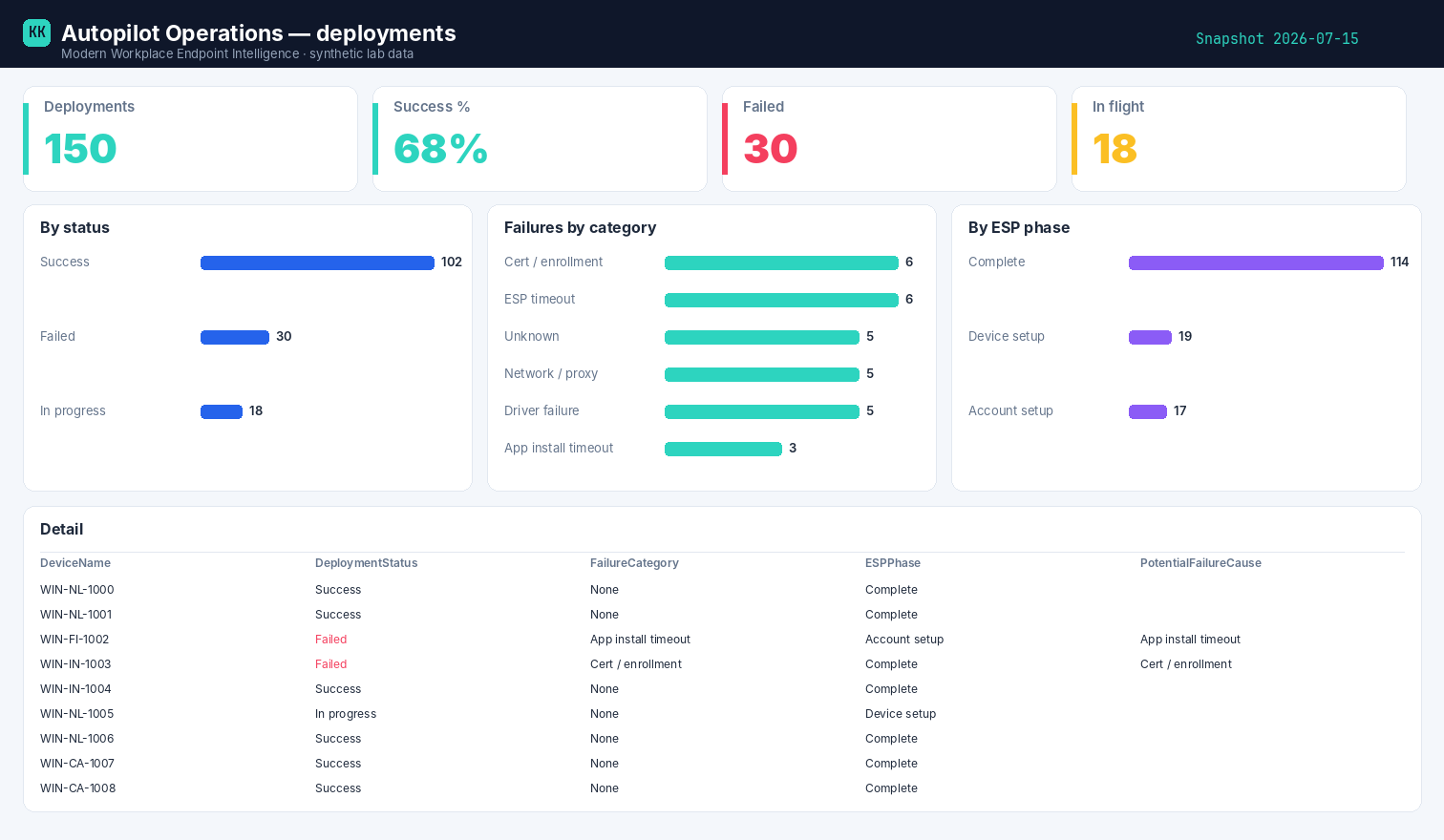
Built on synthetic @contoso.com data. Point the template at your own snapshot to see your fleet.
Related
- The story → Where Autopilot actually breaks
- Power BI report → Autopilot Operations report
- Part of → Zero-Access Agent