Local AI Agent Inventory
Inventories local AI-agent tooling across managed devices — a modern-workspace signal most fleets can't see yet.
Download the script View on GitHub
1 · The script
Read-only by construction — it authenticates with a Managed Identity, calls Microsoft Graph read-only (.Read.All scopes), and writes a sanitized CSV snapshot. Set the three CONFIG values at the top, then run.
View the full script (27 KB)
#requires -Version 7.0
<#
.SYNOPSIS
    Collect-LocalAIAgentInventory.ps1 — shadow-AI / local-AI-tooling inventory collector for
    the Zero-Access Pattern. Read-only, Managed-Identity.

.DESCRIPTION
    Reads the per-device output of a Proactive Remediations DETECTION script (deployed
    separately in Intune) that reports which local AI tools are installed/running on each
    device, parses it into structured agents (name / category / signals / sanctioned-or-not),
    enriches with the primary user's department, location, and account status, and writes a
    governance report plus pre-computed stats. Read-only throughout — nothing is written to
    the tenant; the detection runs on the device, this collector only reads the reported
    result.

    Writes:
      root/       AIAgentInventory.csv         (full, identifiable, for Power BI)
      agent-data/ AIAgentInventory_Agent.csv   (slim; user identifiers optional)
      agent-data/ AIAgentInventory_Stats.csv   (pre-computed counts + coverage gaps)

.NOTES
    DEPENDENCY: a companion Intune Proactive Remediation DETECTION script that emits, per
    device, a line describing detected AI tooling (this collector parses that line — see
    ConvertFrom-DetectionOutput for the expected format). That detection script is not part of
    this repo; point $DetectionScriptName / $DetectionScriptId at yours.

    GENERIC / PARAMETERIZED: no resource group, storage account, container, or detection-script
    ID is hardcoded. Run against a personal lab tenant only.

    BETA ENDPOINT: deviceHealthScripts run states use /beta; devices/users use /v1.0.

    Read-only Graph app roles on the Managed Identity:
      DeviceManagementConfiguration.Read.All    (deviceHealthScripts + deviceRunStates)
      DeviceManagementManagedDevices.Read.All    (managed devices fallback)
      User.Read.All, Directory.Read.All          (user department/location/account status)
    Plus "Storage Blob Data Contributor" on the storage account.

    MIT licensed. Microsoft, Intune, Entra, Microsoft Graph and Azure are trademarks of the
    Microsoft group of companies; other product names are trademarks of their owners.
    Independent content; not endorsed by Microsoft.
#>

# ===========================================================================
#  CONFIGURE ME  ->  set these to your own values, then run.
#  These three lines are the only thing you MUST change.
# ===========================================================================
$ResourceGroup  = "<your-resource-group-name>"     # resource group that holds your storage account
$StorageAccount = "<your-storage-account-name>"    # storage account name (lowercase, globally unique)
$Container      = "<your-container-name>"           # blob container, e.g. "intune-report"

# -- detection script + optional settings -----------------------------------
$DetectionScriptName = "Detect-LocalAIAgents"   # display name of your Proactive Remediation detection script
$DetectionScriptId   = ""                       # leave blank to resolve by name above, or paste your script's ID
$PageSize            = 200                       # drop to 50 if Graph rejects the page size
$ActiveDayThreshold  = 14                        # a device synced within N days counts as "active"
$IncludeUserIdentifiersInAgentCopy = $true       # $false = drop PII from the agent-data copy
$IncludeCleanDevicesInAgentCopy    = $false      # $false = agent copy carries findings + unevaluated only
# ===========================================================================

# Safety net - stop if the placeholders above weren't replaced.
if ("$ResourceGroup $StorageAccount $Container" -match '<your-') {
    throw "Please set ResourceGroup, StorageAccount, and Container at the top of the script before running."
}

#-- Step 1 - Initialize Variables
$ExportLocation     = "$env:TEMP"
$Today              = Get-Date -Format 'yyyy-MM-dd'
$ProgressPreference = 'SilentlyContinue'
$VerbosePreference  = 'Continue'

#-- Step 2 - Graph GET with pagination
Function Invoke-MyGraphGetRequest {
    Param ($URL)
    Write-Verbose "Sending request to $URL"
    $AllResults = @()
    try {
        Do {
            $WebRequest   = Invoke-WebRequest -Uri $URL -Method GET -Headers $script:Headers -UseBasicParsing
            $ResponseData = ($WebRequest.Content | ConvertFrom-Json)
            $AllResults  += $ResponseData.value
            $URL          = $ResponseData.'@odata.nextLink'
        } While ($URL)
        Return $AllResults
    } catch {
        Write-Error "Failed to fetch data from ${URL}: $_"
        return $null
    }
}

#-- Step 3 - Authenticate with Managed Identity
$url = $env:IDENTITY_ENDPOINT
$headers = New-Object "System.Collections.Generic.Dictionary[[String],[String]]"
$headers.Add("X-IDENTITY-HEADER", $env:IDENTITY_HEADER)
$headers.Add("Metadata", "True")
$body = @{ resource = 'https://graph.microsoft.com/' }

Write-Verbose "Obtaining access token"
$accessToken    = (Invoke-RestMethod $url -Method 'POST' -Headers $headers -ContentType 'application/x-www-form-urlencoded' -Body $body).access_token
$script:Headers = @{
    'Authorization'    = "Bearer $accessToken"
    'ConsistencyLevel' = 'eventual'
}
Write-Verbose "Access token obtained successfully"

#-- Step 4 - Storage context
try {
    $StorageAccountContext = (Get-AzStorageAccount -ResourceGroupName $ResourceGroup -Name $StorageAccount).Context
    Write-Verbose "Storage context obtained"
} catch { Write-Error "Failed to get storage context: $_"; return }

#-- Step 5 - Resolve the remediation script ID by display name
if (-not $DetectionScriptId) {
    Write-Verbose "Resolving remediation script '$DetectionScriptName'..."
    $Scripts = Invoke-MyGraphGetRequest -URL "https://graph.microsoft.com/beta/deviceManagement/deviceHealthScripts?`$select=id,displayName"
    $Match   = $Scripts | Where-Object { $_.displayName -eq $DetectionScriptName } | Select-Object -First 1
    if (!$Match) {
        Write-Error "Remediation script '$DetectionScriptName' not found. Check the display name or set `$DetectionScriptId."
        return
    }
    $DetectionScriptId = $Match.id
}
Write-Verbose "Using remediation script ID: $DetectionScriptId"

#-- Step 6 - Fetch per-device detection run states
$RunStateSelect = "detectionState,lastStateUpdateDateTime,preRemediationDetectionScriptOutput,preRemediationDetectionScriptError,remediationState,remediationScriptError"
$NestedFull     = "managedDevice(`$select=id,deviceName,osVersion,operatingSystem,lastSyncDateTime,userPrincipalName)"
$NestedMinimal  = "managedDevice(`$select=id,deviceName,osVersion,userPrincipalName)"

Write-Verbose "Fetching detection run states..."
$NeedBulkDeviceData = $false

$RunStateURI = "https://graph.microsoft.com/beta/deviceManagement/deviceHealthScripts/$DetectionScriptId/deviceRunStates?`$select=$RunStateSelect&`$expand=$NestedFull&`$top=$PageSize"
$RunStates   = Invoke-MyGraphGetRequest -URL $RunStateURI

if (!$RunStates) {
    Write-Warning "Extended projection rejected - retrying with the minimal verified expand."
    $NeedBulkDeviceData = $true
    $RunStateURI = "https://graph.microsoft.com/beta/deviceManagement/deviceHealthScripts/$DetectionScriptId/deviceRunStates?`$select=$RunStateSelect&`$expand=$NestedMinimal&`$top=$PageSize"
    $RunStates   = Invoke-MyGraphGetRequest -URL $RunStateURI
}

if (!$RunStates) { Write-Error "No detection run states returned. Check the script ID and that DeviceManagementConfiguration.Read.All is granted."; return }
Write-Verbose "Run states returned: $($RunStates.Count)"

#-- Step 7 - Bulk managed devices, ONLY if the expand could not supply sync data
$ManagedDeviceMap = @{}
if ($NeedBulkDeviceData) {
    Write-Verbose "Fetching all managed devices (bulk fallback)..."
    $ManagedDevices = Invoke-MyGraphGetRequest -URL "https://graph.microsoft.com/v1.0/deviceManagement/managedDevices?`$select=id,deviceName,userPrincipalName,lastSyncDateTime,operatingSystem,osVersion"
    foreach ($md in $ManagedDevices) {
        if ($md.id) { $ManagedDeviceMap[$md.id] = $md }
    }
    Write-Verbose "Managed device map built: $($ManagedDeviceMap.Count) entries"
}
else {
    Write-Verbose "Expand supplied device detail - bulk managedDevices sweep skipped."
}

#-- Step 8 - Bulk-fetch ALL users ONCE -> hashtable
#   accountEnabled and department are the two fields the governance report needs
#   beyond the standard location set.
Write-Verbose "Fetching all users (bulk)..."
$AllUsers = Invoke-MyGraphGetRequest -URL "https://graph.microsoft.com/v1.0/users?`$select=displayName,userPrincipalName,city,country,officeLocation,department,jobTitle,accountEnabled,usageLocation"

$UserMap = @{}
foreach ($u in $AllUsers) {
    if ($u.userPrincipalName) { $UserMap[$u.userPrincipalName.ToUpper()] = $u }
}
Write-Verbose "User map built: $($UserMap.Count) entries"

#-- Step 9 - Parse the detection output line into individual agents
function ConvertFrom-DetectionOutput {
    param([string]$Output)

    $agents = @()
    if ([string]::IsNullOrWhiteSpace($Output)) { return $agents }

    $clean = $Output.Replace('...[truncated]', '').Trim()

    # Split the sanctioned tail off the unsanctioned head
    $unsanctionedPart = $clean
    $sanctionedPart   = ''
    $idx = $clean.IndexOf('| Sanctioned:')
    if ($idx -ge 0) {
        $unsanctionedPart = $clean.Substring(0, $idx)
        $sanctionedPart   = $clean.Substring($idx + '| Sanctioned:'.Length)
    }

    # Strip the leading label from the unsanctioned segment
    if ($unsanctionedPart -match '^Unsanctioned AI tooling \(\d+\):(.*)$') {
        $unsanctionedPart = $Matches[1]
    } else {
        $unsanctionedPart = ''   # "No unsanctioned AI tooling detected" / OOBE skip
    }

    foreach ($segment in @(
            [pscustomobject]@{ Text = $unsanctionedPart; Sanctioned = $false },
            [pscustomobject]@{ Text = $sanctionedPart;   Sanctioned = $true }
        )) {

        if ([string]::IsNullOrWhiteSpace($segment.Text)) { continue }

        foreach ($entry in ($segment.Text -split ';')) {
            $e = $entry.Trim()
            if (-not $e) { continue }

            # Name [Category|Signal/Signal]
            if ($e -match '^(.*?)\s*\[([^\|\]]+)\|([^\]]+)\]$') {
                $agents += [pscustomobject]@{
                    Name       = $Matches[1].Trim()
                    Category   = $Matches[2].Trim()
                    Signals    = $Matches[3].Trim()
                    Sanctioned = $segment.Sanctioned
                }
            }
            elseif ($e -match '^(.*?)\s*\[([^\]]+)\]$') {
                # Tolerate the older Name [Signals] format
                $agents += [pscustomobject]@{
                    Name       = $Matches[1].Trim()
                    Category   = 'Unknown'
                    Signals    = $Matches[2].Trim()
                    Sanctioned = $segment.Sanctioned
                }
            }
        }
    }
    return $agents
}

#-- Step 10 - Build the enriched record set (one row per device per agent)
Write-Verbose "Building report..."

function Get-FirstValue($v) {
    if ($v -is [array]) { if ($v.Count -gt 0) { return $v[0] } else { return "Unknown" } }
    if ($v)             { return $v }
    return "Unknown"
}

$Enriched = New-Object System.Collections.Generic.List[object]

foreach ($state in $RunStates) {

    # Device identity comes from the expanded managedDevice. When the extended
    # projection was rejected, supplement sync/OS detail from the bulk map by id.
    $md = $state.managedDevice
    if (-not $md -or -not $md.deviceName) { continue }

    $mdExtra = $null
    if ($NeedBulkDeviceData -and $md.id -and $ManagedDeviceMap.ContainsKey($md.id)) {
        $mdExtra = $ManagedDeviceMap[$md.id]
    }

    $deviceName = $md.deviceName
    $upn  = if ($md.userPrincipalName) { [string]$md.userPrincipalName } else { "Unknown" }
    $user = if ($upn -ne "Unknown" -and $UserMap.ContainsKey($upn.ToUpper())) { $UserMap[$upn.ToUpper()] } else { $null }

    $osName    = if ($md.operatingSystem) { $md.operatingSystem } elseif ($mdExtra) { $mdExtra.operatingSystem } else { "Unknown" }
    $osVersion = if ($md.osVersion) { $md.osVersion } elseif ($mdExtra) { $mdExtra.osVersion } else { "Unknown" }
    $syncRaw   = if ($md.lastSyncDateTime) { $md.lastSyncDateTime } elseif ($mdExtra) { $mdExtra.lastSyncDateTime } else { $null }

    # Account status - the governance question is "does a leaver still have local AI tooling installed"
    $AccountStatus = "Unknown"
    if ($user -and $null -ne $user.accountEnabled) {
        $AccountStatus = if ($user.accountEnabled) { "Enabled" } else { "Disabled" }
    }

    # Last sync + activity window
    $LastSyncDate = "Unknown"; $DaysAgo = ""; $IsActive = ""
    if ($syncRaw) {
        $syncDt       = [datetime]$syncRaw
        $LastSyncDate = $syncDt.ToString("yyyy-MM-dd")
        $DaysAgo      = [int](New-TimeSpan -Start $syncDt -End (Get-Date)).TotalDays
        $IsActive     = if ($DaysAgo -le $ActiveDayThreshold) { "Yes" } else { "No" }
    }

    $LastDetection = "Unknown"
    if ($state.lastStateUpdateDateTime) {
        $LastDetection = ([datetime]$state.lastStateUpdateDateTime).ToString("yyyy-MM-dd")
    }

    $rawOutput = [string]$state.preRemediationDetectionScriptOutput
    $agents    = ConvertFrom-DetectionOutput -Output $rawOutput

    # Devices that errored or were skipped in OOBE are visible, not silently dropped
    $DetectionState = if ($state.detectionState) { [string]$state.detectionState } else { "unknown" }

    $scanStatus = "Scanned"
    if ($state.preRemediationDetectionScriptError -or $DetectionState -eq 'scriptError') { $scanStatus = "ScriptError" }
    elseif ($DetectionState -in @('pending', 'unknown'))                                  { $scanStatus = "NotYetReported" }
    elseif ($rawOutput -like 'Skipped*')                                                  { $scanStatus = "SkippedOOBE" }
    elseif (-not $rawOutput)                                                              { $scanStatus = "NoOutput" }

    $hasUnsanctioned = if ($agents | Where-Object { -not $_.Sanctioned }) { "Yes" } else { "No" }

    # No agents detected -> emit a single 'None' row so estate denominators work
    if ($agents.Count -eq 0) {
        $agents = @([pscustomobject]@{ Name = 'None'; Category = 'None'; Signals = ''; Sanctioned = $false })
    }

    # Country resolution. Entra 'country' is free text and often blank; 'usageLocation'
    # is an ISO 3166-1 alpha-2 code and is reliably populated on licensed users.
    $CountryName = Get-FirstValue $user.country
    $CountryCode = Get-FirstValue $user.usageLocation
    if ($CountryName -eq "Unknown" -and $CountryCode -ne "Unknown") { $CountryName = $CountryCode }
    if ($CountryCode -eq "Unknown" -and $CountryName -ne "Unknown" -and $CountryName.Length -eq 2) { $CountryCode = $CountryName.ToUpper() }

    $agentCount = $agents.Count
    $rowIndex   = 0

    foreach ($agent in $agents) {
        $rowIndex++
        $Enriched.Add([PSCustomObject]@{
            DeviceName          = $deviceName
            PrimaryUser         = $upn
            UserDisplayName     = Get-FirstValue $user.displayName
            Department          = Get-FirstValue $user.department
            JobTitle            = Get-FirstValue $user.jobTitle
            OfficeLocation      = Get-FirstValue $user.officeLocation
            City                = Get-FirstValue $user.city
            Country             = $CountryName
            CountryCode         = $CountryCode
            AccountStatus       = $AccountStatus

            # --- the Power BI filter columns ---
            AIAgentName         = $agent.Name
            AIAgentCategory     = $agent.Category
            AIAgentSanctioned   = if ($agent.Sanctioned) { "Sanctioned" } else { "Unsanctioned" }
            DetectionSignals    = $agent.Signals

            # --- counting guards ---
            # This file is TALL: one row per device per agent. Counting rows
            # overstates the device count. IsPrimaryDeviceRow is 'Yes' on exactly
            # one row per device, so device counts = rows where it equals 'Yes'.
            IsPrimaryDeviceRow  = if ($rowIndex -eq 1) { "Yes" } else { "No" }
            AgentCountOnDevice  = $agentCount

            # --- device context ---
            HasUnsanctionedAI   = $hasUnsanctioned
            ScanStatus          = $scanStatus
            DetectionState      = $DetectionState
            OperatingSystem     = $osName
            OSVersion           = $osVersion
            LastSyncDate        = $LastSyncDate
            LastSyncDaysAgo     = $DaysAgo
            IsActiveLast14Days  = $IsActive
            LastDetectionDate   = $LastDetection
            SnapshotDate        = $Today
        })
    }
}

if (!$Enriched) { Write-Error "No report rows produced."; return }
Write-Verbose "Report rows (device x agent): $($Enriched.Count)"

#-- Step 11 - Pre-computed stats
Write-Verbose "Building summary statistics..."
$Stats = [System.Collections.Generic.List[object]]::new()

function Add-Stat {
    param([string]$Category, [string]$Key, [int]$Count, [string]$Label)
    # StatLabel is a plain-English sentence. Azure AI Search (standard.lucene)
    # tokenises PascalCase categories like 'DevicesByAgent' as a single opaque
    # token, so natural-language questions never reach them. The label is what
    # the agent actually matches on.
    if (-not $Label) { $Label = "$Category - $Key" }
    $Stats.Add([pscustomobject]@{
        ReportType   = 'AIAgentInventory'
        Category     = $Category
        Key          = $Key
        Count        = $Count
        StatLabel    = $Label
        SnapshotDate = $Today
    })
}

$DeviceLevel  = $Enriched | Group-Object DeviceName
$DeviceCount  = $DeviceLevel.Count

Add-Stat -Category 'Total' -Key 'DevicesScanned' -Count $DeviceCount `
    -Label "Total number of distinct devices with an AI agent detection result"

$withUnsanctioned = @($DeviceLevel | Where-Object { $_.Group[0].HasUnsanctionedAI -eq 'Yes' })
Add-Stat -Category 'Total' -Key 'DevicesWithUnsanctionedAI' -Count $withUnsanctioned.Count `
    -Label "Number of distinct devices with unsanctioned AI tooling installed or running"

$cleanDevices = @($DeviceLevel | Where-Object { $_.Group[0].AIAgentName -eq 'None' })
Add-Stat -Category 'Total' -Key 'DevicesWithNoAIDetected' -Count $cleanDevices.Count `
    -Label "Number of distinct devices where no AI tooling of any kind was detected"

# Honest gap: devices the detection could not evaluate. Absent is not the same as clean.
$notEvaluated = @($DeviceLevel | Where-Object { $_.Group[0].ScanStatus -ne 'Scanned' })
Add-Stat -Category 'Coverage' -Key 'DevicesNotSuccessfullyScanned' -Count $notEvaluated.Count `
    -Label "Number of distinct devices where the AI detection did not complete, so their AI tooling status is unknown"

# Agent popularity - the headline chart
$Enriched | Where-Object { $_.AIAgentName -ne 'None' } |
    Group-Object AIAgentName | ForEach-Object {
        $n = ($_.Group | Select-Object -ExpandProperty DeviceName -Unique).Count
        Add-Stat -Category 'DevicesByAgent' -Key $_.Name -Count $n `
            -Label "Number of distinct devices with $($_.Name) detected"
    }

$Enriched | Where-Object { $_.AIAgentName -ne 'None' } |
    Group-Object AIAgentCategory | ForEach-Object {
        $n = ($_.Group | Select-Object -ExpandProperty DeviceName -Unique).Count
        Add-Stat -Category 'DevicesByAgentCategory' -Key $_.Name -Count $n `
            -Label "Number of distinct devices with AI tooling of type $($_.Name)"
    }

# Sanctioned vs unsanctioned split - the adoption-vs-exception story
$Enriched | Where-Object { $_.AIAgentName -ne 'None' } |
    Group-Object AIAgentSanctioned | ForEach-Object {
        $n = ($_.Group | Select-Object -ExpandProperty DeviceName -Unique).Count
        Add-Stat -Category 'DevicesBySanctionState' -Key $_.Name -Count $n `
            -Label "Number of distinct devices with $($_.Name) AI tooling"
    }

# Departments carrying the most unsanctioned tooling - who to talk to first
$Enriched | Where-Object { $_.AIAgentSanctioned -eq 'Unsanctioned' -and $_.AIAgentName -ne 'None' -and $_.Department -ne 'Unknown' } |
    Group-Object Department | ForEach-Object {
        $n = ($_.Group | Select-Object -ExpandProperty DeviceName -Unique).Count
        Add-Stat -Category 'UnsanctionedByDepartment' -Key $_.Name -Count $n `
            -Label "Number of distinct devices with unsanctioned AI tooling in the $($_.Name) department"
    }

$Enriched | Where-Object { $_.AIAgentSanctioned -eq 'Unsanctioned' -and $_.AIAgentName -ne 'None' -and $_.Country -ne 'Unknown' } |
    Group-Object Country | ForEach-Object {
        $n = ($_.Group | Select-Object -ExpandProperty DeviceName -Unique).Count
        Add-Stat -Category 'UnsanctionedByCountry' -Key $_.Name -Count $n `
            -Label "Number of distinct devices with unsanctioned AI tooling in country $($_.Name)"
    }

# Total devices per country and per office, so a RATE can be calculated rather than
# reading raw counts (a large country will always top an unsanctioned-count chart).
$Enriched | Where-Object { $_.Country -ne 'Unknown' } |
    Group-Object Country | ForEach-Object {
        $n = ($_.Group | Select-Object -ExpandProperty DeviceName -Unique).Count
        Add-Stat -Category 'DevicesByCountry' -Key $_.Name -Count $n `
            -Label "Total number of distinct devices scanned in country $($_.Name)"
    }

$Enriched | Where-Object { $_.OfficeLocation -ne 'Unknown' } |
    Group-Object OfficeLocation | ForEach-Object {
        $n = ($_.Group | Select-Object -ExpandProperty DeviceName -Unique).Count
        Add-Stat -Category 'DevicesByOfficeLocation' -Key $_.Name -Count $n `
            -Label "Total number of distinct devices scanned at office location $($_.Name)"
    }

# Honest gap: devices that cannot be placed on the map at all.
$noCountry = @($DeviceLevel | Where-Object { $_.Group[0].Country -eq 'Unknown' })
Add-Stat -Category 'Coverage' -Key 'DevicesWithNoCountry' -Count $noCountry.Count `
    -Label "Number of distinct devices with no country recorded on the primary user, excluded from all country breakdowns"

$noOffice = @($DeviceLevel | Where-Object { $_.Group[0].OfficeLocation -eq 'Unknown' })
Add-Stat -Category 'Coverage' -Key 'DevicesWithNoOfficeLocation' -Count $noOffice.Count `
    -Label "Number of distinct devices with no office location recorded on the primary user, excluded from all office location breakdowns"

$Enriched | Where-Object { $_.AIAgentSanctioned -eq 'Unsanctioned' -and $_.AIAgentName -ne 'None' -and $_.OfficeLocation -ne 'Unknown' } |
    Group-Object OfficeLocation | ForEach-Object {
        $n = ($_.Group | Select-Object -ExpandProperty DeviceName -Unique).Count
        Add-Stat -Category 'UnsanctionedByOfficeLocation' -Key $_.Name -Count $n `
            -Label "Number of distinct devices with unsanctioned AI tooling at office location $($_.Name)"
    }

# Disabled accounts still carrying AI tooling - a leaver-risk signal
$Enriched | Where-Object { $_.AccountStatus -eq 'Disabled' -and $_.AIAgentName -ne 'None' } |
    Group-Object AIAgentSanctioned | ForEach-Object {
        $n = ($_.Group | Select-Object -ExpandProperty DeviceName -Unique).Count
        Add-Stat -Category 'DisabledAccountsWithAI' -Key $_.Name -Count $n `
            -Label "Number of distinct devices with $($_.Name) AI tooling whose primary user account is disabled"
    }

# Scan health - how much of the estate the detection actually covered
$DeviceLevel | Group-Object { $_.Group[0].ScanStatus } | ForEach-Object {
    Add-Stat -Category 'ScanStatus' -Key $_.Name -Count $_.Count `
        -Label "Number of distinct devices whose AI detection scan status was $($_.Name)"
}

Write-Verbose "Summary stat rows: $($Stats.Count)"

#-- Step 12 - Publish helper (12 MB agent gate)
function Publish-Csv {
    param($Data, [string]$Name, [switch]$RootOnly, [switch]$AgentOnly)
    if (-not $Data) { Write-Warning "No rows for $Name"; return }

    $path = Join-Path $ExportLocation $Name
    $Data | Export-Csv -Path $path -NoTypeInformation -Encoding UTF8 -Force
    $mb = [math]::Round((Get-Item $path).Length / 1MB, 2)

    if (-not $AgentOnly) {
        Set-AzStorageBlobContent -File $path -Container $Container -Blob $Name `
            -Context $StorageAccountContext -Force | Out-Null
        Write-Output "$Name -> root ($mb MB)"
    }
    if (-not $RootOnly) {
        if ($mb -le 12) {
            Set-AzStorageBlobContent -File $path -Container $Container -Blob "agent-data/$Name" `
                -Context $StorageAccountContext -Force | Out-Null
            Write-Output "$Name -> agent-data ($mb MB)"
        } else {
            Write-Warning "$Name is $mb MB - over 12MB gate; agent copy skipped."
        }
    }
}

#-- Step 13 - Publish
# ROOT: full identifiable detail for Power BI. Never goes to agent-data.
$PowerBIRows = $Enriched | Select-Object `
    DeviceName, PrimaryUser, UserDisplayName, Department, JobTitle,
    OfficeLocation, City, Country, CountryCode, AccountStatus,
    AIAgentName, AIAgentCategory, AIAgentSanctioned, DetectionSignals,
    IsPrimaryDeviceRow, AgentCountOnDevice,
    HasUnsanctionedAI, ScanStatus, DetectionState, OperatingSystem, OSVersion,
    LastSyncDate, LastSyncDaysAgo, IsActiveLast14Days, LastDetectionDate, SnapshotDate

# AGENT: slim copy. RowKey is a deterministic document key for Azure AI Search.
# Without it the blob indexer keys by row position, so a device gaining or losing an
# agent shifts every following row and leaves stale documents behind. Base64-encode
# it in the indexer field mapping (keys must be URL-safe).
$Keyed = $Enriched | ForEach-Object {
    $_ | Add-Member -NotePropertyName 'RowKey' -NotePropertyValue ("{0}|{1}" -f $_.DeviceName, $_.AIAgentName) -Force -PassThru
}

# Scope the agent copy. A confirmed-clean device is dropped; a device the scan could
# NOT evaluate is kept, because absent must never be readable as clean.
$AgentScope = $Keyed
if (-not $IncludeCleanDevicesInAgentCopy) {
    $AgentScope = $Keyed | Where-Object { $_.AIAgentName -ne 'None' -or $_.ScanStatus -ne 'Scanned' }
    Write-Verbose "Agent copy scoped to findings + unevaluated: $(@($AgentScope).Count) of $($Keyed.Count) rows"
}

if ($IncludeUserIdentifiersInAgentCopy) {
    $AgentRows = $AgentScope | Select-Object `
        RowKey, DeviceName, PrimaryUser, UserDisplayName, Department, JobTitle,
        OfficeLocation, City, Country, CountryCode, AccountStatus,
        AIAgentName, AIAgentCategory, AIAgentSanctioned, DetectionSignals,
        IsPrimaryDeviceRow, AgentCountOnDevice, HasUnsanctionedAI, ScanStatus, DetectionState,
        OperatingSystem, IsActiveLast14Days, LastDetectionDate, SnapshotDate
}
else {
    $AgentRows = $AgentScope | Select-Object `
        RowKey, DeviceName, Department, OfficeLocation, City, Country, CountryCode, AccountStatus,
        AIAgentName, AIAgentCategory, AIAgentSanctioned, DetectionSignals,
        IsPrimaryDeviceRow, AgentCountOnDevice, HasUnsanctionedAI, ScanStatus, DetectionState,
        OperatingSystem, IsActiveLast14Days, LastDetectionDate, SnapshotDate
}

$StatRows = $Stats | ForEach-Object {
    $_ | Add-Member -NotePropertyName 'RowKey' -NotePropertyValue ("{0}|{1}|{2}" -f $_.ReportType, $_.Category, $_.Key) -Force -PassThru
} | Select-Object RowKey, ReportType, Category, Key, Count, StatLabel, SnapshotDate

Publish-Csv -Data $PowerBIRows -Name "AIAgentInventory.csv"       -RootOnly
Publish-Csv -Data $AgentRows   -Name "AIAgentInventory_Agent.csv" -AgentOnly
Publish-Csv -Data $StatRows    -Name "AIAgentInventory_Stats.csv" -AgentOnly

Write-Verbose "Script completed successfully at $(Get-Date)"
2 · The Power BI template
Local AI Agent Inventory template (.pbit)
Carries the parameterised CSV connection, the full schema, and the governance DAX measures. Full Power Query, DAX and layout live on the report page.
3 · Example report
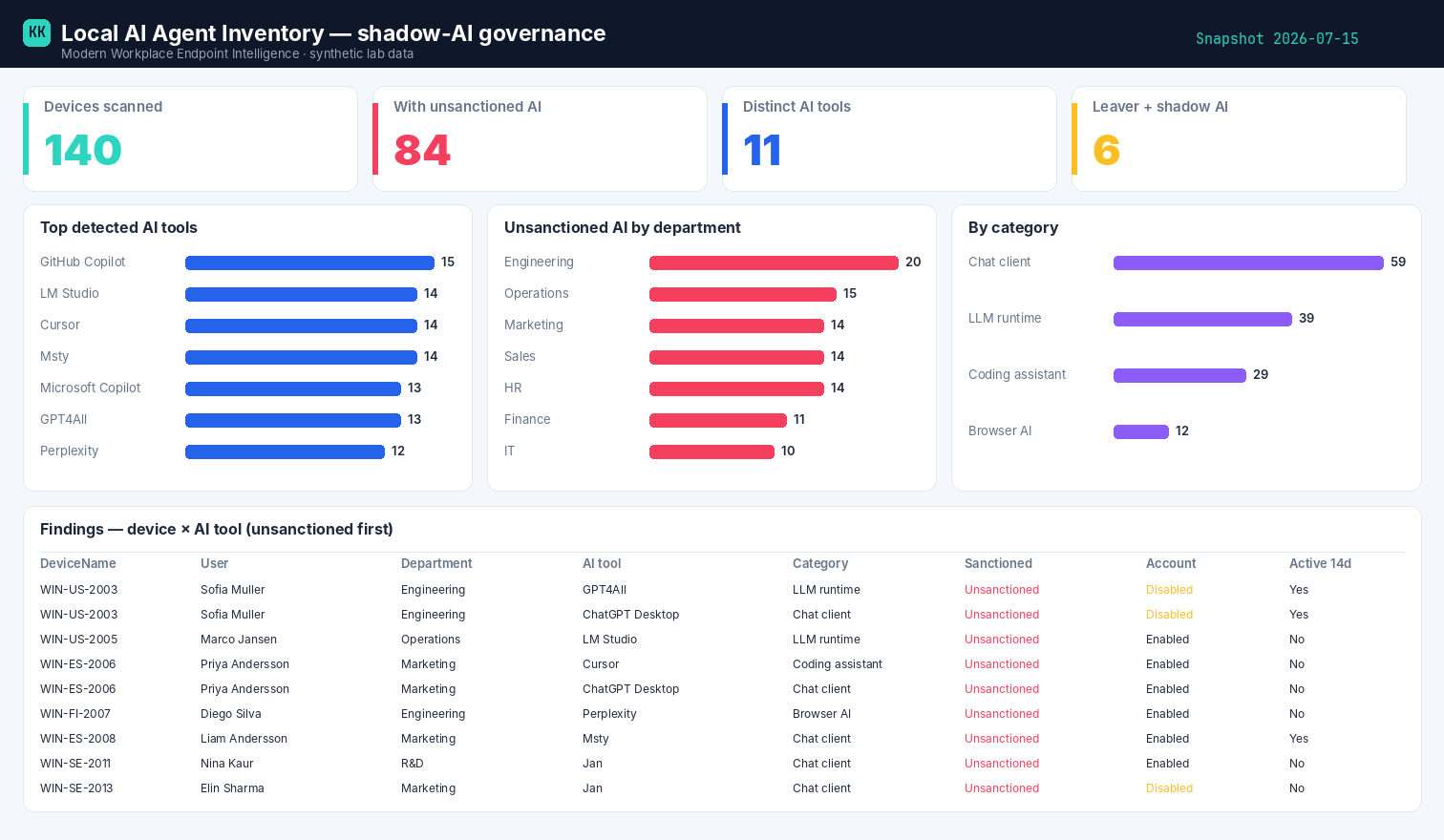
Built on synthetic @contoso.com data — 140 devices, 84 carrying unsanctioned AI.
Related
- Power BI report → Local AI Agent Inventory report
- Deep-dive teardown → in the Zero-Access Agent project