Non-Compliant Windows Devices — Power BI report
Built on the read-only snapshot from the Non-Compliant Devices script — no live tenant connection, just the sanitized CSV. It answers, fast: which Windows devices are failing an Intune compliance policy, and on which specific setting.
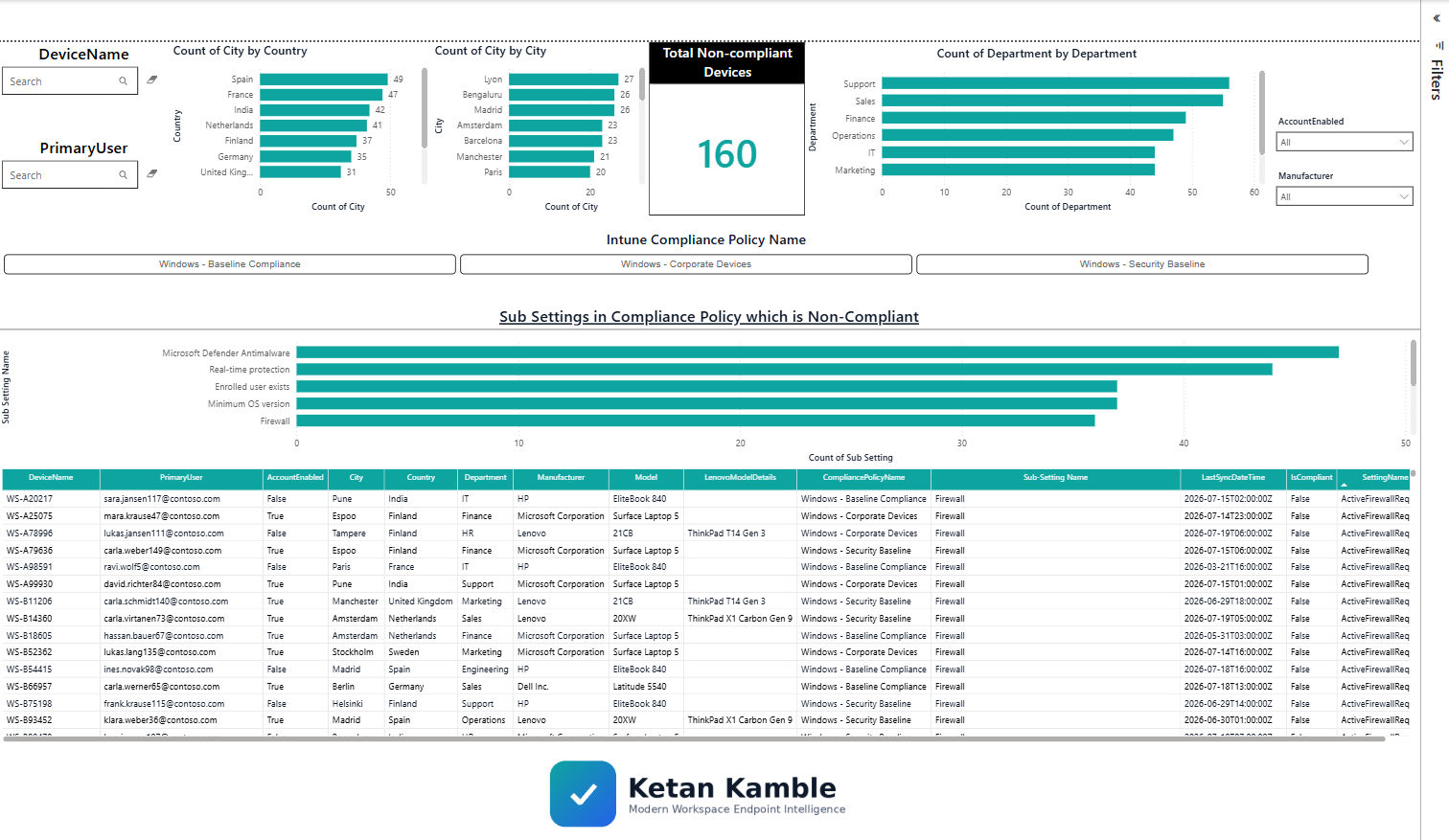
What it shows
- Total Non-Compliant Devices — a distinct device count (a device can fail several settings).
- By Country / City / Department — where the non-compliance concentrates.
- Sub-settings that are non-compliant — Firewall, Real-time protection, Minimum OS version, Antivirus… ranked.
- Detail table — one row per device × failing setting, with the friendly setting name.
Download the template
Download the Non-Compliant Devices template
Open it in free Power BI Desktop, point the query's Source = at the synthetic
NonCompliant_Windows_Devices.csv, and it lights up with no tenant access at all.
The one clever bit: friendly setting names
Intune's raw SettingName values are machine-readable. The report maps them to what an admin actually
sees in the portal — ActiveFirewallRequired → Firewall, RtpEnabled → Real-time protection,
OsMinimumVersion → Minimum OS version, and so on — then de-dupes so each device × setting counts once.
Related
- The script → Non-Compliant Devices
- How it works → teardown
- Part of → Zero-Access Agent