Inventory — All Devices
Full managed-device inventory across the fleet — the backbone dataset every other report leans on.
Download the script View on GitHub
1 · The script
Read-only by construction — it authenticates with a Managed Identity, calls Microsoft Graph read-only (.Read.All scopes), and writes a sanitized CSV snapshot. Set the three CONFIG values at the top, then run.
View the full script (26 KB)
#requires -Version 7.0
<#
.SYNOPSIS
    Collect-InventoryAllDevices.ps1 — the "Inventory — All Devices" collector for the
    Zero-Access Pattern. Read-only, Managed-Identity, pre-aggregating.

.DESCRIPTION
    An Azure Automation runbook that signs in as the Automation Account's system-assigned
    Managed Identity and builds a single, enriched device inventory from Microsoft Graph:

      - all managed devices (all platforms)
      - Microsoft Defender agent status (via a server-side Intune Reports export job)
      - OEM warranty details parsed from each device's Notes field (via $batch)
      - user location = organisational assignment (city/country/office) from Entra (via $batch)

    It writes two CSVs to the storage account's `agent-data/` container:
      - Inventory_AllDevices.csv  — the full enriched row-per-device inventory
      - Summary_Stats.csv         — pre-aggregated counts (count DEVICES, not rows)

    Nothing is written back to the tenant. The pre-aggregation happens here, in a reviewed
    job, so the AI agent reads vetted numbers rather than improvising over raw rows.

.NOTES
    GENERIC / PARAMETERIZED: no resource group, storage account, container, or OEM name is
    hardcoded — pass them in. Run against a personal lab tenant only.

    BETA ENDPOINT: this collector calls https://graph.microsoft.com/beta (needed for the
    reports export jobs and some device properties). Beta endpoints can change without
    notice — pin to /v1.0 where an equivalent exists, and re-verify after Graph updates.

    Read-only Graph app roles required on the Managed Identity (assign once — see
    docs/build-it-yourself.md):
      DeviceManagementManagedDevices.Read.All   (managed devices, Notes, reports)
      User.Read.All                             (user city/country/office enrichment)
    Plus "Storage Blob Data Contributor" on the target storage account (to write CSVs).

    MIT licensed. Microsoft, Intune, Entra, Microsoft Graph, Defender and Azure are
    trademarks of the Microsoft group of companies. Independent content; not endorsed by
    Microsoft. Verify every endpoint and permission in your own lab tenant before relying
    on it.
#>

# ===========================================================================
#  CONFIGURE ME  ->  set these to your own values, then run.
#  These three lines are the only thing you MUST change.
# ===========================================================================
$ResourceGroup  = "<your-resource-group-name>"     # resource group that holds your storage account
$StorageAccount = "<your-storage-account-name>"    # storage account name (lowercase, globally unique)
$Container      = "<your-container-name>"           # blob container, e.g. "intune-report"

# -- optional settings (safe to leave as they are) --------------------------
$WarrantyManufacturer = 'Lenovo'   # manufacturer whose warranty is stored in the device Notes field
$MaxAgentFileMB       = 12          # size gate for agent-data/ (AI Search ~16 MB extraction ceiling)
# ===========================================================================

# Safety net - stop if the placeholders above weren't replaced.
if ("$ResourceGroup $StorageAccount $Container" -match '<your-') {
    throw "Please set ResourceGroup, StorageAccount, and Container at the top of the script before running."
}

#-- Step 1 - Initialize Variables
$ExportLocation         = "$env:TEMP"
$ProgressPreference     = 'SilentlyContinue'
$VerbosePreference      = 'Continue'
$ErrorActionPreference  = 'Stop'
$script:GraphBase       = 'https://graph.microsoft.com/beta'
$script:RunStart        = Get-Date
$SnapshotDate           = (Get-Date).ToString('yyyy-MM-dd')

# ============================================================================
# AUTHENTICATION - MANAGED IDENTITY WITH TOKEN REFRESH
# ============================================================================

function Get-ManagedIdentityToken {
    param([string]$Resource = 'https://graph.microsoft.com/')

    $url = $env:IDENTITY_ENDPOINT
    if (-not $url) { throw "IDENTITY_ENDPOINT not set. Ensure system-assigned Managed Identity is enabled." }

    $headers = @{ 'X-IDENTITY-HEADER' = $env:IDENTITY_HEADER; 'Metadata' = 'True' }
    $response = Invoke-RestMethod -Uri $url -Method POST -Headers $headers `
        -ContentType 'application/x-www-form-urlencoded' `
        -Body @{ resource = $Resource } -ErrorAction Stop

    if (-not $response.access_token) { throw "Managed Identity token acquisition returned an empty token." }
    return $response.access_token
}

function Initialize-GraphAuth {
    $token = Get-ManagedIdentityToken
    $script:Headers     = @{ Authorization = "Bearer $token"; 'Content-Type' = 'application/json' }
    $script:TokenExpiry = (Get-Date).AddMinutes(50)
    Write-Verbose "Graph token acquired. Refresh scheduled for $($script:TokenExpiry)."
}

function Get-GraphHeaders {
    if ((Get-Date) -ge $script:TokenExpiry) {
        Write-Information "Token nearing expiry - refreshing via Managed Identity." -InformationAction Continue
        Initialize-GraphAuth
    }
    return $script:Headers
}

Initialize-GraphAuth

# ============================================================================
# GRAPH REQUEST HELPER - RETRY + PAGINATION
# ============================================================================

function Invoke-GraphRequest {
    param(
        [Parameter(Mandatory)][string]$Uri,
        [ValidateSet('GET','POST')][string]$Method = 'GET',
        [string]$Body = $null,
        [switch]$NoPaging
    )

    $allResults = [System.Collections.Generic.List[object]]::new()
    $nextLink   = $Uri
    $pageCount  = 0

    do {
        $retryCount = 0
        $response   = $null

        while ($null -eq $response) {
            try {
                if ($pageCount -gt 0) { Start-Sleep -Milliseconds 200 }

                $params = @{ Uri = $nextLink; Method = $Method; Headers = (Get-GraphHeaders); ErrorAction = 'Stop' }
                if ($Method -eq 'POST' -and $Body) { $params['Body'] = $Body }

                $response = Invoke-RestMethod @params
                if ($null -eq $response) { $response = @{} }
            }
            catch {
                $statusCode = 0
                try { $statusCode = [int]$_.Exception.Response.StatusCode } catch { }

                if ($statusCode -eq 401 -and $retryCount -lt 5) {
                    $retryCount++
                    Write-Warning "401 received - refreshing token (attempt $retryCount/5)."
                    Initialize-GraphAuth
                    continue
                }
                if ($statusCode -in 429, 502, 503, 504 -and $retryCount -lt 5) {
                    $retryCount++
                    $retryAfter = 30
                    try {
                        $headerVal = @($_.Exception.Response.Headers.GetValues('Retry-After'))[0]
                        $parsed = 0
                        if ($headerVal -and [int]::TryParse($headerVal, [ref]$parsed)) {
                            $retryAfter = [Math]::Min($parsed, 300)
                        }
                    } catch { }
                    Write-Warning "HTTP $statusCode - retry $retryCount/5 in ${retryAfter}s."
                    Start-Sleep -Seconds $retryAfter
                    continue
                }
                throw "Graph request failed [$statusCode] $Method $nextLink :: $($_.Exception.Message)"
            }
        }

        $pageCount++
        if ($response.PSObject.Properties['value']) {
            foreach ($item in $response.value) { $allResults.Add($item) }
        } else {
            $allResults.Add($response)
        }

        $nextLink = if (-not $NoPaging -and $response.PSObject.Properties['@odata.nextLink']) {
            $response.'@odata.nextLink'
        } else { $null }

    } while ($nextLink)

    return $allResults
}

# ============================================================================
# REPORTS EXPORT JOB HELPER
# ============================================================================

function Invoke-IntuneExportJob {
    param(
        [Parameter(Mandatory)][string]$ReportName,
        [int]$PollIntervalSeconds = 5,
        [int]$TimeoutMinutes = 20
    )

    $body = @{ reportName = $ReportName; format = 'csv' } | ConvertTo-Json
    Write-Verbose "Submitting export job: $ReportName"
    $job = (Invoke-GraphRequest -Uri "$script:GraphBase/deviceManagement/reports/exportJobs" `
            -Method POST -Body $body -NoPaging)[0]

    $deadline = (Get-Date).AddMinutes($TimeoutMinutes)
    while ($job.status -in 'notStarted', 'inProgress') {
        if ((Get-Date) -gt $deadline) { throw "Export job '$ReportName' timed out after $TimeoutMinutes minutes." }
        Start-Sleep -Seconds $PollIntervalSeconds
        $job = (Invoke-GraphRequest -Uri "$script:GraphBase/deviceManagement/reports/exportJobs('$($job.id)')" -NoPaging)[0]
    }

    if ($job.status -ne 'completed') { throw "Export job '$ReportName' finished with status '$($job.status)'." }

    $zipPath = Join-Path $ExportLocation "$ReportName`_$([guid]::NewGuid().ToString('N').Substring(0,8)).zip"
    Invoke-WebRequest -Uri $job.url -OutFile $zipPath -UseBasicParsing | Out-Null

    $extractPath = "$zipPath.extracted"
    Expand-Archive -Path $zipPath -DestinationPath $extractPath -Force
    $csvFile = Get-ChildItem -Path $extractPath -Filter '*.csv' | Select-Object -First 1
    if (-not $csvFile) { throw "Export job '$ReportName' ZIP contained no CSV." }

    $rows = Import-Csv -Path $csvFile.FullName
    Remove-Item $zipPath, $extractPath -Recurse -Force -ErrorAction SilentlyContinue
    return $rows
}

# ============================================================================
# COLUMN NAME RESOLVER (export schemas vary by tenant/version)
# ============================================================================

function Get-DefValue {
    param($Row, [string[]]$Candidates)
    foreach ($n in $Candidates) {
        $p = $Row.PSObject.Properties[$n]
        if ($p -and -not [string]::IsNullOrWhiteSpace([string]$p.Value)) { return [string]$p.Value }
    }
    return 'N/A'
}

# ============================================================================
# AGENT-DATA UPLOAD HELPER (with size gate)
# ============================================================================

function Export-AgentDataCsv {
    param(
        [Parameter(Mandatory)][object[]]$Data,
        [Parameter(Mandatory)][string]$FileName,
        [Parameter(Mandatory)]$Ctx
    )
    $path = Join-Path $ExportLocation $FileName
    $Data | Export-Csv -Path $path -NoTypeInformation -Force -Encoding UTF8

    $sizeMB = [math]::Round((Get-Item $path).Length / 1MB, 2)
    if ($sizeMB -gt $MaxAgentFileMB) {
        Write-Warning "$FileName is $sizeMB MB (exceeds $MaxAgentFileMB MB gate) - NOT uploaded to agent-data/. Reduce columns."
        return
    }
    Set-AzStorageBlobContent -File $path -Container $Container `
        -Blob "agent-data/$FileName" -Context $Ctx -Force | Out-Null
    Write-Information "Uploaded agent-data/$FileName ($sizeMB MB)" -InformationAction Continue
}

# ============================================================================
# MAIN
# ============================================================================

try {
    Write-Information "=== Intune Agent-Data Inventory | Snapshot: $SnapshotDate ===" -InformationAction Continue

    # ------------------------------------------------------------------
    # [1/6] Storage context
    # ------------------------------------------------------------------
    Write-Information "[1/6] Connecting to storage..." -InformationAction Continue
    $null = Connect-AzAccount -Identity -ErrorAction Stop
    $Ctx = (Get-AzStorageAccount -ResourceGroupName $ResourceGroup -Name $StorageAccount).Context

    # ------------------------------------------------------------------
    # [2/6] Defender agent status (server-side Intune Reports export job)
    # ------------------------------------------------------------------
    Write-Information "[2/6] Pulling DefenderAgents export..." -InformationAction Continue
    $defenderLookup = @{}
    $defenderRowCount = 0
    try {
        $defRows = Invoke-IntuneExportJob -ReportName 'DefenderAgents'
        $defenderRowCount = $defRows.Count

        foreach ($r in $defRows) {
            $entry = [PSCustomObject]@{
                State              = Get-DefValue $r @('DeviceState_loc','DeviceState')
                RealTimeProtection = Get-DefValue $r @('RealTimeProtectionEnabled')
                SignatureOverdue   = Get-DefValue $r @('SignatureUpdateOverdue')
                TamperProtection   = Get-DefValue $r @('TamperProtectionEnabled')
                LastReported       = Get-DefValue $r @('LastReportedDateTime')
            }
            if ($r.DeviceId)   { $defenderLookup[[string]$r.DeviceId] = $entry }
            if ($r.DeviceName) { $defenderLookup[('name:' + ([string]$r.DeviceName).Trim().ToUpper())] = $entry }
        }
        Write-Information "Defender lookup built from $defenderRowCount export rows." -InformationAction Continue
    }
    catch {
        Write-Warning "DefenderAgents export failed - Defender columns will be N/A. Detail: $($_.Exception.Message)"
    }

    # ------------------------------------------------------------------
    # [3/6] All managed devices - ALL PLATFORMS (no OS filter)
    # ------------------------------------------------------------------
    Write-Information "[3/6] Pulling all managed devices..." -InformationAction Continue
    $devicesUri = "$script:GraphBase/deviceManagement/managedDevices?" +
        "`$select=id,deviceName,manufacturer,model,serialNumber,operatingSystem,osVersion," +
        "userDisplayName,emailAddress,userId,complianceState,isEncrypted,managedDeviceOwnerType," +
        "deviceEnrollmentType,lastSyncDateTime&`$top=1000"
    $devices = Invoke-GraphRequest -Uri $devicesUri
    Write-Information "Managed devices retrieved: $($devices.Count)" -InformationAction Continue

    # ------------------------------------------------------------------
    # [4/6] OEM warranty enrichment - read Notes directly from Intune via $batch
    #        (some fleets store warranty as key=value lines in the device Notes field)
    # ------------------------------------------------------------------
    $warrantyLookup = @{}
    $warrantyDevices = @($devices | Where-Object { $_.manufacturer -match $WarrantyManufacturer })
    Write-Information "[4/6] Reading Notes for $($warrantyDevices.Count) $WarrantyManufacturer devices via `$batch..." -InformationAction Continue

    try {
        for ($i = 0; $i -lt $warrantyDevices.Count; $i += 20) {
            $chunk = $warrantyDevices[$i..([Math]::Min($i + 19, $warrantyDevices.Count - 1))]

            $requests = @()
            $id = 0
            foreach ($dev in $chunk) {
                $id++
                $requests += @{
                    id     = "$id"
                    method = 'GET'
                    url    = "/deviceManagement/managedDevices/$($dev.id)?`$select=id,notes"
                }
            }

            $body = @{ requests = $requests } | ConvertTo-Json -Depth 5
            $batchResult = (Invoke-GraphRequest -Uri "$script:GraphBase/`$batch" -Method POST -Body $body -NoPaging)[0]

            foreach ($resp in $batchResult.responses) {
                if ($resp.status -eq 200 -and $resp.body.id -and $resp.body.notes) {
                    $parsed = @{}
                    foreach ($line in ($resp.body.notes -split "`r?`n")) {
                        if ($line -match '^\s*([^=]+?)\s*=\s*(.+?)\s*$') {
                            $parsed[$Matches[1]] = $Matches[2]
                        }
                    }
                    $warrantyLookup[$resp.body.id] = [PSCustomObject]@{
                        ModelName     = if ($parsed['Model'])             { $parsed['Model'] }             else { 'N/A' }
                        WarrantyStart = if ($parsed['WarrantyStartDate']) { $parsed['WarrantyStartDate'] } else { 'N/A' }
                        WarrantyEnd   = if ($parsed['WarrantyEndDate'])   { $parsed['WarrantyEndDate'] }   else { 'N/A' }
                    }
                }
            }

            if (($i / 20) % 10 -eq 0 -and $i -gt 0) { Start-Sleep -Milliseconds 500 }
            if (($i / 20) % 50 -eq 0 -and $i -gt 0) {
                Write-Information "  Notes progress: $i/$($warrantyDevices.Count)" -InformationAction Continue
            }
        }
        Write-Information "Warranty notes parsed: $($warrantyLookup.Count)/$($warrantyDevices.Count) devices." -InformationAction Continue
    }
    catch {
        Write-Warning "Notes batch read failed partway - warranty columns partial/N/A. Detail: $($_.Exception.Message)"
    }

    # ------------------------------------------------------------------
    # [5/6] User location enrichment via $batch (unique users only)
    #        Location = organisational assignment from Entra, not whereabouts.
    # ------------------------------------------------------------------
    $userLookup = @{}
    $uniqueUserIds = @($devices | Where-Object { $_.userId } |
        Select-Object -ExpandProperty userId -Unique)
    Write-Information "[5/6] Fetching location for $($uniqueUserIds.Count) unique users via `$batch..." -InformationAction Continue

    try {
        for ($i = 0; $i -lt $uniqueUserIds.Count; $i += 20) {
            $chunk = $uniqueUserIds[$i..([Math]::Min($i + 19, $uniqueUserIds.Count - 1))]

            $requests = @()
            $id = 0
            foreach ($uid in $chunk) {
                $id++
                $requests += @{
                    id     = "$id"
                    method = 'GET'
                    url    = "/users/$uid`?`$select=id,city,country,officeLocation"
                }
            }

            $body = @{ requests = $requests } | ConvertTo-Json -Depth 5
            $batchResult = (Invoke-GraphRequest -Uri "$script:GraphBase/`$batch" -Method POST -Body $body -NoPaging)[0]

            foreach ($resp in $batchResult.responses) {
                if ($resp.status -eq 200 -and $resp.body.id) {
                    $userLookup[[string]$resp.body.id] = [PSCustomObject]@{
                        City           = if ($resp.body.city)           { [string]$resp.body.city }           else { 'Unknown' }
                        Country        = if ($resp.body.country)        { [string]$resp.body.country }        else { 'Unknown' }
                        OfficeLocation = if ($resp.body.officeLocation) { [string]$resp.body.officeLocation } else { 'Unknown' }
                    }
                }
            }

            if (($i / 20) % 10 -eq 0 -and $i -gt 0) { Start-Sleep -Milliseconds 500 }
            if (($i / 20) % 50 -eq 0 -and $i -gt 0) {
                Write-Information "  User progress: $i/$($uniqueUserIds.Count)" -InformationAction Continue
            }
        }
        Write-Information "User locations resolved: $($userLookup.Count)/$($uniqueUserIds.Count)" -InformationAction Continue
    }
    catch {
        Write-Warning "User location batch failed partway - location columns partial/Unknown. Detail: $($_.Exception.Message)"
    }

    # ------------------------------------------------------------------
    # [6/6] Build inventory, export inventory + summary stats
    # ------------------------------------------------------------------
    Write-Information "[6/6] Building inventory and exporting CSVs..." -InformationAction Continue

    $inventory = foreach ($d in $devices) {
        # Defender join: try id first, then device name
        $def = $null
        if ($d.id -and $defenderLookup.ContainsKey([string]$d.id)) { $def = $defenderLookup[[string]$d.id] }
        elseif ($d.deviceName) {
            $nameKey = 'name:' + ([string]$d.deviceName).Trim().ToUpper()
            if ($defenderLookup.ContainsKey($nameKey)) { $def = $defenderLookup[$nameKey] }
        }

        # OEM warranty notes join by managedDevice id
        $len = if ($d.id -and $warrantyLookup.ContainsKey($d.id)) { $warrantyLookup[$d.id] } else { $null }

        # User location join by userId
        $loc = if ($d.userId -and $userLookup.ContainsKey([string]$d.userId)) { $userLookup[[string]$d.userId] } else { $null }

        # Warranty state (dates only exist for devices with OEM notes currently)
        $warrantyState = 'Unknown'
        if ($len -and $len.WarrantyEnd -and $len.WarrantyEnd -ne 'N/A') {
            $we = [datetime]::MinValue
            if ([datetime]::TryParse($len.WarrantyEnd, [ref]$we)) {
                $warrantyState = if ($we -lt (Get-Date)) { 'Expired' } else { 'Active' }
            }
        }

        [PSCustomObject]@{
            DeviceName         = $d.deviceName
            Manufacturer       = $d.manufacturer
            Model              = $d.model
            ModelFriendlyName  = if ($len) { $len.ModelName }     else { 'N/A' }
            WarrantyStartDate  = if ($len) { $len.WarrantyStart } else { 'N/A' }
            WarrantyEndDate    = if ($len) { $len.WarrantyEnd }   else { 'N/A' }
            WarrantyState      = $warrantyState
            SerialNumber       = $d.serialNumber
            OperatingSystem    = $d.operatingSystem
            OSVersion          = $d.osVersion
            UserName           = $d.userDisplayName
            Email              = $d.emailAddress
            UserCity           = if ($loc) { $loc.City }           else { 'Unknown' }
            UserCountry        = if ($loc) { $loc.Country }        else { 'Unknown' }
            UserOfficeLocation = if ($loc) { $loc.OfficeLocation } else { 'Unknown' }
            ComplianceStatus   = $d.complianceState
            Encrypted          = if ($null -ne $d.isEncrypted) { $d.isEncrypted } else { 'N/A' }
            OwnerType          = $d.managedDeviceOwnerType
            EnrollmentType     = $d.deviceEnrollmentType
            LastSync           = $d.lastSyncDateTime
            DefenderState              = if ($def) { $def.State }              else { 'N/A' }
            DefenderRealTimeProtection = if ($def) { $def.RealTimeProtection } else { 'N/A' }
            DefenderSignatureOverdue   = if ($def) { $def.SignatureOverdue }   else { 'N/A' }
            DefenderTamperProtection   = if ($def) { $def.TamperProtection }   else { 'N/A' }
            DefenderLastReported       = if ($def) { $def.LastReported }       else { 'N/A' }
            SnapshotDate       = $SnapshotDate
        }
    }

    Export-AgentDataCsv -Data $inventory -FileName "Inventory_AllDevices.csv" -Ctx $Ctx

    # Summary stats: pre-computed counts so the agent answers "how many X" reliably
    $stats = [System.Collections.Generic.List[object]]::new()
    function Add-Stat {
        param($Category, $Groups)
        foreach ($g in $Groups) {
            $stats.Add([PSCustomObject]@{
                Category     = $Category
                Key          = if ([string]::IsNullOrWhiteSpace([string]$g.Name)) { 'Unknown' } else { $g.Name }
                Count        = $g.Count
                SnapshotDate = $SnapshotDate
            })
        }
    }

    Add-Stat 'DevicesByOS'            ($inventory | Group-Object OperatingSystem)
    Add-Stat 'DevicesByManufacturer'  ($inventory | Group-Object Manufacturer)
    Add-Stat 'DevicesByModel'         ($inventory | Group-Object Model | Sort-Object Count -Descending | Select-Object -First 100)
    Add-Stat 'DevicesByCompliance'    ($inventory | Group-Object ComplianceStatus)
    Add-Stat 'DevicesByOSVersion'     ($inventory | Group-Object OSVersion | Sort-Object Count -Descending | Select-Object -First 50)
    Add-Stat 'DevicesByOwnerType'     ($inventory | Group-Object OwnerType)
    Add-Stat 'DevicesByEncryption'    ($inventory | Group-Object Encrypted)
    Add-Stat 'DevicesByDefenderState' ($inventory | Group-Object DefenderState)
    Add-Stat 'DevicesByCountry'       ($inventory | Group-Object UserCountry)
    Add-Stat 'DevicesByOfficeLocation' ($inventory | Group-Object UserOfficeLocation | Sort-Object Count -Descending | Select-Object -First 100)
    Add-Stat 'DevicesByWarrantyState' ($inventory | Group-Object WarrantyState)
    Add-Stat 'DevicesByLocationAndManufacturer' ($inventory | Group-Object { "$($_.UserOfficeLocation) | $($_.Manufacturer)" } | Sort-Object Count -Descending | Select-Object -First 200)
    Add-Stat 'DevicesByLocationAndWarranty'     ($inventory | Group-Object { "$($_.UserOfficeLocation) | $($_.WarrantyState)" } | Sort-Object Count -Descending | Select-Object -First 200)
    Add-Stat 'DevicesByCountryAndManufacturer'  ($inventory | Group-Object { "$($_.UserCountry) | $($_.Manufacturer)" } | Sort-Object Count -Descending | Select-Object -First 100)
    Add-Stat 'DevicesByCountryAndCompliance'    ($inventory | Group-Object { "$($_.UserCountry) | $($_.ComplianceStatus)" } | Sort-Object Count -Descending | Select-Object -First 100)

    $stats.Add([PSCustomObject]@{ Category='Total'; Key='AllManagedDevices'; Count=$inventory.Count; SnapshotDate=$SnapshotDate })

    Export-AgentDataCsv -Data $stats -FileName "Summary_Stats.csv" -Ctx $Ctx

    # Coverage metrics
    $defenderJoined = @($inventory | Where-Object { $_.DefenderState -and $_.DefenderState -ne 'N/A' }).Count
    $locationJoined = @($inventory | Where-Object { $_.UserOfficeLocation -and $_.UserOfficeLocation -ne 'Unknown' }).Count

    $durationMin = [math]::Round(((Get-Date) - $script:RunStart).TotalMinutes, 1)
    Write-Information ("RUN-METADATA | DurationMin={0} | Devices={1} | WarrantyDevices={2} | NotesParsed={3} | DefenderExportRows={4} | DefenderJoined={5} | UsersResolved={6} | LocationJoined={7}" -f `
        $durationMin, $inventory.Count, $warrantyDevices.Count, $warrantyLookup.Count, $defenderRowCount, $defenderJoined, $userLookup.Count, $locationJoined) -InformationAction Continue
    Write-Information "=== Run completed successfully in $durationMin minutes ===" -InformationAction Continue
}
catch {
    throw "Runbook failed: $($_.Exception.Message)"
}
finally {
    Write-Verbose "Script complete."
}
2 · The Power BI template
Inventory — All Devices template (.pbit)
Carries the parameterised CSV connection, the full schema, and every DAX measure. Full Power Query, DAX and visual layout live on the report page.
3 · Example report
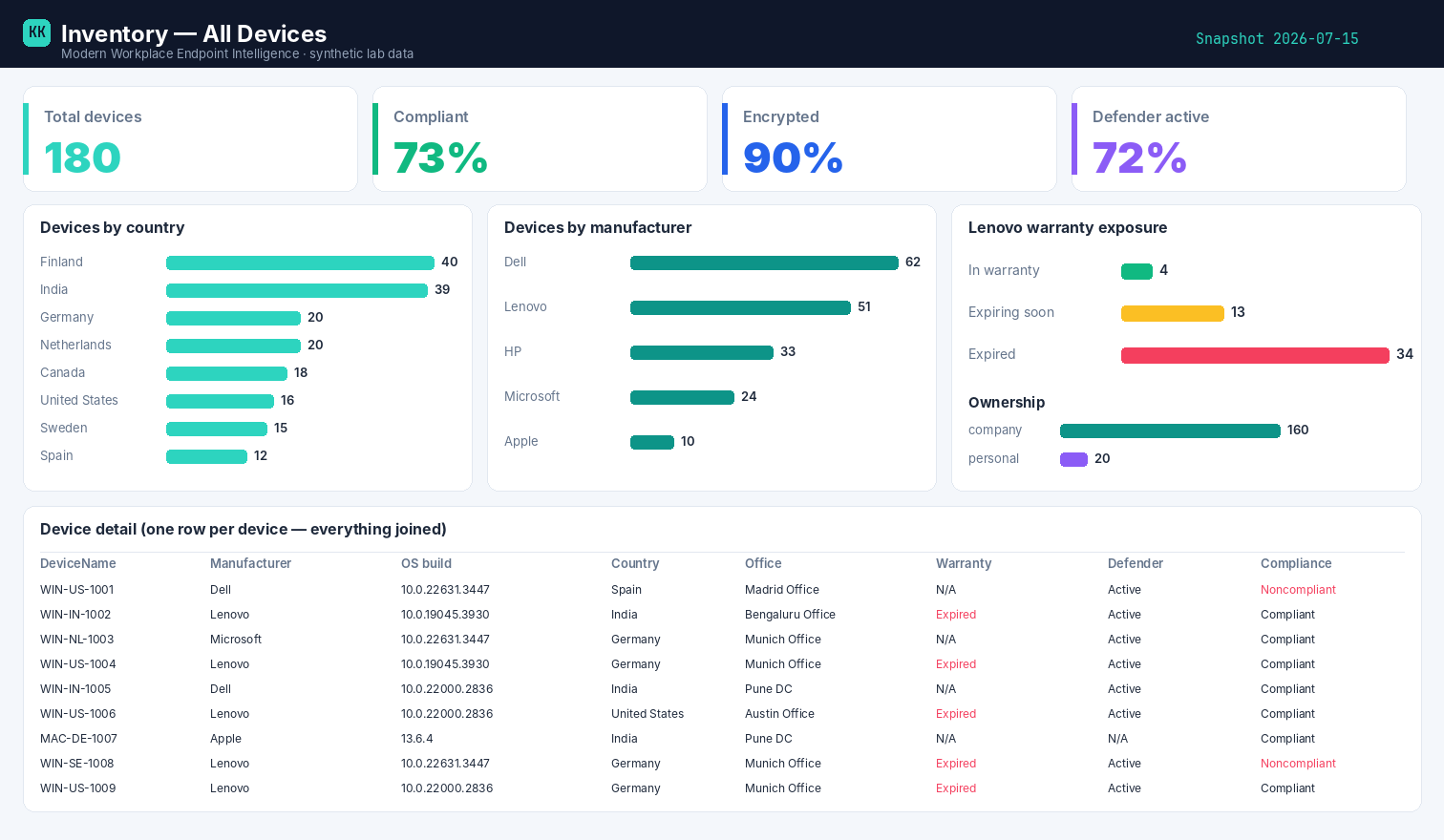
Built on synthetic @contoso.com data. Point the template at your own snapshot to see your fleet.
Related
- Power BI report → Inventory — All Devices report
- Deep-dive teardown → in the Zero-Access Agent project