App Deployment Failures
Every Intune app failure rolled up per app — failed vs targeted, a rate, and a triage category.
Download the script View on GitHub
1 · The script
Read-only by construction — it authenticates with a Managed Identity, calls Microsoft Graph read-only (.Read.All scopes), and writes a sanitized CSV snapshot. Set the CONFIG values at the top, then run.
View the full script (57 KB)
#requires -Version 7.0
<#
.SYNOPSIS
Collect-AppDeploymentFailures.ps1 — app-deployment failure intelligence collector for
the Zero-Access Pattern. Read-only, Managed-Identity. Triages every failure into an
actionable category, owner team, remediation, and a user-facing phrase.
.DESCRIPTION
Aggregate-first, then drill down:
1. Pull the app install-status AGGREGATE to find which apps actually have failures.
2. Drill into the top-N failing apps (by failed-device count) with per-app export jobs.
3. Triage each failing row against an error-code KNOWLEDGE BASE ($map in Get-TriageInfo)
into { category, owner team, escalation tier, remediation steps, what-to-tell-user }.
4. Correlate: repeat-offender devices (a device problem, not an app problem), dominant
error per app, possible regressions, and ticket routing (ServiceDesk vs EUC team).
5. Enrich with Entra location (site-specific failures = network/proxy, not the app).
Writes three CSVs:
root/ App_Deployment_Failures.csv (full, for Power BI)
agent-data/ App_Deployment_Failures_Slim.csv (slim, for the search index)
agent-data/ Triage_Category_Guidance.csv (one row per category — the phrases)
The triage map is the point: it turns hard-won EUC error-code knowledge into data the
agent can read, so answers are specific ("route to L2, dominant error 0x80070643,
enable verbose MSI logging") instead of generic. Extend the map over time — it's a
living knowledge base. Read-only throughout; nothing is written to the tenant.
.NOTES
GENERIC / PARAMETERIZED: no resource group, storage account, or container is hardcoded.
OwnerTeam / routing labels ("EUC-Team", "ServiceDesk") are placeholders — rename them to
your own teams. Run against a personal lab tenant only.
BETA ENDPOINT: uses https://graph.microsoft.com/beta (reports export jobs, managed
devices). Re-verify after Graph updates.
Read-only Graph app roles on the Managed Identity:
DeviceManagementApps.Read.All (app install status + reports)
DeviceManagementManagedDevices.Read.All (device health lookup + reports)
User.Read.All (optional location enrichment)
Plus "Storage Blob Data Contributor" on the storage account (to write the CSVs).
MIT licensed. Microsoft, Intune, Entra, Microsoft Graph and Azure are trademarks of the
Microsoft group of companies. Independent content; not endorsed by Microsoft. The
error-code guidance is a starting point — verify against your own environment.
#>
# ===========================================================================
# CONFIGURE ME -> set these to your own values, then run.
# These three lines are the only thing you MUST change.
# ===========================================================================
$ResourceGroup = "<your-resource-group-name>" # resource group that holds your storage account
$StorageAccount = "<your-storage-account-name>" # storage account name (lowercase, globally unique)
$Container = "<your-container-name>" # blob container, e.g. "intune-report"
# ===========================================================================
# Safety net - stop if the placeholders above weren't replaced.
if ("$ResourceGroup $StorageAccount $Container" -match '<your-') {
throw "Please set ResourceGroup, StorageAccount, and Container at the top of the script before running."
}
#-- Step 1 - Initialize Variables
$ExportLocation = "$env:TEMP"
$ProgressPreference = 'SilentlyContinue'
$VerbosePreference = 'Continue'
$CsvFileName = "App_Deployment_Failures.csv"
# Report behaviour (optional tuning — sensible defaults)
$MaxAppsToAnalyze = 50 # cap on failing apps drilled into per run (by failed device count desc)
$StaleDeviceThresholdDays = 14 # failures on devices not synced within this window -> DeviceHealth
$RepeatOffenderThreshold = 3 # device failing >= N distinct apps -> repeat offender (device-level issue)
$RegressionDeviceMinimum = 10 # PossibleRegression when failed devices >= this AND
$RegressionFailureRatePercent = 20 # failure rate >= this percent
$MultiDeviceRoutingThreshold = 3 # same app failing on >= N devices -> route ticket to EUC-Team
$MaxRetries = 5 # Graph retry attempts on 429/5xx
$SkipUserLocation = $false # $true = skip Entra ID Country/City/Office/Department enrichment
$IncludeAvailableIntent = $false # $true = also report notInstalled rows for 'available' intent (noisy)
# Run context
$ErrorActionPreference = 'Stop'
$script:GraphBase = 'https://graph.microsoft.com/beta'
$script:ThrottleEvents = 0
$script:RunStart = Get-Date
$workPath = $ExportLocation
# ============================================================================
# AUTHENTICATION - MANAGED IDENTITY WITH TOKEN REFRESH
# ============================================================================
function Get-ManagedIdentityToken {
param([string]$Resource = 'https://graph.microsoft.com/')
$url = $env:IDENTITY_ENDPOINT
if (-not $url) {
throw "IDENTITY_ENDPOINT not set. Ensure the Automation Account has a system-assigned Managed Identity enabled."
}
$headers = @{
'X-IDENTITY-HEADER' = $env:IDENTITY_HEADER
'Metadata' = 'True'
}
$response = Invoke-RestMethod -Uri $url -Method POST -Headers $headers `
-ContentType 'application/x-www-form-urlencoded' `
-Body @{ resource = $Resource } -ErrorAction Stop
if (-not $response.access_token) {
throw "Managed Identity token acquisition returned an empty token."
}
return $response.access_token
}
function Initialize-GraphAuth {
$token = Get-ManagedIdentityToken
$script:Headers = @{ Authorization = "Bearer $token"; 'Content-Type' = 'application/json' }
$script:TokenExpiry = (Get-Date).AddMinutes(50) # refresh well before the ~60-75 min lifetime
Write-Verbose "Graph token acquired. Refresh scheduled for $($script:TokenExpiry)."
}
function Get-GraphHeaders {
if ((Get-Date) -ge $script:TokenExpiry) {
Write-Information "Token nearing expiry - refreshing via Managed Identity." -InformationAction Continue
Initialize-GraphAuth
}
return $script:Headers
}
Initialize-GraphAuth
# ============================================================================
# GRAPH REQUEST HELPER - STATUS-CODE-AWARE RETRY + PAGINATION
# ============================================================================
function Invoke-GraphRequest {
<#
GET with paging support, or POST with a body.
Retries on 429/502/503/504 honouring Retry-After. Refreshes token on 401.
#>
param(
[Parameter(Mandatory)]
[string]$Uri,
[ValidateSet('GET', 'POST')]
[string]$Method = 'GET',
[string]$Body = $null,
[switch]$NoPaging
)
$allResults = [System.Collections.Generic.List[object]]::new()
$nextLink = $Uri
$pageCount = 0
do {
$retryCount = 0
$response = $null
while ($null -eq $response) {
try {
if ($pageCount -gt 0) { Start-Sleep -Milliseconds 200 }
$params = @{
Uri = $nextLink
Method = $Method
Headers = (Get-GraphHeaders)
ErrorAction = 'Stop'
}
if ($Method -eq 'POST' -and $Body) { $params['Body'] = $Body }
$response = Invoke-RestMethod @params
if ($null -eq $response) { $response = @{} } # 204-style empty success
}
catch {
$statusCode = 0
try { $statusCode = [int]$_.Exception.Response.StatusCode } catch { }
if ($statusCode -eq 401 -and $retryCount -lt $MaxRetries) {
$retryCount++
Write-Warning "401 received - refreshing token (attempt $retryCount/$MaxRetries)."
Initialize-GraphAuth
continue
}
if ($statusCode -in 429, 502, 503, 504 -and $retryCount -lt $MaxRetries) {
$retryCount++
$script:ThrottleEvents++
$retryAfter = 30
try {
$headerVal = $null
if ($_.Exception.Response.Headers) {
$headerVal = @($_.Exception.Response.Headers.GetValues('Retry-After'))[0]
}
$parsed = 0
if ($headerVal -and [int]::TryParse($headerVal, [ref]$parsed)) {
$retryAfter = [Math]::Min($parsed, 300)
}
}
catch { }
Write-Warning "HTTP $statusCode - retry $retryCount/$MaxRetries in ${retryAfter}s. URI: $nextLink"
Start-Sleep -Seconds $retryAfter
continue
}
throw "Graph request failed [$statusCode] $Method $nextLink :: $($_.Exception.Message)"
}
}
$pageCount++
if ($response.PSObject.Properties['value']) {
foreach ($item in $response.value) { $allResults.Add($item) }
}
else {
$allResults.Add($response)
}
$nextLink = if (-not $NoPaging -and $response.PSObject.Properties['@odata.nextLink']) {
$response.'@odata.nextLink'
} else { $null }
} while ($nextLink)
return $allResults
}
# ============================================================================
# REPORTS EXPORT JOB HELPERS (the scalable pattern for 10k+ devices)
# ============================================================================
function Invoke-IntuneExportJob {
<#
Submits an exportJob, polls to completion, downloads the ZIP,
extracts the CSV and returns parsed rows. Server-side report
generation - no client-side pagination over thousands of rows.
#>
param(
[Parameter(Mandatory)]
[string]$ReportName,
[string]$Filter = $null,
[int]$PollIntervalSeconds = 5,
[int]$TimeoutMinutes = 20
)
$bodyHash = @{ reportName = $ReportName; format = 'csv' }
if ($Filter) { $bodyHash['filter'] = $Filter }
$body = $bodyHash | ConvertTo-Json
Write-Verbose "Submitting export job: $ReportName | filter: $Filter"
$job = (Invoke-GraphRequest -Uri "$script:GraphBase/deviceManagement/reports/exportJobs" `
-Method POST -Body $body -NoPaging)[0]
$deadline = (Get-Date).AddMinutes($TimeoutMinutes)
while ($job.status -in 'notStarted', 'inProgress') {
if ((Get-Date) -gt $deadline) {
throw "Export job '$ReportName' (id: $($job.id)) timed out after $TimeoutMinutes minutes."
}
Start-Sleep -Seconds $PollIntervalSeconds
$job = (Invoke-GraphRequest -Uri "$script:GraphBase/deviceManagement/reports/exportJobs('$($job.id)')" -NoPaging)[0]
}
if ($job.status -ne 'completed') {
throw "Export job '$ReportName' finished with status '$($job.status)'."
}
$zipPath = Join-Path $workPath "$ReportName`_$([guid]::NewGuid().ToString('N').Substring(0,8)).zip"
Invoke-WebRequest -Uri $job.url -OutFile $zipPath -UseBasicParsing | Out-Null
$extractPath = "$zipPath.extracted"
Expand-Archive -Path $zipPath -DestinationPath $extractPath -Force
$csvFile = Get-ChildItem -Path $extractPath -Filter '*.csv' | Select-Object -First 1
if (-not $csvFile) { throw "Export job '$ReportName' ZIP contained no CSV." }
$rows = Import-Csv -Path $csvFile.FullName
# Cleanup to respect the 400 MB sandbox limit
Remove-Item $zipPath, $extractPath -Recurse -Force -ErrorAction SilentlyContinue
return $rows
}
function Get-ColumnValue {
<#
Microsoft has renamed export columns between report schema versions.
Resolve a value by trying candidate column names in order, so a
schema rename degrades gracefully instead of breaking the report.
#>
param(
[Parameter(Mandatory)] [object]$Row,
[Parameter(Mandatory)] [string[]]$Candidates,
[object]$Default = $null
)
foreach ($name in $Candidates) {
$prop = $Row.PSObject.Properties[$name]
if ($prop -and -not [string]::IsNullOrWhiteSpace([string]$prop.Value)) {
return $prop.Value
}
}
return $Default
}
# ============================================================================
# TRIAGE INTELLIGENCE
# ============================================================================
function Convert-ToHexErrorCode {
param([object]$ErrorCode)
if ($null -eq $ErrorCode -or [string]::IsNullOrWhiteSpace([string]$ErrorCode)) { return 'N/A' }
$raw = [string]$ErrorCode
if ($raw -match '^0x[0-9A-Fa-f]+$') { return $raw.ToUpper().Replace('0X', '0x') }
$decimal = 0L
if ([long]::TryParse($raw, [ref]$decimal)) {
if ($decimal -eq 0) { return 'N/A' }
return '0x{0:X8}' -f [uint32]($decimal -band 0xFFFFFFFF)
}
return $raw
}
function Get-TriageInfo {
<#
Returns category, owner team, escalation tier, remediation steps and a
scripted phrase for the agent. Extend the $map with tenant-specific
learnings over time - this hashtable is the team's living knowledge base.
Codes below are documented Intune/Win32 deployment errors.
Handles Graph export column values:
- InstallState passed as the _loc (human-readable) value e.g. 'Failed'
- HexCode sourced from HexErrorCode column directly
- StateDetail sourced from AppInstallStateDetails_loc column
#>
param(
[string]$HexCode,
[string]$InstallState,
[string]$StateDetail,
[bool]$DeviceIsStale
)
# Stale device trumps everything - it is a device problem, not an app problem.
if ($DeviceIsStale) {
return [PSCustomObject]@{
TriageCategory = 'DeviceHealth'
OwnerTeam = 'ServiceDesk'
EscalationTier = 'L1'
Remediation = 'Device has not synced within threshold. 1. Confirm device is powered on and network-connected; 2. Trigger sync from Company Portal or Intune portal; 3. If unreachable, follow stale device runbook (retire/re-enrol).'
WhatToTellUser = 'Your device has not checked in with our management system recently. Please connect it to the internet and restart it; the app will install automatically once it reconnects.'
}
}
$map = @{
# ── DETECTION ────────────────────────────────────────────────────────
'0x87D1041C' = @{ Cat = 'DetectionRule'; Team = 'EUC-Team'; Tier = 'L2'
Fix = 'App installed but detection rule did not confirm it. Review detection logic (file path/version, registry, MSI product code) against what the installer actually lays down. Most common after vendor changes install path or version format.'
Tell = 'The app may already be installed correctly - we are fixing a verification rule on our side. No action needed from you yet.' }
'0x87D00324' = @{ Cat = 'DetectionRule'; Team = 'EUC-Team'; Tier = 'L2'
Fix = 'App not detected after installation completed. Installer may have exited 0 but detection rule does not match footprint. Verify detection method against actual install output; check if install ran in wrong context (system vs user).'
Tell = 'The app installed but our system cannot confirm it yet. Please leave the device on; we are reviewing the configuration.' }
'0x87D00325' = @{ Cat = 'DetectionRule'; Team = 'EUC-Team'; Tier = 'L2'
Fix = 'App still detected after uninstall completed. Uninstall command did not fully remove the app footprint or detection rule is too broad. Review uninstall command and detection logic.'
Tell = 'There is a configuration issue on our side with removing this app. No action needed from you.' }
# ── PERMISSIONS ──────────────────────────────────────────────────────
'0x80070005' = @{ Cat = 'Permissions'; Team = 'EUC-Team'; Tier = 'L2'
Fix = 'Access denied during install. 1. Confirm install context (system vs user) matches the package design; 2. Check AppLocker/WDAC and AV tamper protection; 3. Review local rights if user-context install.'
Tell = 'The installation was blocked by a permissions setting. Our technical team is reviewing it; no action needed from you.' }
# ── PACKAGING ERRORS ─────────────────────────────────────────────────
'0x80070002' = @{ Cat = 'PackagingError'; Team = 'EUC-Team'; Tier = 'L2'
Fix = 'File not found. Install command references a file missing from the .intunewin package or wrong working directory. Repackage and verify the setup file path in the install command.'
Tell = 'There is an issue with the installation package itself. The packaging team has been notified.' }
'0x80073CFF' = @{ Cat = 'PackagingError'; Team = 'EUC-Team'; Tier = 'L2'
Fix = 'MSIX/APPX sideloading or signature trust issue. Verify package signature chain and that the signing cert is trusted on devices.'
Tell = 'There is a trust configuration issue with this app package. The packaging team is on it.' }
'0x80073CF3' = @{ Cat = 'PackagingError'; Team = 'EUC-Team'; Tier = 'L2'
Fix = 'Package failed dependency, update or conflict validation. 1. Verify all dependency apps are assigned and install successfully; 2. Check for circular dependency chains; 3. Review supersedence configuration.'
Tell = 'This app needs another component installed first; we are resolving the dependency chain on our side.' }
'0x80091007' = @{ Cat = 'PackagingError'; Team = 'EUC-Team'; Tier = 'L2'
Fix = 'Hash mismatch - content integrity check failed. The downloaded package does not match the expected hash. Re-upload the .intunewin to Intune to regenerate the content; check for corrupted source files.'
Tell = 'The installation package appears to be corrupted. The packaging team has been notified and will re-publish it.' }
'1619' = @{ Cat = 'PackagingError'; Team = 'EUC-Team'; Tier = 'L2'
Fix = 'MSI package could not be opened. The .msi file inside the .intunewin is missing, corrupt, or the install command path is wrong. Repackage and verify the install command references the correct filename.'
Tell = 'There is an issue with the installation package. The packaging team has been notified.' }
'1625' = @{ Cat = 'PackagingError'; Team = 'EUC-Team'; Tier = 'L2'
Fix = 'Installation forbidden by system policy. AppLocker, WDAC, or a software restriction policy is blocking the installer. Review policy rules against the installer path/signature.'
Tell = 'The installation was blocked by a security policy. Our technical team is reviewing it.' }
'1624' = @{ Cat = 'PackagingError'; Team = 'EUC-Team'; Tier = 'L2'
Fix = 'Error applying MSI transform (.mst). The transform file is missing from the package or incompatible with this MSI version. Repackage without the transform or update it to match the MSI version.'
Tell = 'There is a configuration issue with the installation package. The packaging team has been notified.' }
# ── FATAL MSI ERRORS ─────────────────────────────────────────────────
'0x80070643' = @{ Cat = 'FatalInstallError'; Team = 'EUC-Team'; Tier = 'L2'
Fix = 'Fatal error during installation (ERROR_INSTALL_FAILURE / 0x80070643). Most common MSI failure. 1. Pull AppWorkload.log and enable verbose MSI logging (/l*v %TEMP%\install.log) to get the actual failure line; 2. Check for AV interference during install; 3. Check for a prior partial install leaving the product in a broken state (run msiexec /x first); 4. Verify installer runs silently with no UI prompts.'
Tell = 'The installation hit a critical error. Please keep your device on and connected; our team is investigating.' }
'1603' = @{ Cat = 'FatalInstallError'; Team = 'EUC-Team'; Tier = 'L2'
Fix = 'Fatal error during installation (MSI exit code 1603). Functionally identical to 0x80070643. 1. Enable verbose MSI logging in the install command (/l*v); 2. Check AppWorkload.log for the actual failure; 3. Common causes: AV blocking, locked files, prior partial install, missing prerequisites.'
Tell = 'The installation hit a critical error. Please keep your device on and connected; our team is investigating.' }
# ── CONFLICTING INSTALLS ──────────────────────────────────────────────
'0x80070652' = @{ Cat = 'ConflictingInstall'; Team = 'ServiceDesk'; Tier = 'L1'
Fix = 'Another installation is already in progress. Windows Installer mutex is locked. 1. Ask user to reboot and retry sync; 2. If recurring, check for stuck msiexec.exe process or overlapping Intune deployments targeting the same device.'
Tell = 'Another software installation is running on your device. Please restart your device and the installation will retry automatically.' }
'1618' = @{ Cat = 'ConflictingInstall'; Team = 'ServiceDesk'; Tier = 'L1'
Fix = 'Another installation is already in progress (MSI exit code 1618). Same as 0x80070652. Ask user to reboot; check for stuck msiexec process.'
Tell = 'Another software installation is running on your device. Please restart your device and the installation will retry automatically.' }
'1638' = @{ Cat = 'ConflictingInstall'; Team = 'EUC-Team'; Tier = 'L2'
Fix = 'Another version of this product is already installed (exit code 1638). The MSI ProductCode or UpgradeCode conflict is blocking installation. 1. Check if a different version is installed; 2. Add an uninstall command or use supersedence in Intune; 3. Verify the upgrade table in the MSI.'
Tell = 'A different version of this app is already on your device and is preventing the update. Our team is resolving this.' }
# ── USER ACTION / INTERACTION ─────────────────────────────────────────
'0x80073D02' = @{ Cat = 'UserActionRequired'; Team = 'ServiceDesk'; Tier = 'L1'
Fix = 'Package resources in use - the app (or a process it depends on) is open. Ask the user to close the application and retry sync.'
Tell = 'Please close the application (and any related windows), then we can retry the update. Saving your work first.' }
'1602' = @{ Cat = 'UserActionRequired'; Team = 'ServiceDesk'; Tier = 'L1'
Fix = 'User canceled the installation (exit code 1602). This should only occur for user-context installs with UI. Switch to system context install or ensure the install is fully silent (/quiet /norestart).'
Tell = 'The installation was canceled. Please contact the Service Desk if you need this app installed.' }
'0x87D300CD' = @{ Cat = 'UserActionRequired'; Team = 'ServiceDesk'; Tier = 'L1'
Fix = 'User logged off while the app install was being processed. Install should retry on next sync when user is logged on. If recurring, switch to system context install which does not require user session.'
Tell = 'The installation was interrupted because you logged off. Please stay logged in and the installation will retry automatically.' }
# ── REBOOT REQUIRED ───────────────────────────────────────────────────
'0x80070BC2' = @{ Cat = 'RebootRequired'; Team = 'ServiceDesk'; Tier = 'L1'
Fix = 'Reboot required to complete installation. Device has a pending reboot from a prior install or Windows Update. 1. Ask user to restart the device; 2. If recurring across many devices, review reboot settings in the Intune app assignment.'
Tell = 'Your device needs a restart to complete the installation. Please save your work and restart your device.' }
'3010' = @{ Cat = 'RebootRequired'; Team = 'ServiceDesk'; Tier = 'L1'
Fix = 'Installation succeeded but a reboot is required (MSI exit code 3010). This is a soft success. Configure the Intune app to handle reboot behavior, or ask the user to restart.'
Tell = 'The app installed successfully but your device needs a restart to finish. Please save your work and restart.' }
# ── CONTENT / NETWORK ─────────────────────────────────────────────────
'0x800705B4' = @{ Cat = 'ContentNetwork'; Team = 'EUC-Team'; Tier = 'L2'
Fix = 'Timeout. Install exceeded the execution window. 1. Check if installer waits for user input (must be fully silent); 2. Verify download completed (large apps over VPN/slow links); 3. Consider Delivery Optimization or content pre-staging for large packages.'
Tell = 'The installation timed out, often due to a slow connection. Please connect to a faster network (office or home Wi-Fi, not mobile hotspot) and we will retry automatically.' }
'0x87D00607' = @{ Cat = 'ContentNetwork'; Team = 'EUC-Team'; Tier = 'L2'
Fix = 'Content not found. The app content could not be downloaded from Intune CDN. 1. Verify proxy/firewall allows *.delivery.mp.microsoft.com and *.manage.microsoft.com; 2. Re-upload the app content in Intune if the CDN link has expired; 3. Check Delivery Optimization configuration.'
Tell = 'The app could not be downloaded to your device. Please try connecting to a different network (e.g., office Wi-Fi) while we investigate.' }
'0x87D30068' = @{ Cat = 'ContentNetwork'; Team = 'EUC-Team'; Tier = 'L2'
Fix = 'Content download from CDN timed out. Large package or slow/restricted network. 1. Check network bandwidth at the device site; 2. Review Delivery Optimization config; 3. Consider splitting large packages.'
Tell = 'The app download timed out due to a slow connection. Please connect to a faster network and the download will retry.' }
'0x87D3006A' = @{ Cat = 'ContentNetwork'; Team = 'EUC-Team'; Tier = 'L2'
Fix = 'Disk space exhausted during content download. Free up space on the device before retrying. Check C: drive free space, OneDrive cache, user profile size.'
Tell = 'Your device ran out of disk space while downloading the app. Please free up space (empty Recycle Bin, clear Downloads) and restart.' }
# ── STORAGE ───────────────────────────────────────────────────────────
'0x87D13B10' = @{ Cat = 'Storage'; Team = 'ServiceDesk'; Tier = 'L1'
Fix = 'Insufficient disk space. Guide user through Storage Sense / disk cleanup; check for bloated user profiles or OneDrive cache; retry sync.'
Tell = 'Your device is low on disk space, which blocked the installation. Please free up at least 5 GB (empty Recycle Bin, clear Downloads) and the install will retry.' }
'0x87D01201' = @{ Cat = 'Storage'; Team = 'ServiceDesk'; Tier = 'L1'
Fix = 'Not enough cache space for content download. Free disk space on device and retry.'
Tell = 'Your device is low on disk space. Please free up at least 5 GB and the installation will retry.' }
# ── REMEDIATION ───────────────────────────────────────────────────────
'0x87D1FDE8' = @{ Cat = 'RemediationFailed'; Team = 'EUC-Team'; Tier = 'L2'
Fix = 'Remediation script failed. 1. Check the remediation script for errors; 2. Verify the script runs successfully in the correct execution context (system/user); 3. Review Remediations output in Intune portal for the specific error detail.'
Tell = 'An automated fix script failed on your device. Our team is investigating; no action needed from you.' }
# ── UNKNOWN / GENERIC ─────────────────────────────────────────────────
'0x80004005' = @{ Cat = 'Unknown'; Team = 'EUC-Team'; Tier = 'L2'
Fix = 'Unspecified error. Collect AppWorkload.log and the vendor installer log (always configure verbose MSI logging in the install command: /l*v). Frequently caused by AV interference or a prior partial install.'
Tell = 'The installation hit a general error. Please leave the device on and connected; we are investigating.' }
'1605' = @{ Cat = 'Unknown'; Team = 'EUC-Team'; Tier = 'L2'
Fix = 'This action is only valid for products that are currently installed (exit code 1605). The uninstall or repair command was sent but the product is not installed. Verify detection rules and assignment; check if a prior uninstall already removed it.'
Tell = 'There is a mismatch between what is on your device and what our system expects. Our team is reviewing it.' }
'0xC0000142' = @{ Cat = 'Unknown'; Team = 'EUC-Team'; Tier = 'L2'
Fix = 'DLL initialization failed - process terminated abnormally (STATUS_DLL_INIT_FAILED). A required DLL could not be loaded during install. Check for missing Visual C++ Redistributables, .NET Framework, or conflicting DLL versions. Pull AppWorkload.log for the specific DLL name.'
Tell = 'The installation failed due to a missing system component. Our technical team is investigating.' }
}
if ($map.ContainsKey($HexCode)) {
$m = $map[$HexCode]
return [PSCustomObject]@{
TriageCategory = $m.Cat
OwnerTeam = $m.Team
EscalationTier = $m.Tier
Remediation = $m.Fix
WhatToTellUser = $m.Tell
}
}
# State-detail driven fallbacks (more reliable than unknown error codes)
$detail = [string]$StateDetail
if ($detail -match 'dependency|depend') {
return [PSCustomObject]@{
TriageCategory = 'PackagingError'; OwnerTeam = 'EUC-Team'; EscalationTier = 'L2'
Remediation = "Dependency failure ($detail). Verify the dependency app is assigned to the same group, installs successfully on its own, and the dependency chain has no circular references."
WhatToTellUser = 'This app needs another component installed first; we are resolving the chain on our side.'
}
}
if ($detail -match 'download|content|cdn|timed out') {
return [PSCustomObject]@{
TriageCategory = 'ContentNetwork'; OwnerTeam = 'EUC-Team'; EscalationTier = 'L2'
Remediation = "Content download issue ($detail). 1. Verify proxy/firewall allows Intune CDN endpoints (*.delivery.mp.microsoft.com, *.manage.microsoft.com); 2. Check if pattern correlates with a site/subnet; 3. Review Delivery Optimization config."
WhatToTellUser = 'The app download is being blocked or slowed on the network. Please try from a different network if possible while we investigate.'
}
}
if ($detail -match 'detect') {
return [PSCustomObject]@{
TriageCategory = 'DetectionRule'; OwnerTeam = 'EUC-Team'; EscalationTier = 'L2'
Remediation = "Detection issue ($detail). Validate detection rules against the actual install footprint on an affected device."
WhatToTellUser = 'The app may already be installed - we are correcting a verification rule.'
}
}
if ($detail -match 'fatal|failure|error') {
return [PSCustomObject]@{
TriageCategory = 'FatalInstallError'; OwnerTeam = 'EUC-Team'; EscalationTier = 'L2'
Remediation = "Fatal install error ($detail). 1. Pull AppWorkload.log; 2. Enable verbose MSI logging (/l*v); 3. Check for AV interference or prior partial install; 4. Review installer for silent install compliance."
WhatToTellUser = 'The installation hit a critical error. Please keep your device on and connected; our team is investigating.'
}
}
if ($detail -match 'reboot|restart') {
return [PSCustomObject]@{
TriageCategory = 'RebootRequired'; OwnerTeam = 'ServiceDesk'; EscalationTier = 'L1'
Remediation = "Reboot pending ($detail). Ask user to restart the device; installation will retry on next sync."
WhatToTellUser = 'Your device needs a restart. Please save your work and restart your device.'
}
}
if ($detail -match 'disk|space|storage') {
return [PSCustomObject]@{
TriageCategory = 'Storage'; OwnerTeam = 'ServiceDesk'; EscalationTier = 'L1'
Remediation = "Disk space issue ($detail). Ask user to free up disk space (Storage Sense, Recycle Bin, clear Downloads) and retry sync."
WhatToTellUser = 'Your device is low on disk space. Please free up at least 5 GB and the installation will retry.'
}
}
# Final fallback based on install state
$stateLower = $InstallState.ToLower()
switch -Regex ($stateLower) {
'fail' {
return [PSCustomObject]@{
TriageCategory = 'Unknown'; OwnerTeam = 'EUC-Team'; EscalationTier = 'L2'
Remediation = '1. Pull AppWorkload.log from the device; 2. Verify assignment and filters; 3. Check compliance state; 4. Retry via device sync; 5. Escalate with logs if reproducible.'
WhatToTellUser = 'The installation failed and our team is investigating. Please keep the device on and connected.'
}
}
'notinstalled|not installed' {
return [PSCustomObject]@{
TriageCategory = 'DeviceHealth'; OwnerTeam = 'ServiceDesk'; EscalationTier = 'L1'
Remediation = 'App assigned but no install attempt registered. 1. Confirm device sync is current; 2. Verify Intune Management Extension service is running (Win32 apps); 3. Check assignment filters include this device.'
WhatToTellUser = 'The installation has not started yet on your device. Please restart it while connected to the internet.'
}
}
default {
return [PSCustomObject]@{
TriageCategory = 'Unknown'; OwnerTeam = 'EUC-Team'; EscalationTier = 'L2'
Remediation = 'Review device logs and app assignment status; extend the triage map with findings so the next occurrence auto-classifies.'
WhatToTellUser = 'We are looking into an installation issue on your device. No action needed right now.'
}
}
}
}
function Get-ClientLogPath {
param([string]$Platform)
switch -Regex ([string]$Platform) {
'Windows' { return '%ProgramData%\Microsoft\IntuneManagementExtension\Logs\AppWorkload.log (Win32) + AgentExecutor.log; Event Viewer > DeviceManagement-Enterprise-Diagnostics-Provider' }
'macOS' { return '/Library/Logs/Microsoft/Intune/IntuneMDMDaemon*.log' }
'iOS' { return 'Company Portal app > Settings > Send Logs (or Settings > Privacy > Analytics)' }
'Android' { return 'Company Portal app > Menu > Settings > Diagnostic Data > Send Logs' }
default { return 'Collect Intune diagnostics via portal: Devices > [device] > Collect diagnostics' }
}
}
function Get-UserLocationLookup {
<#
Resolves Country / City / OfficeLocation / Department from Entra ID for
the distinct UPNs in the failure report, using Graph $batch (20 per call).
Lets EUC spot site-specific patterns (one country failing = network/proxy
at that site, not an app problem). Requires User.Read.All on the MI -
degrades gracefully to N/A columns with a warning if not granted.
#>
param([string[]]$UserPrincipalNames)
$lookup = @{}
$upns = @($UserPrincipalNames | Where-Object { $_ -and $_ -ne 'N/A' } | Select-Object -Unique)
if ($upns.Count -eq 0) { return $lookup }
Write-Information "Resolving location for $($upns.Count) unique users via Graph `$batch..." -InformationAction Continue
try {
for ($i = 0; $i -lt $upns.Count; $i += 20) {
$chunk = $upns[$i..([Math]::Min($i + 19, $upns.Count - 1))]
$requests = @()
$id = 0
foreach ($upn in $chunk) {
$id++
$requests += @{
id = "$id"
method = 'GET'
url = "/users/$([uri]::EscapeDataString($upn))?`$select=userPrincipalName,country,city,officeLocation,department"
}
}
$body = @{ requests = $requests } | ConvertTo-Json -Depth 5
$batchResult = (Invoke-GraphRequest -Uri "$script:GraphBase/`$batch" -Method POST -Body $body -NoPaging)[0]
foreach ($resp in $batchResult.responses) {
if ($resp.status -eq 200 -and $resp.body.userPrincipalName) {
$lookup[$resp.body.userPrincipalName.ToLower()] = [PSCustomObject]@{
Country = if ($resp.body.country) { $resp.body.country } else { 'N/A' }
City = if ($resp.body.city) { $resp.body.city } else { 'N/A' }
OfficeLocation = if ($resp.body.officeLocation) { $resp.body.officeLocation } else { 'N/A' }
Department = if ($resp.body.department) { $resp.body.department } else { 'N/A' }
}
}
}
if ($upns.Count -gt 20) { Start-Sleep -Milliseconds 200 }
}
Write-Information "User location resolved for $($lookup.Count)/$($upns.Count) users." -InformationAction Continue
}
catch {
Write-Warning "User location lookup failed (User.Read.All permission likely missing on the Managed Identity). Location columns will be N/A. Detail: $($_.Exception.Message)"
}
return $lookup
}
function Get-SafeDateTime {
param([object]$Value)
if ([string]::IsNullOrWhiteSpace([string]$Value)) { return $null }
try { return [datetime]::Parse([string]$Value) } catch { return $null }
}
# ============================================================================
# MAIN
# ============================================================================
try {
Write-Information "=== Intune App Deployment Failure Intelligence ===" -InformationAction Continue
Write-Information "Run started: $script:RunStart | MaxApps: $MaxAppsToAnalyze | StaleThreshold: ${StaleDeviceThresholdDays}d" -InformationAction Continue
# ------------------------------------------------------------------
# STEP 1 - Aggregate first: which apps actually have failures?
# ------------------------------------------------------------------
Write-Information "[1/5] Pulling app install status aggregate (export job)..." -InformationAction Continue
$aggregate = Invoke-IntuneExportJob -ReportName 'AppInstallStatusAggregate'
$failingApps = foreach ($row in $aggregate) {
$failedCount = [int](Get-ColumnValue -Row $row -Candidates @('FailedDeviceCount', 'NumberOfDevicesFailed', 'FailedDevicePercentage') -Default 0)
$installed = [int](Get-ColumnValue -Row $row -Candidates @('InstalledDeviceCount', 'NumberOfDevicesInstalled') -Default 0)
$notInst = [int](Get-ColumnValue -Row $row -Candidates @('NotInstalledDeviceCount', 'NumberOfDevicesNotInstalled') -Default 0)
$pending = [int](Get-ColumnValue -Row $row -Candidates @('PendingInstallDeviceCount', 'NumberOfDevicesPendingInstall') -Default 0)
if ($failedCount -gt 0) {
$totalTargeted = $failedCount + $installed + $notInst + $pending
[PSCustomObject]@{
ApplicationId = Get-ColumnValue -Row $row -Candidates @('ApplicationId', 'AppId')
DisplayName = Get-ColumnValue -Row $row -Candidates @('DisplayName', 'ApplicationName', 'AppName') -Default 'Unknown'
Publisher = Get-ColumnValue -Row $row -Candidates @('Publisher', 'AppPublisher') -Default 'Unknown'
Platform = Get-ColumnValue -Row $row -Candidates @('Platform', 'AppPlatform') -Default 'Unknown'
AppVersion = Get-ColumnValue -Row $row -Candidates @('AppVersion', 'Version') -Default 'N/A'
FailedDevices = $failedCount
InstalledDevices = $installed
TotalTargeted = $totalTargeted
FailureRatePct = if ($totalTargeted -gt 0) { [math]::Round(($failedCount / $totalTargeted) * 100, 1) } else { 0 }
}
}
}
$failingApps = @($failingApps | Where-Object { $_.ApplicationId } | Sort-Object FailedDevices -Descending)
Write-Information "Apps with failures: $($failingApps.Count) (analysing top $([Math]::Min($failingApps.Count, $MaxAppsToAnalyze)))" -InformationAction Continue
$appsToAnalyze = @($failingApps | Select-Object -First $MaxAppsToAnalyze)
# ------------------------------------------------------------------
# STEP 2 - Device health context (sync recency for triage)
# ------------------------------------------------------------------
Write-Information "[2/5] Building device health lookup..." -InformationAction Continue
$devicesUri = "$script:GraphBase/deviceManagement/managedDevices?`$select=id,deviceName,lastSyncDateTime,complianceState,osVersion,deviceEnrollmentType&`$top=1000"
$devices = Invoke-GraphRequest -Uri $devicesUri
$deviceLookup = @{}
foreach ($d in $devices) { $deviceLookup[$d.id] = $d }
Write-Information "Device lookup built: $($deviceLookup.Count) managed devices." -InformationAction Continue
$staleCutoff = (Get-Date).AddDays(-$StaleDeviceThresholdDays)
# ------------------------------------------------------------------
# STEP 3 - Device-level detail, only for failing apps (export jobs)
# ------------------------------------------------------------------
Write-Information "[3/5] Pulling device-level failure detail for $($appsToAnalyze.Count) apps..." -InformationAction Continue
$detailReport = [System.Collections.Generic.List[object]]::new()
$appIndex = 0
foreach ($app in $appsToAnalyze) {
$appIndex++
Write-Information " [$appIndex/$($appsToAnalyze.Count)] $($app.DisplayName) ($($app.FailedDevices) failed devices)" -InformationAction Continue
$rows = $null
try {
$rows = Invoke-IntuneExportJob -ReportName 'DeviceInstallStatusByApp' `
-Filter "(ApplicationId eq '$($app.ApplicationId)')"
}
catch {
Write-Warning " Skipping app '$($app.DisplayName)': $($_.Exception.Message)"
continue
}
foreach ($row in $rows) {
# Use _loc (human-readable) column first, fall back to numeric InstallState.
# AppInstallState_loc values: 'Installed', 'Failed', 'Not installed', 'Pending install' etc.
# Numeric InstallState: 1=Installed, 2=Failed, 7=NotInstalled
$installStateLoc = [string](Get-ColumnValue -Row $row -Candidates @('AppInstallState_loc', 'AppInstallState') -Default '')
$installStateCode = [string](Get-ColumnValue -Row $row -Candidates @('InstallState') -Default '')
$installState = if ($installStateLoc) { $installStateLoc } else { $installStateCode }
# Failure scope: failed always; notInstalled only for required intent unless overridden
$isFailure = $installStateLoc -match 'fail' -or $installStateCode -eq '2'
$isNotInstalled = $installStateLoc -match 'not installed|notinstalled' -or $installStateCode -eq '7'
if (-not $isFailure -and -not $isNotInstalled) { continue }
if ($isNotInstalled -and -not $IncludeAvailableIntent) {
$intent = [string](Get-ColumnValue -Row $row -Candidates @('AssignmentIntent', 'Intent') -Default '')
if ($intent -match 'available') { continue }
}
$deviceId = [string](Get-ColumnValue -Row $row -Candidates @('DeviceId', 'IntuneDeviceId'))
$device = if ($deviceId -and $deviceLookup.ContainsKey($deviceId)) { $deviceLookup[$deviceId] } else { $null }
$lastSync = if ($device) { Get-SafeDateTime $device.lastSyncDateTime }
else { Get-SafeDateTime (Get-ColumnValue -Row $row -Candidates @('LastModifiedDateTime', 'LastSyncDateTime')) }
$isStale = ($null -ne $lastSync) -and ($lastSync -lt $staleCutoff)
$daysSinceSync = if ($lastSync) { [math]::Round(((Get-Date) - $lastSync).TotalDays, 1) } else { $null }
# HexErrorCode column is already hex - use it directly
$rawError = Get-ColumnValue -Row $row -Candidates @('HexErrorCode', 'ErrorCode', 'AppInstallErrorCode')
$hexCode = Convert-ToHexErrorCode -ErrorCode $rawError
# Use _loc (human-readable) state detail column
$stateDetail = [string](Get-ColumnValue -Row $row -Candidates @('AppInstallStateDetails_loc', 'AppInstallStateDetails', 'InstallStateDetail', 'AppInstallStateDetail') -Default '')
$platform = [string](Get-ColumnValue -Row $row -Candidates @('Platform', 'OSDescription') -Default $app.Platform)
$triage = Get-TriageInfo -HexCode $hexCode -InstallState $installState `
-StateDetail $stateDetail -DeviceIsStale $isStale
$detailReport.Add([PSCustomObject]@{
DeviceName = Get-ColumnValue -Row $row -Candidates @('DeviceName') -Default 'Unknown'
UserPrincipalName = Get-ColumnValue -Row $row -Candidates @('UserPrincipalName', 'UPN', 'UserName') -Default 'N/A'
AppName = $app.DisplayName
AppPublisher = $app.Publisher
AppVersion = Get-ColumnValue -Row $row -Candidates @('AppVersion', 'DisplayVersion') -Default $app.AppVersion
Platform = $platform
InstallState = $installState
InstallStateDetail = if ($stateDetail) { $stateDetail } else { 'N/A' }
ErrorCodeDecimal = if ($rawError) { $rawError } else { 'N/A' }
ErrorCodeHex = $hexCode
TriageCategory = $triage.TriageCategory
OwnerTeam = $triage.OwnerTeam
EscalationTier = $triage.EscalationTier
RemediationSteps = $triage.Remediation
WhatToTellUser = $triage.WhatToTellUser
LogPath = Get-ClientLogPath -Platform $platform
DeviceHealthFlag = if ($isStale) { 'STALE-SYNC' } else { 'OK' }
DaysSinceLastSync = $daysSinceSync
ComplianceState = if ($device) { $device.complianceState } else { 'Unknown' }
OSVersion = if ($device) { $device.osVersion } else { 'N/A' }
RepeatOffender = 'No' # populated in correlation pass
FailingAppsOnDevice = 1 # populated in correlation pass
TicketRouting = 'ServiceDesk' # populated in correlation pass
EUCLogsNeeded = 'N/A' # populated in correlation pass
Country = 'N/A' # populated from Entra ID
City = 'N/A'
OfficeLocation = 'N/A'
Department = 'N/A'
AppFailedDevices = $app.FailedDevices
AppTotalTargeted = $app.TotalTargeted
AppFailureRatePct = $app.FailureRatePct
AppDominantErrorHex = 'N/A' # populated in correlation pass
PossibleRegression = 'No' # populated in correlation pass
LastModified = Get-ColumnValue -Row $row -Candidates @('LastModifiedDateTime') -Default 'N/A'
DeviceId = $deviceId
AppId = $app.ApplicationId
})
}
}
Write-Information "Detail rows collected: $($detailReport.Count)" -InformationAction Continue
# ------------------------------------------------------------------
# STEP 4 - Correlation pass: stamp flags onto rows (single-CSV design)
# ------------------------------------------------------------------
Write-Information "[4/5] Running correlation analysis..." -InformationAction Continue
# Repeat offender devices: failing >= threshold distinct apps -> device problem
$deviceAppCounts = @{}
foreach ($g in ($detailReport | Where-Object { $_.DeviceName -ne 'Unknown' } | Group-Object DeviceName)) {
$deviceAppCounts[$g.Name] = @($g.Group | Select-Object -ExpandProperty AppName -Unique).Count
}
foreach ($entry in $detailReport) {
if ($deviceAppCounts.ContainsKey($entry.DeviceName)) {
$entry.FailingAppsOnDevice = $deviceAppCounts[$entry.DeviceName]
if ($entry.FailingAppsOnDevice -ge $RepeatOffenderThreshold) {
$entry.RepeatOffender = 'Yes'
if ($entry.TriageCategory -ne 'DeviceHealth') {
$entry.RemediationSteps = "DEVICE-LEVEL ISSUE LIKELY (fails $($entry.FailingAppsOnDevice) apps): prioritise device remediation - check IME service health, disk, AV, certificates; consider Fresh Start or re-enrolment. Original guidance: " + $entry.RemediationSteps
}
}
}
}
# App-level pattern flags: dominant error + regression + ticket routing
foreach ($app in $appsToAnalyze) {
$appRows = @($detailReport | Where-Object { $_.AppId -eq $app.ApplicationId })
if ($appRows.Count -eq 0) { continue }
$topError = $appRows | Where-Object { $_.ErrorCodeHex -ne 'N/A' } |
Group-Object ErrorCodeHex | Sort-Object Count -Descending | Select-Object -First 1
$dominantHex = if ($topError) { $topError.Name } else { 'N/A' }
$isRegression = ($app.FailedDevices -ge $RegressionDeviceMinimum) -and
($app.FailureRatePct -ge $RegressionFailureRatePercent)
$distinctDevices = @($appRows | Select-Object -ExpandProperty DeviceName -Unique).Count
$isMultiDevice = $distinctDevices -ge $MultiDeviceRoutingThreshold
$platform = [string]$appRows[0].Platform
$eucLogs = if ($platform -match 'Windows') {
"EUC: Collect Intune diagnostics from 2-3 affected devices (Intune portal > Devices > [device] > Collect diagnostics). Primary: AppWorkload.log + IntuneManagementExtension.log (%ProgramData%\Microsoft\IntuneManagementExtension\Logs). Compare ErrorCodeHex across devices (dominant: $dominantHex on $distinctDevices devices). Check: recent package/version change, supersedence chain, assignment/filter changes, and Country/OfficeLocation pattern (site-specific = network/proxy, not app)."
}
elseif ($platform -match 'macOS') {
"EUC: Collect /Library/Logs/Microsoft/Intune/IntuneMDMDaemon*.log from 2-3 affected devices. Compare error pattern across devices (dominant: $dominantHex). Check recent PKG/script change and site pattern via Country/OfficeLocation."
}
else {
"EUC: Collect Company Portal logs (Send Logs) from 2-3 affected devices. Compare pattern (dominant error: $dominantHex). Check VPP token / app store availability / assignment changes; correlate Country/OfficeLocation for site patterns."
}
foreach ($entry in $appRows) {
$entry.AppDominantErrorHex = $dominantHex
$entry.PossibleRegression = if ($isRegression) { 'YES - INVESTIGATE' } else { 'No' }
if ($isMultiDevice) {
$entry.TicketRouting = "EUC-Team (app fails on $distinctDevices devices)"
$entry.EUCLogsNeeded = $eucLogs
}
else {
$entry.TicketRouting = 'ServiceDesk (single/few devices - self-fix using LogPath + RemediationSteps)'
$entry.EUCLogsNeeded = 'N/A - Service Desk handles using LogPath column'
}
}
}
# Entra ID location enrichment (Country/City/Office/Department per user)
if (-not $SkipUserLocation) {
$userLookup = Get-UserLocationLookup -UserPrincipalNames @($detailReport | Select-Object -ExpandProperty UserPrincipalName -Unique)
foreach ($entry in $detailReport) {
$key = ([string]$entry.UserPrincipalName).ToLower()
if ($userLookup.ContainsKey($key)) {
$loc = $userLookup[$key]
$entry.Country = $loc.Country
$entry.City = $loc.City
$entry.OfficeLocation = $loc.OfficeLocation
$entry.Department = $loc.Department
}
}
}
$repeatOffenderCount = @($deviceAppCounts.GetEnumerator() | Where-Object { $_.Value -ge $RepeatOffenderThreshold }).Count
$regressionCount = @($detailReport | Where-Object { $_.PossibleRegression -like 'YES*' } |
Select-Object -ExpandProperty AppId -Unique).Count
# ------------------------------------------------------------------
# STEP 5 - Export single CSV + upload
# ------------------------------------------------------------------
Write-Information "[5/5] Exporting report..." -InformationAction Continue
$csvPath = Join-Path $ExportLocation $CsvFileName
if (-not (Test-Path $ExportLocation)) { $null = New-Item -ItemType Directory -Path $ExportLocation -Force }
$detailReport | Export-Csv -Path $csvPath -NoTypeInformation -Force -Encoding UTF8
$durationMin = [math]::Round(((Get-Date) - $script:RunStart).TotalMinutes, 1)
Write-Information ("RUN-METADATA | DurationMin={0} | ManagedDevices={1} | AppsWithFailures={2} | AppsAnalyzed={3} | FailureRows={4} | RepeatOffenderDevices={5} | PossibleRegressions={6} | ThrottleEvents={7}" -f `
$durationMin, $deviceLookup.Count, $failingApps.Count, $appsToAnalyze.Count, `
$detailReport.Count, $repeatOffenderCount, $regressionCount, $script:ThrottleEvents) -InformationAction Continue
Write-Verbose "Uploading to Blob Storage..."
try {
$null = Connect-AzAccount -Identity -ErrorAction Stop
$Ctx = (Get-AzStorageAccount -ResourceGroupName $ResourceGroup -Name $StorageAccount).Context
Set-AzStorageBlobContent -File $csvPath -Container $Container -Blob (Split-Path -Leaf $csvPath) -Context $Ctx -Force
Write-Verbose "Upload successful."
}
catch { Write-Warning "Blob upload failed: $_" }
Write-Information "=== Run completed successfully in $durationMin minutes ===" -InformationAction Continue
# ── Slim export for AI Search (16 MB extraction limit) ──────────────
$SlimFileName = "App_Deployment_Failures_Slim.csv"
$SlimPath = Join-Path $ExportLocation $SlimFileName
$detailReport |
Select-Object DeviceName, UserPrincipalName, AppName, AppVersion, Platform,
InstallState, ErrorCodeHex, TriageCategory, OwnerTeam,
EscalationTier,
@{N='TicketRouting';E={ ($_.TicketRouting -split ' ')[0] }},
DeviceHealthFlag, RepeatOffender, FailingAppsOnDevice,
PossibleRegression, Country, City, OfficeLocation,
AppFailureRatePct |
Export-Csv -Path $SlimPath -NoTypeInformation -Force -Encoding UTF8
Set-AzStorageBlobContent -File $SlimPath -Container $Container `
-Blob "agent-data/$SlimFileName" -Context $Ctx -Force | Out-Null
Write-Information "Slim agent export uploaded: agent-data/$SlimFileName" -InformationAction Continue
# ── Triage phrase lookup (tiny, one row per category) ───────────────
$LookupPath = Join-Path $ExportLocation "Triage_Category_Guidance.csv"
$detailReport |
Group-Object TriageCategory |
ForEach-Object {
[PSCustomObject]@{
TriageCategory = $_.Name
OwnerTeam = $_.Group[0].OwnerTeam
WhatToTellUser = $_.Group[0].WhatToTellUser
}
} | Export-Csv -Path $LookupPath -NoTypeInformation -Force -Encoding UTF8
Set-AzStorageBlobContent -File $LookupPath -Container $Container `
-Blob "agent-data/Triage_Category_Guidance.csv" -Context $Ctx -Force | Out-Null
}
catch {
throw "Runbook failed: $($_.Exception.Message)"
}
finally {
Write-Verbose "Script complete."
}
2 · The Power BI template
App Deployment Failures template (.pbit)
Opens to a pre-built report — KPI cards, charts, a detail table and slicers, already wired. On open it prompts for your Storage account / container / file, then loads from Blob. Full details on the report page.
3 · Example report
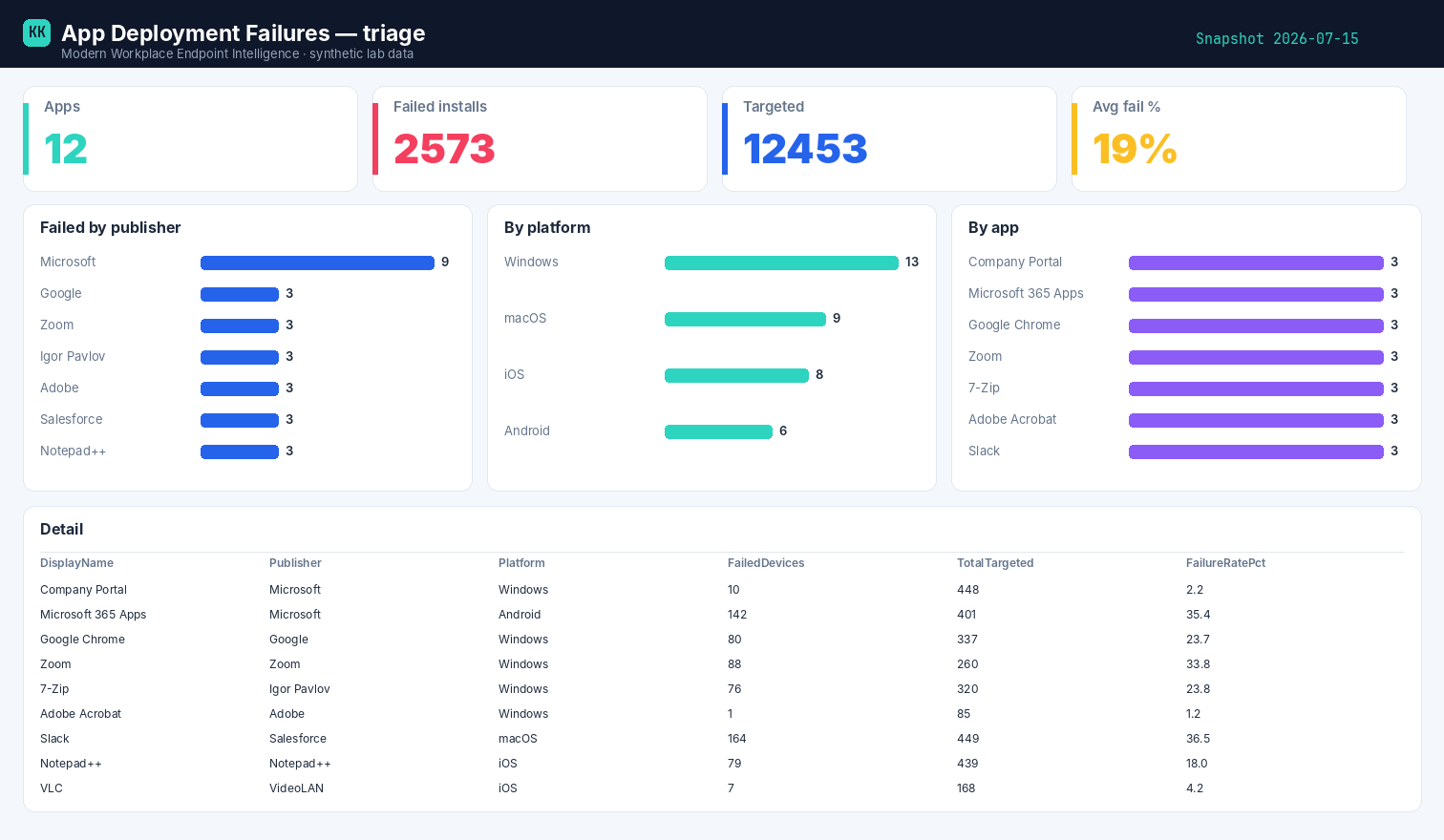
Built on synthetic @contoso.com data. Point the template at your own snapshot to see your fleet.
Related
- The story → Which app is failing, and why
- Power BI report → App Deployment Failures report
- Part of → Zero-Access Agent