Non-Compliant Devices — how it actually works
The portal shows you a device with a red Non-compliant badge. It rarely shows you, at a glance, which specific settings failed across which policies — and it never hands you that as data you can report on. This collector does: a scheduled, read-only Azure Automation runbook that walks Microsoft Graph, flattens "device → failing policy → failing setting" into one row per failure, and writes a sanitized CSV. No live tenant connection for the report; the agent and Power BI only ever see the snapshot.
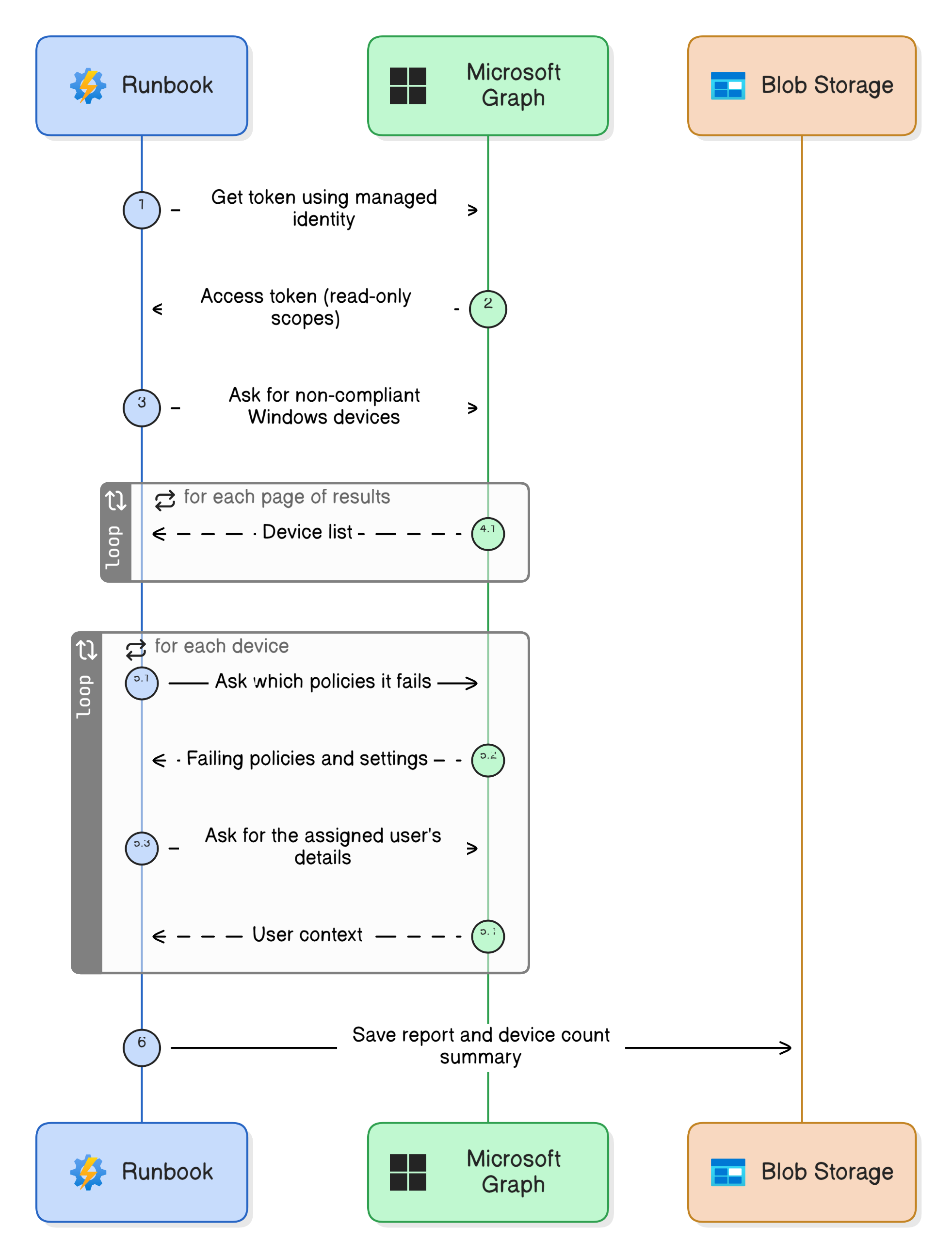
The Graph calls behind it
Everything is a GET. Nothing is ever written back to the tenant.
-
Get a token — no secrets. The runbook authenticates with its Managed Identity via the
IDENTITY_ENDPOINT, so there are no stored keys or app secrets anywhere in the script. -
Find the non-compliant Windows devices (paged):
Paging followsGET /beta/deviceManagement/managedDevices ?$filter=operatingSystem eq 'Windows' and complianceState eq 'nonCompliant' &$select=id,deviceName,manufacturer,model,userPrincipalName,lastSyncDateTime,complianceState@odata.nextLinkuntil it's exhausted. -
Look up each unique user once (v1.0), for city / country / department / account state:
This runs per unique UPN and is cached — not once per device row. -
For each device, ask which policies it fails (beta):
Only states wherestate = nonCompliantare kept. -
For each failing policy, ask which settings failed (beta):
Each failingGET /beta/deviceManagement/managedDevices/{id}/deviceCompliancePolicyStates/{policyId}/settingStatessettingStatebecomes a row —SettingName(the policy prefix stripped off),SettingState, anderrorDescription. -
Write the snapshots to Blob storage — a root
NonCompliant_Windows_Devices.csvfor Power BI, and anagent-data/copy plus a_Stats.csv(kept under the 12 MB gate for the AI-search layer).
The permissions (least-privilege, read-only)
DeviceManagementManagedDevices.Read.All · User.Read.All
The bit that surprises people: the N+1 fan-out
This is the story worth telling. There isn't one magic "give me non-compliance detail" endpoint. It's a fan-out:
- 1 call for the device list, then
- 1
deviceCompliancePolicyStatescall per device, then - 1
settingStatescall per failing policy on that device.
On a large fleet that's thousands of calls, which is exactly why the setting-level detail lives on a beta endpoint and almost nobody surfaces it. The payoff is what the portal won't give you as data: "device X is non-compliant specifically on Firewall and Real-time protection."
Beta endpoint
deviceCompliancePolicyStates/{id}/settingStates is a /beta endpoint. Beta shapes can change
without notice — reproduce it in your own lab before you depend on it, and expect the odd device
that returns policy states but no setting states (the script handles that case explicitly).
The one number people get wrong
A device that fails three settings across two policies produces several rows. Count rows and your
"non-compliant devices" number is inflated. The _Stats output is built to count distinct
DeviceName, never rows — for the total, per-setting, per-policy, per-country and per-manufacturer
cuts alike. It even flags the gap between devices Intune reports as non-compliant and devices that
returned a concrete failing setting, so you can see when the two disagree.
Run it yourself — no tenant needed
The synthetic dataset ships a fake-but-realistic
NonCompliant_Windows_Devices.csv (multiple failing settings per device, 10 countries). Point the
Power BI report at it and the whole thing lights up
with no Graph access at all — the fastest, safest way to see the shape of the data.
Related
- The script → Collect-NonCompliantDevices.ps1
- The report → Non-Compliant Windows Devices — Power BI
- The pattern → Zero-Access Agent
Sanitized: parameterised storage source, no real account, synthetic data only. Independent content — not affiliated with, sponsored by, or endorsed by Microsoft. Microsoft, Intune, Entra, Microsoft Graph, Azure and Power BI are trademarks of the Microsoft group of companies. Everything here comes from a personal lab.