Non-Compliant Devices
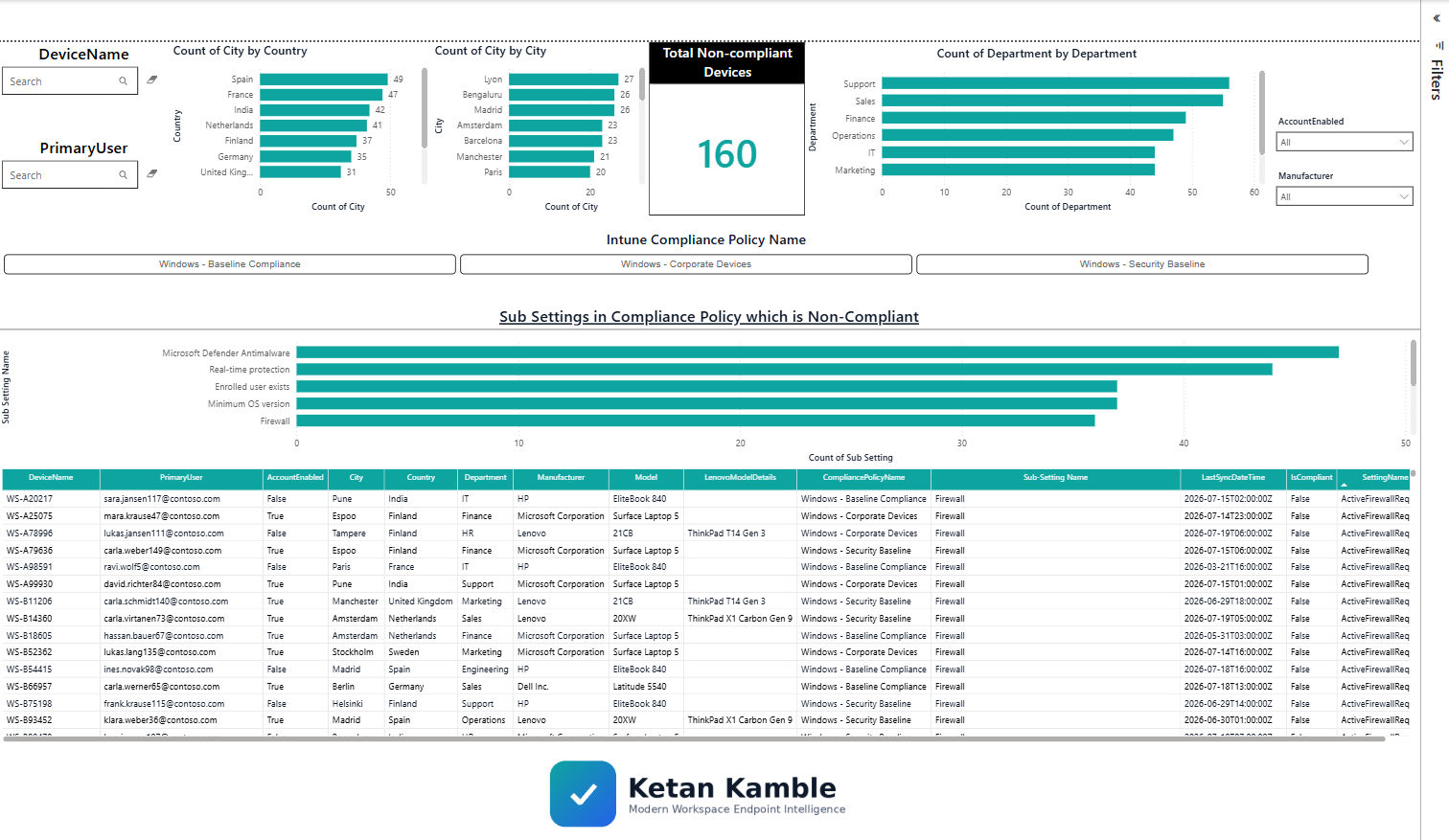
Finds every non-compliant Windows device and — the part the portal won't hand you as data — the exact settings that failed, across which policies. Read-only, Managed Identity, no secrets.
1 · The script
It authenticates with a Managed Identity, queries Microsoft Graph with read-only (.Read.All) requests
(managedDevices → deviceCompliancePolicyStates → settingStates), enriches with per-user context,
and writes a sanitized CSV snapshot. Set the three CONFIG values at the top, then run.
View the full script
<#
.SYNOPSIS
    Zero-Access collector — Non-Compliant Windows Devices.

    Read-only Azure Automation runbook. Authenticates with a Managed Identity, queries Microsoft
    Graph with read-only (.Read.All) requests to find non-compliant Windows devices and the exact settings that
    failed, enriches with user context, pre-aggregates DISTINCT-DEVICE stats, and writes sanitized
    CSV snapshots to Blob storage. Nothing is ever written back to the tenant.

    Part of the Zero-Access Agent pattern: give the report the data, never the systems.
    Independent content — not affiliated with or endorsed by Microsoft.
#>

# ===========================================================================
#  CONFIGURE ME  ->  set these to your own values, then run.
#  These three lines are the only thing you MUST change.
# ===========================================================================
$ResourceGroup  = "<your-resource-group-name>"     # resource group that holds your storage account
$StorageAccount = "<your-storage-account-name>"    # storage account name (lowercase, globally unique)
$Container      = "<your-container-name>"           # blob container, e.g. "intune-report"
# ---------------------------------------------------------------------------
# Optional: also copy the root CSV to a secondary file share (another consumer).
# Leave empty to skip. Never put a real internal server name in a public repo.
$SecondarySharePath = ""                            # e.g. "\\your-server\share"
# ===========================================================================
# Safety net - stop if the placeholders above weren't replaced.
if ("$ResourceGroup $StorageAccount $Container" -match '<your-') {
    throw "Please set ResourceGroup, StorageAccount, and Container at the top of the script before running."
}

# --- Step 1: Initialize variables ---
$ExportLocation      = "$env:TEMP"
$LenovoModelFileName = "Lenovo_Model_Details.csv"
$OutputFileName      = "NonCompliant_Windows_Devices.csv"
$AgentFileName       = "NonCompliant_Windows_Devices_Agent.csv"
$StatsFileName       = "NonCompliant_Stats.csv"
$Today               = Get-Date -Format 'yyyy-MM-dd'
$ProgressPreference  = 'SilentlyContinue'
$VerbosePreference   = 'Continue'
Write-Verbose "Script started at $(Get-Date)"

# --- Step 2: Graph GET with pagination ---
Function Invoke-MyGraphGetRequest {
    Param ($URL)
    $AllResults = @()
    try {
        Do {
            $WebRequest   = Invoke-WebRequest -Uri $URL -Method GET -Headers $script:Headers -UseBasicParsing
            $ResponseData = ($WebRequest.Content | ConvertFrom-Json)
            $AllResults  += $ResponseData.value
            $URL          = $ResponseData.'@odata.nextLink'
        } While ($URL)
        Return $AllResults
    } catch {
        Write-Error "Failed to fetch data from ${URL}: $_"
        return $null
    }
}

# --- Step 3: Authenticate with the Managed Identity (Graph token, no secrets) ---
$url     = $env:IDENTITY_ENDPOINT
$headers = New-Object "System.Collections.Generic.Dictionary[[String],[String]]"
$headers.Add("X-IDENTITY-HEADER", $env:IDENTITY_HEADER)
$headers.Add("Metadata", "True")
$body = @{ resource = 'https://graph.microsoft.com/' }
$accessToken   = (Invoke-RestMethod $url -Method 'POST' -Headers $headers -ContentType 'application/x-www-form-urlencoded' -Body $body).access_token
$script:Headers = @{ 'Authorization' = "Bearer $accessToken" }
Write-Verbose "Access token obtained."

# --- Step 4: Fetch non-compliant Windows devices (read-only GET) ---
$DeviceQuery = "https://graph.microsoft.com/beta/deviceManagement/managedDevices?`$filter=operatingSystem eq 'Windows' and complianceState eq 'nonCompliant'&`$select=id,deviceName,manufacturer,model,userPrincipalName,lastSyncDateTime,complianceState"
$DeviceData  = Invoke-MyGraphGetRequest -URL $DeviceQuery
if (!$DeviceData) { Write-Error "Failed to fetch non-compliant device data."; return }
$DeviceCount = $DeviceData.Count
$nonCompliantDevices = $DeviceData
Write-Verbose "Total non-compliant Windows devices found: $DeviceCount"

# --- Step 5: Download Lenovo model lookup (optional enrichment) ---
try {
    $StorageAccountContext = (Get-AzStorageAccount -ResourceGroupName $ResourceGroup -Name $StorageAccount).Context
    $LocalFilePath = Join-Path -Path $ExportLocation -ChildPath $LenovoModelFileName
    Get-AzStorageBlobContent -Container $Container -Blob $LenovoModelFileName -Destination $LocalFilePath -Context $StorageAccountContext -Force | Out-Null
} catch {
    Write-Warning "Lenovo model lookup not available (continuing without it): $_"
}
$LenovoModelMapping = @{}
if (Test-Path $LocalFilePath) {
    Import-Csv -Path $LocalFilePath | ForEach-Object {
        if ($_.model.Trim() -ne "" -and $_.Model1.Trim() -ne "") {
            $LenovoModelMapping[$_.model.Trim().ToUpper()] = $_.Model1.Trim()
        }
    }
}

# --- Step 6: Fetch user context for each unique user (read-only GET) ---
$UserDetails    = @{}
$UserPrincipals = $DeviceData | Select-Object -ExpandProperty userPrincipalName -Unique
foreach ($upn in $UserPrincipals) {
    if (-not $upn) { continue }
    try {
        $UserDetailsURI = "https://graph.microsoft.com/v1.0/users?`$filter=userPrincipalName eq '$upn'&`$select=displayName,userPrincipalName,city,country,department,accountEnabled"
        $UserResponse   = Invoke-MyGraphGetRequest -URL $UserDetailsURI
        if ($UserResponse -and $UserResponse.Count -gt 0) {
            $u = $UserResponse[0]
            $UserDetails[$upn] = @{ City = $u.city; Country = $u.country; Department = $u.department; AccountEnabled = $u.accountEnabled }
        }
    } catch {
        Write-Warning "Could not get details for user $upn : $_"
        $UserDetails[$upn] = @{ City = "Unknown"; Country = "Unknown"; Department = "Unknown"; AccountEnabled = "Unknown" }
    }
}

# --- Step 7: Per device -> compliance policy states -> failing setting states ---
$results = @()
foreach ($device in $nonCompliantDevices) {
    $deviceId = $device.id
    try {
        # All compliance policy states for this device
        $policyStatesUrl = "https://graph.microsoft.com/beta/deviceManagement/managedDevices/$deviceId/deviceCompliancePolicyStates"
        $policyStates    = Invoke-RestMethod -Uri $policyStatesUrl -Headers $script:Headers -Method Get

        foreach ($policyState in $policyStates.value) {
            if ($policyState.state -ne "nonCompliant") { continue }   # only failing policies

            # Individual setting states under this failing policy
            $settingsUrl      = "https://graph.microsoft.com/beta/deviceManagement/managedDevices/$deviceId/deviceCompliancePolicyStates/$($policyState.id)/settingStates"
            $settingsResponse = Invoke-RestMethod -Uri $settingsUrl -Headers $script:Headers -Method Get

            $u = $UserDetails[$device.userPrincipalName]
            $lenovo = if ($device.manufacturer -like "*Lenovo*" -and $LenovoModelMapping.ContainsKey($device.model.ToUpper())) { $LenovoModelMapping[$device.model.ToUpper()] } else { "Unknown Model" }

            if ($settingsResponse.value.Count -eq 0) {
                if ($policyState.displayName -eq "Default Device Compliance Policy") {
                    $results += [PSCustomObject]@{
                        DeviceName = $device.deviceName; PrimaryUser = $device.userPrincipalName
                        City = $u?.City ?? "Unknown"; Country = $u?.Country ?? "Unknown"; Department = $u?.Department ?? "Unknown"; AccountEnabled = $u?.AccountEnabled ?? "Unknown"
                        Manufacturer = $device.manufacturer; Model = $device.model; LenovoModelDetails = $lenovo
                        LastSyncDateTime = $device.lastSyncDateTime; CompliancePolicyName = $policyState.displayName
                        IsCompliant = $false; SettingName = "Has a compliance policy assigned"; SettingState = "Non-compliant"; StateDetails = "No compliance policies assigned to this device"
                    }
                }
                continue
            }

            foreach ($setting in $settingsResponse.value | Where-Object { $_.state -eq "nonCompliant" }) {
                $results += [PSCustomObject]@{
                    DeviceName = $device.deviceName; PrimaryUser = $device.userPrincipalName
                    City = $u?.City ?? "Unknown"; Country = $u?.Country ?? "Unknown"; Department = $u?.Department ?? "Unknown"; AccountEnabled = $u?.AccountEnabled ?? "Unknown"
                    Manufacturer = $device.manufacturer; Model = $device.model; LenovoModelDetails = $lenovo
                    LastSyncDateTime = $device.lastSyncDateTime; CompliancePolicyName = $policyState.displayName
                    IsCompliant = $false
                    SettingName  = $setting.setting -replace '.*\.', ''   # strip the policy prefix -> friendly-ish name
                    SettingState = $setting.state
                    StateDetails = $setting.errorDescription
                }
            }
        }
    } catch {
        Write-Warning "Failed to process compliance policies for device $($device.deviceName): $_"
    }
}

# --- Step 8: Root CSV for Power BI ---
if ($results.Count -gt 0) {
    $outputPath = Join-Path -Path $ExportLocation -ChildPath $OutputFileName
    $results | Export-Csv -Path $outputPath -NoTypeInformation -Force
    try {
        Set-AzStorageBlobContent -File $outputPath -Container $Container -Blob $OutputFileName -Context $StorageAccountContext -Force | Out-Null
        Write-Verbose "Uploaded $Container/$OutputFileName"
    } catch { Write-Warning "Failed to upload root report: $_" }
} else { Write-Verbose "No results to export." }

# --- Step 9: Agent copies + DISTINCT-DEVICE stats (count devices, never rows) ---
if ($results.Count -gt 0) {
    $AgentRows = $results | Select-Object DeviceName,PrimaryUser,City,Country,Department,AccountEnabled,Manufacturer,Model,LenovoModelDetails,LastSyncDateTime,CompliancePolicyName,IsCompliant,SettingName,SettingState,StateDetails,@{Name='SnapshotDate';Expression={$Today}}

    $Stats = [System.Collections.Generic.List[object]]::new()
    function Add-NCStat { param([string]$Category,[string]$Key,[int]$Count)
        $Stats.Add([pscustomobject]@{ ReportType='NonCompliant'; Category=$Category; Key=$Key; Count=$Count; SnapshotDate=$Today }) }
    function Get-DistinctDeviceCount($Group) { @($Group | Select-Object -ExpandProperty DeviceName -Unique).Count }

    $TotalDevices = @($results | Select-Object -ExpandProperty DeviceName -Unique).Count
    Add-NCStat 'Total' 'NonCompliantDevicesReported' $DeviceCount
    Add-NCStat 'Total' 'NonCompliantDevices'         $TotalDevices
    Add-NCStat 'Total' 'DevicesWithNoFailingSetting' ($DeviceCount - $TotalDevices)
    Add-NCStat 'Total' 'FailingSettingRows'          $results.Count
    $results | Group-Object SettingName          | ForEach-Object { Add-NCStat 'NonCompliantBySetting'  $_.Name (Get-DistinctDeviceCount $_.Group) }
    $results | Group-Object CompliancePolicyName | ForEach-Object { Add-NCStat 'NonCompliantByPolicy'   $_.Name (Get-DistinctDeviceCount $_.Group) }
    $results | Group-Object { "$($_.CompliancePolicyName) | $($_.SettingName)" } | ForEach-Object { Add-NCStat 'NonCompliantByPolicyAndSetting' $_.Name (Get-DistinctDeviceCount $_.Group) }
    $results | Where-Object { $_.Country }      | Group-Object Country      | ForEach-Object { Add-NCStat 'NonCompliantByCountry'      $_.Name (Get-DistinctDeviceCount $_.Group) }
    $results | Where-Object { $_.Manufacturer } | Group-Object Manufacturer | ForEach-Object { Add-NCStat 'NonCompliantByManufacturer' $_.Name (Get-DistinctDeviceCount $_.Group) }

    if ($TotalDevices -ne $DeviceCount) {
        Write-Warning "Graph reported $DeviceCount non-compliant devices but only $TotalDevices produced setting rows. $($DeviceCount - $TotalDevices) returned no failing settings."
    }

    function Publish-AgentCsv { param($Data,[string]$Name)
        if (-not $Data) { return }
        $path = Join-Path $ExportLocation $Name
        $Data | Export-Csv -Path $path -NoTypeInformation -Encoding UTF8 -Force
        $mb = [math]::Round((Get-Item $path).Length / 1MB, 2)
        if ($mb -le 12) {
            Set-AzStorageBlobContent -File $path -Container $Container -Blob "agent-data/$Name" -Context $StorageAccountContext -Force | Out-Null
            Write-Output "$Name -> agent-data ($mb MB)"
        } else { Write-Warning "$Name is $mb MB - over the 12MB agent gate; skipped." }
    }
    Publish-AgentCsv -Data $AgentRows -Name $AgentFileName
    Publish-AgentCsv -Data $Stats     -Name $StatsFileName
}

# --- Step 10 (optional): copy the root CSV to a secondary share ---
if ($SecondarySharePath -and $results.Count -gt 0) {
    try {
        Copy-Item -Path $outputPath -Destination (Join-Path -Path $SecondarySharePath -ChildPath $OutputFileName) -Force
        Write-Verbose "Copied CSV to secondary share."
    } catch { Write-Warning "Failed to copy CSV to secondary share: $_" }
}

Write-Verbose "Script completed at $(Get-Date)"
2 · The Power BI template
Non-Compliant Devices template
3 · Example report
Related
- Power BI report → Non-Compliant Devices report
- How it works (teardown) → Non-Compliant Devices teardown